
 To Next Page
G
gjonesSep 3, 2025
Why is the playback picture poor on my LG RH188HS?
- CCynthia GoodwinSep 3, 2025
If the playback picture on your LG DVD Recorder is poor, the disc may be dirty. Try cleaning the disc.

Why is the playback picture poor on my LG RH188HS?
If the playback picture on your LG DVD Recorder is poor, the disc may be dirty. Try cleaning the disc.
What to do if the LG DVD recorder is not operating normally?
If your LG DVD recorder is not operating normally, unplug the power cord, wait at least five seconds, and then plug it in again.
What to do if the front panel display is not working on my LG RH188HS?
If the front panel display on your LG DVD Recorder is not working, unplug the power cord, wait at least five seconds, and then plug it in again.
Why is there no Stereo Audio Record and/or Playback on my LG DVD Recorder?
If you're not getting stereo audio record or playback on your LG DVD Recorder, consider these possibilities: * If your TV is not Stereo-compatible or the broadcast program is not in stereo format there is no solution. * Ensure the recorder A/V Out jacks are connected to the TV A/V In jacks, as stereo is only available via A/V output from the recorder. * Select AUX or A/V source as the TV input. * Check if the recorder’s TV audio channel is set to mono and set TV audio channel mode to Stereo.
Why can't I play a disc recorded on my LG RH188HS DVD Recorder on another player?
If you cannot play a disc recorded on your LG DVD recorder on another player: * If the disc was recorded in Video mode, finalize the disc. * If the disc was recorded in VR mode, the other player must be RW compatible to play it.
Why is the camcorder image not shown on my LG RH188HS DVD Recorder?
If the camcorder image is not showing on your LG DVD Recorder, check the following: * Ensure the camcorder is turned on and operating properly. * Verify that the recorder’s source is correctly selected using AV/INPUT to choose the appropriate input channel (AV1, AV2, DV, etc.).
Why is the picture or sound of a broadcasting channel weak or missing on my LG RH188HS?
If the picture or sound of a broadcasting channel is weak or missing on your LG DVD Recorder, the aerial or cables may be loose. Tighten the connections or replace the cable.
Why are some channels skipped over when using PR/CH (+/-) on my LG DVD Recorder?
If some channels are skipped when using PR/CH (+/-) on your LG DVD Recorder, it's likely because those channels are not stored in the recorder. To resolve this, restore the channels.
Why is the picture from the external input distorted on my LG DVD Recorder?
If the picture from an external input connected to your LG DVD Recorder is distorted, it may be because the video signal from the external component is copy-protected. In this case, you cannot connect via this recorder and should connect the component directly to your TV.
What to do if my LG RH188HS DVD Recorder has no power?
If your LG DVD recorder has no power, the most likely cause is that the power cord is not properly connected. Ensure the power cord is securely plugged into the wall outlet.
Instructions for safe use of the power cord and outlets to prevent hazards.
Guidance on how to dispose of the product responsibly according to regulations.
Information on DVD-RW discs, formats, and editing features.
Information on DVD-R discs, formats, and recording limitations.
Information on DVD-RAM discs, formats, and compatibility.
Information on DVD+RW discs, formats, and features.
Information on DVD+R discs, formats, and recording limitations.
Information on DVD+R DL discs, storage capacity, and features.
Details on playing DVD, VCD, Audio CD, and CD-R/RW formats.
Guidelines for protecting the internal hard disk drive against damage and failure.
Instructions on how to use the remote control buttons for various functions.
Step-by-step guide for connecting via SCART and standard video/audio cables.
How to connect using S-Video and Component Video for improved picture quality.
Explains what HDMI is and its capabilities for digital AV connections.
Tips and notes for successful HDMI connection and compatibility checks.
How to connect to amplifiers using analog stereo or Dolby Pro Logic audio outputs.
Connecting via digital optical or coaxial outputs for multi-channel audio.
Guides on performing initial settings and general menu operation.
Setting audio output formats like Dolby Digital, DTS, PCM, and DRC.
Setting parental control levels and security passwords for disc playback.
Configuring regional codes and obtaining DivX VOD registration codes.
Setting recording quality (XP, SP, LP, EP) and aspect ratio.
Configuring DV audio, TV audio channels, and automatic chapter creation.
Setting MPEG4 format, AV2 input, and formatting discs for recording.
Fixing recordings for playback and naming discs.
Protecting discs from accidental changes and enabling/disabling PBC.
Troubleshooting steps for displaying DivX subtitles properly.
Explains DVD disc types, recording formats, and modes.
Information on HDD recording capacity, limits, and best practices.
Details on preset recording quality modes (XP, SP, LP, EP).
How to use timeshift to pause and record live TV or playback.
Editing recorded clips during timeshift and searching marked scenes.
Verifying programmed timer recordings and canceling them.
How to stop an active timer recording and resolve common timer issues.
Solutions for issues related to power, picture display, and audio output.
Troubleshooting steps for poor picture quality and playback failures.
Resolving problems with disc playback compatibility and recording failures.
Solutions for remote control malfunctions and stereo audio problems.
How to reset the recorder to its default factory settings.
 General
| I/O ports | - RGB In. - DV IN. |
|---|---|
| Dimensions (WxDxH) | 430 x 275 x 54 mm |
| Audio decoders | Dolby Digital, DTS |
| Audio formats supported | MP3, WMA |
| HDD capacity | 160 GB |
| Maximum HDD recording time | 400 h |
| Device type | DVD recorder |
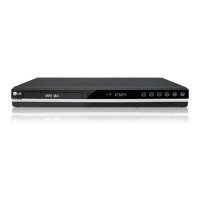
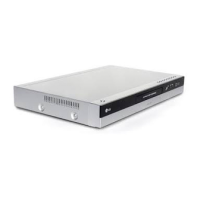
| Product color | Black, Silver |
| Composite video out | 1 |
 Weight and Dimensions
| Weight | 4100 g |
|---|