11
Phone Components
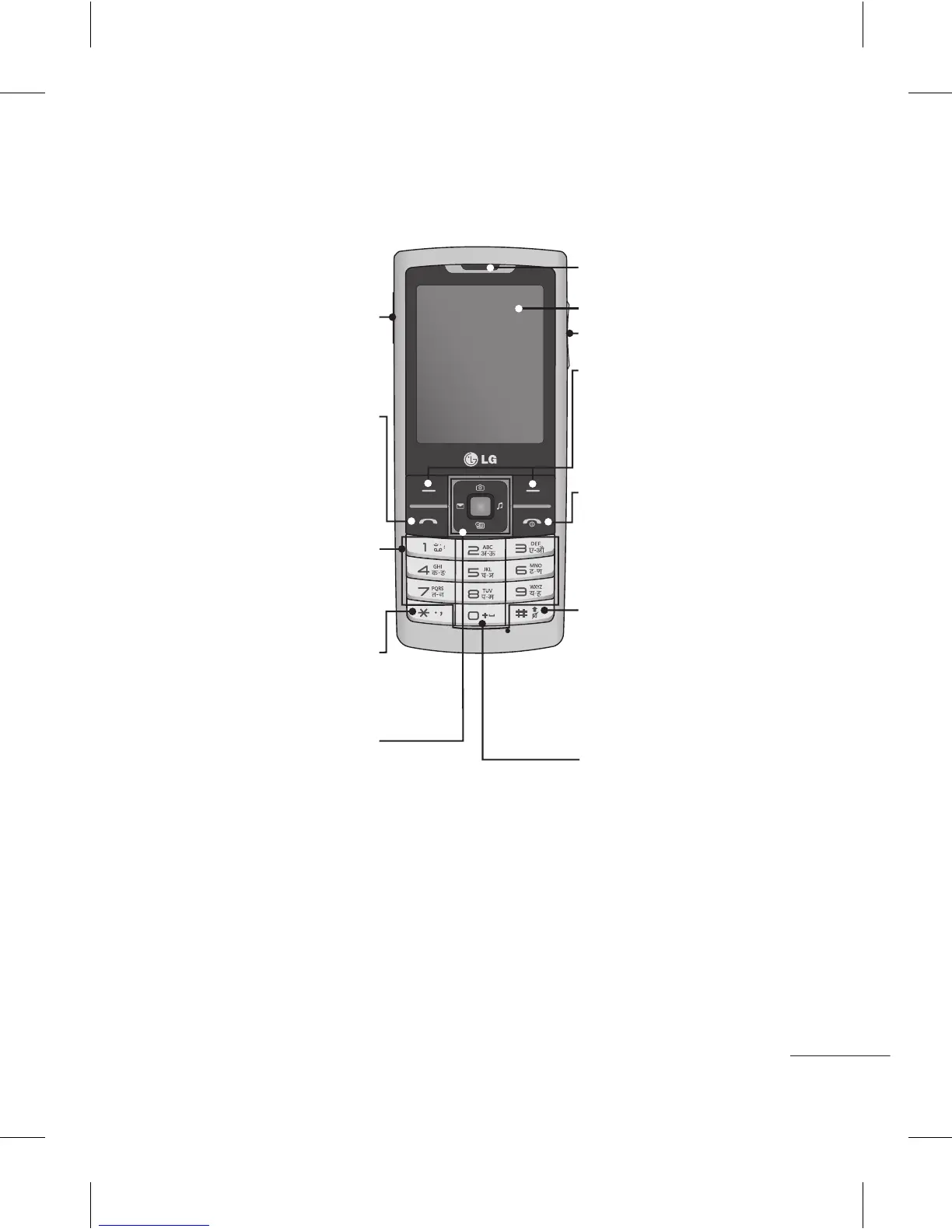
Soft keys (Left soft key /
Right soft key)
These keys perform the
function Indicated in the
bottom of the display.
End key
Allows you to power
the phone on or off(hold
down), end calls, or return
to Standby Mode.
Display screen
Send key
- Dial a phone number and
answer a call.
- In standby mode: Shows a
history of calls.
Navigation keys
• In menu: Navigates between menus.
• Upper Navigation Key: Press upper
Navigation key will go to Camera.
• Lower Navigation Key: Press lower
Navigation key will go to Tool bar.
(Note: If Tool bar is deactivated from
display settings then By pressing lower
navigation key will Open Calander).
• Left Navigation Key: Press Left
Navigation key and will go to New text
message.
• Right Navigation Key: Press right
Navigation key will go to Music.
Number key
In most of the time, the
numeric keys are used to
input number of characters.
* Key(Symbol key)
Insert symbol when
writing a message.
Earpiece
Side volume key
Micro USB Port / Earphone
jack / Charger port
# Key
Long press this key in idle
screen to enter to Silent
Mode.Also short press
changes edit mode in all
editor screen.
0 Key
Insert space when writing a
message.


 To Next Page