EasyManua.ls Logo

LG SJ4 - User Manual

LG SJ4
6 pages
Print Icon
To Next Page IconTo Next Page
Loading...
SIMPLE MANUAL
Wireless
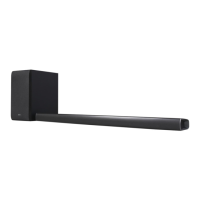
Sound Bar
MODEL
SJ4
ENGLISH
Please read this manual carefully before operating your set
and retain it for future reference.
To view the instructions of advanced features,
visit http://www.lg.com and then download Owner’s Manual.
Some of the content in this manual may differ from your unit.
CAUTION
RISK OF ELECTRIC SHOCK
DO NOT OPEN
CAUTION: TO REDUCE THE RISK OF ELECTRIC SHOCK DO
NOT REMOVE COVER (OR BACK) NO USER-SERVICEABLE
PARTS INSIDE REFER SERVICING TO QUALIFIED SERVICE
PERSONNEL.
This lightning ash with arrowhead symbol
within an equilateral triangle is intended to
alert the user to the presence of uninsulated
dangerous voltage within the product’s
enclosure that may be of sufcient
magnitude to constitute a risk of electric shock to persons.
The exclamation point within an equilateral
triangle is intended to alert the user to the
presence of important operating and
maintenance (servicing) instructions in the
literature accompanying the product.
WARNING: TO PREVENT FIRE OR ELECTRIC SHOCK
HAZARD, DO NOT EXPOSE THIS PRODUCT TO RAIN OR
MOISTURE.
WARNING: Do not install this equipment in a conned space
such as a book case or similar unit.
CAUTION: Do not use high voltage products around this
product. (ex. Electrical swatter) This product may malfunction
due to electrical shock.
CAUTION: No naked ame sources, such as lighted
candles, should be placed on the apparatus.
CAUTION: Do not block any ventilation openings. Install in
accordance with the manufacturer’s instructions.
Slots and openings in the cabinet are provided for ventilation
and to ensure reliable operation of the product and to protect
it from over heating. The openings should never be blocked by
placing the product on a bed, sofa, rug or other similar surface.
This product shall not be placed in a built-in installation such
as a bookcase or rack unless proper ventilation is provided or
the manufacturer’s instruction has been adhered to.
CAUTION concerning the Power Cord
The Power Plug is the disconnecting device. In case of an
emergency, the Power Plug must remain readily accessible.
CAUTION: The apparatus should not be exposed to water
(dripping or splashing) and no objects lled with liquids, such
as vases, should be placed on the apparatus.
NOTICE:
For safety marking information including product
identication and supply ratings, please refer to the main
label on the bottom or the other surface of the product.
For models using an adapter
Only use the AC adapter supplied with this device. Do
not use a power supply from another device or another
manufacturer. Using any other power cable or power
supply may cause damage to the device and void your
warranty.
y
The appliance is not intended for use by young children
or inrm persons without supervision.
y
Young Children should be supervised to ensure that they
do not play with appliance.
y
If the appliance is supplied from a cord extension set or
an electrical portable outlet device, the cord extension
set on electrical portable outlet device must be
positioned so that it is not subject to splashing (of water
or any form of liquid) or ingress of moisture.
RF Radiation Exposure Statement
This equipment shall be installed and used at a minimum
distance of 20 cm from the human body.
Copyright © 2017-2019 LG Electronics Inc. All Rights Reserved.
www.lg.com
MFL70205132
SJ4.DAUSLLK_SIM_ENG_MFL70205132.indd 1-4 2019-01-03  9:46:04

Other manuals for LG SJ4

Question and Answer IconNeed help?

Do you have a question about the LG SJ4 and is the answer not in the manual?

Summary

Simple Manual - Wireless Sound Bar

Safety and Precautions

General Safety Warnings

Information on preventing electric shock, fire hazards, and proper product usage to avoid damage or malfunction.

RF Radiation Exposure Statement

Guidance on minimum safe distance for installation and use near human bodies.

Hardware Overview and Setup

Front and Rear Panel Connections

Details the buttons on the front panel and connection ports on the rear panel for various devices.

Wireless Subwoofer Connection

Instructions for automatically and manually connecting the wireless subwoofer to the sound bar.

Connectivity and Control

Connecting to the TV and Other Devices

Steps for connecting the sound bar to a TV via Optical or HDMI ARC, and other external devices.

Remote Control Operations

Explains the functions of remote control buttons and battery replacement.

Additional Information

Product Specifications and Software Notices

Details AC adapter, dimensions, power output, and open source software license information.

Overview

This document provides a simple manual for the LG Wireless Sound Bar, model SJ4. It covers basic setup, connection to a TV and other devices, and general usage.

Function Description

The LG Wireless Sound Bar is an audio device designed to enhance the sound experience of your television and other connected devices. It features wireless connectivity for its subwoofer, simplifying setup and reducing cable clutter. The sound bar acts as the main unit, processing audio signals and delivering them through its integrated speakers, while the wireless subwoofer provides deep bass for a more immersive sound.

Key functions include:

  • Audio Playback: Delivers enhanced audio for TV programs, movies, music, and other content from connected sources.
  • Wireless Subwoofer: Connects wirelessly to the main sound bar unit, providing flexible placement options for optimal bass performance.
  • Multiple Input Options: Supports various connection methods, including Optical, HDMI ARC, Portable In, and USB, allowing compatibility with a wide range of devices.
  • Sound Effects: Offers different sound modes like ASC (Adaptive Sound Control), Bass Blast, and Cinema to optimize audio for various content types.
  • Volume Control: Allows adjustment of overall volume and specific subwoofer level.
  • Automatic Power Control: Features an Auto Power On/Off function that can automatically turn the unit on or off based on input source detection.
  • Night Mode: A "Night On/Off" feature reduces the volume at night, preventing disturbance.

Usage Features

Front and Rear Panel Controls:

The sound bar features controls located on its rear panel for easy access. These include:

  • Power Button (Standby / On): To turn the unit on or off.
  • Function Button (F): To select the desired input source (e.g., Optical, HDMI, USB).
  • Volume Buttons (+/-): To adjust the overall volume level.

Connections:

The rear panel provides various ports for connecting to other devices:

  • DC IN: For connecting the AC adapter to power the sound bar.
  • OPTICAL IN: For connecting to a TV or other audio device using an optical cable.
  • PORTABLE IN: For connecting portable devices.
  • USB (5V 500mA): For connecting a USB device, likely for media playback or firmware updates.
  • HDMI OUT (TV ARC): For connecting to a TV that supports HDMI ARC (Audio Return Channel). This allows audio from the TV to be sent back to the sound bar through the same HDMI cable used for video.
  • HDMI IN: For connecting to a device with an HDMI output, such as a set-top box or Blu-ray player.

Subwoofer Connection:

The wireless subwoofer connects automatically to the sound bar.

  1. Connect the power cords of both the wireless subwoofer and the sound bar to electrical outlets.
  2. Turn on the main sound bar unit.
  3. The sound bar and subwoofer should automatically connect, indicated by the green LED on the subwoofer turning on.

Manual Subwoofer Connection (if automatic fails):

  1. Press the "Pairing" button on the rear of the wireless subwoofer. The green LED on the subwoofer will blink quickly.
  2. Turn on the main sound bar unit.
  3. Once paired, the green LED on the subwoofer will turn on continuously.

Important Note for Wireless Interference:

To prevent wireless interference, it is recommended to keep the sound bar and subwoofer at least 1 meter (approximately 3 feet) away from other wireless devices such as wireless routers or microwave ovens.

TV Connection:

The sound bar can be connected to a TV using either an Optical cable or an HDMI ARC cable.

  • Optical Connection:

    1. Connect an optical cable from the TV's optical output to the sound bar's OPTICAL IN port.
    2. On your TV's settings menu, select "External Speaker (Optical)" as the audio output.
  • HDMI(ARC) Connection:

    1. Connect an HDMI cable from the TV's HDMI IN (ARC) port to the sound bar's HDMI OUT (TV ARC) port.
    2. On your TV's settings menu, select "External Speaker (HDMI ARC)" as the audio output.
    • Note: HDMI ARC connection is only possible if your TV supports HDMI ARC. If both OPTICAL and ARC are connected simultaneously, the ARC signal will take priority.

Additional Device Connection:

External devices like set-top boxes or media players can be connected to the sound bar.

  1. Connect the external device's HDMI OUT to the sound bar's HDMI IN.
  2. Alternatively, if the device has an optical output, connect it to the sound bar's OPTICAL IN.
  3. Use the "F" button on the remote control or the unit to repeatedly select the correct input source for the connected device.

Remote Control Features:

The included remote control provides convenient access to various functions:

  • ASC/BASS BLAST/CINEMA: Buttons to select different sound effects.
  • NIGHT ON/OFF: Toggles night mode, which reduces volume levels for quiet listening.
  • WOOFER LEVEL +/-: Adjusts the bass intensity from the subwoofer.
  • AUTO POWER ON/OFF: Enables or disables the automatic power-on feature.
  • Standard playback controls (play/pause, skip track) are also available.

Maintenance Features

General Care:

  • Cleaning: The manual does not specify cleaning instructions, but generally, electronic devices should be cleaned with a soft, dry cloth. Avoid using liquid cleaners or abrasive materials.
  • Ventilation: Ensure that ventilation openings on the sound bar are not blocked. Proper ventilation is crucial to prevent overheating and ensure reliable operation. Do not place the unit on soft surfaces like beds, sofas, or rugs that could block airflow. If placing in a built-in installation (like a bookcase), ensure adequate ventilation is provided.
  • Power Cord: The power plug serves as the disconnecting device. In an emergency, ensure the power plug is readily accessible.
  • Liquid and Moisture: The apparatus should not be exposed to water (dripping or splashing). Do not place objects filled with liquids, such as vases, on the apparatus.
  • Heat Sources: Do not place naked flame sources, such as lighted candles, on or near the apparatus.
  • High Voltage Products: Avoid using high voltage products (e.g., electrical swatters) near the sound bar, as this may cause malfunction due to electrical shock.

Battery Replacement for Remote Control:

  1. Open the battery compartment on the back of the remote control.
  2. Insert two AAA (R03) batteries, ensuring correct polarity (+ and -).
  3. Close the battery compartment.

Safety Information:

The manual includes important safety warnings:

  • Risk of Electric Shock: Do not remove the cover or back of the unit. There are no user-serviceable parts inside. Refer servicing to qualified service personnel.
  • Fire/Electric Shock Hazard: Do not expose the product to rain or moisture.
  • Confined Spaces: Do not install the equipment in confined spaces like bookcases or similar units without proper ventilation.
  • RF Radiation Exposure: The equipment should be installed and used at a minimum distance of 20 cm from the human body.

AC Adapter Usage:

  • Only use the AC adapter supplied with this device. Using a power supply from another device or manufacturer may damage the device and void the warranty.
  • If the appliance is supplied from a cord extension set or an electrical portable outlet device, ensure the cord extension set is positioned so it is not subject to splashing (of water or any form of liquid) or ingress of moisture.

This comprehensive overview should help users understand and operate their LG Wireless Sound Bar effectively and safely.

LG SJ4 Specifications

General IconGeneral
Audio decodersDTS Digital Surround, Dolby Digital
RMS rated power300 W
Audio output channels2.1 channels
Audio Return Channel (ARC)Yes
Product colorBlack
TV stand usageNo
Audio formats supportedFLAC, LPCM, MP3, OGG, WAV, WMA
Consumer Electronics Control (CEC)SimpLink
Impedance4 Ω
Tweeter diameter20 mm
Number of tweeter drivers2
Soundbar speaker RMS power120 W
Signal-to-Noise Ratio (SNR)82 dB
Subwoofer typeActive subwoofer
Subwoofer sensitivity85 dB
Receiver included-
HDMI version1.4
Bluetooth version4.0
USB 2.0 ports quantityUSB 2.0 ports have a data transmission speed of 480 Mbps, and are backwards compatible with USB 1.1 ports. You can connect all kinds of peripheral devices to them.
Connectivity technologyWired & Wireless
Digital audio coaxial in0
Apple docking compatibilityNot supported
Subwoofer driver diameter (imperial)6 \
AC input voltage100-240 V
AC input frequency50 - 60 Hz
Power consumption (standby)0.5 W
Power consumption (typical)22 W
Subwoofer power consumption33 W
Package depth373 mm
Package width946 mm
Package height223 mm
Package weight8800 g
Weight and Dimensions IconWeight and Dimensions
Depth85 mm
Width890 mm
Height55 mm
Soundbar weight2400 g
Subwoofer depth252 mm
Subwoofer width171 mm
Subwoofer height320 mm
Subwoofer weight4200 g

Related product manuals