EasyManua.ls Logo

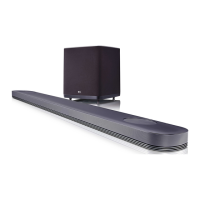
LG SJ9 - User Manual

LG SJ9
73 pages
Print Icon
To Next Page IconTo Next Page
Loading...
MODEL
SJ9 (SJ9, SPJ9B-W)
OWNER’S MANUAL
SMART Hi-Fi
AUDIO
SJ9
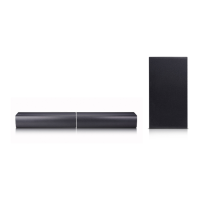
Wireless Multi-room Sound Bar
Please read this manual carefully before operating your set and retain it for future reference.
To view the instructions of advanced features, visit http://www.lg.com and then download
Owner’s Manual. Some of the content in this manual may differ from your unit.
www.lg.com
Copyright © 2017 LG Electronics Inc. All Rights Reserved.

Table of Contents

Other manuals for LG SJ9

Questions and Answers

  • J
    Jeffrey HowardAug 18, 2025
    What to do if the sound output of my LG Speaker System is low?
    • S
      Stacy McclureAug 18, 2025
      If the sound output from your LG Speaker System seems low, try these steps: First, switch the DRC function to OFF using the Music Flow Player. If connected to a TV, change the AUDIO DIGITAL OUT setting on the TV Setup Menu from PCM to AUTO or BITSTREAM. If connected to a Player, change the AUDIO DIGITAL OUT setting on the Player Setup Menu from PCM to PRIMARY PASS-THROUGH or BITSTREAM. Also, change the Audio DRC setting on the connected device's setup menu to the OFF state and make sure Night Mode is turned OFF.
  • E
    Eric HillAug 20, 2025
    How to connect LG SJ9 with Bluetooth when it is not connecting?
    • B
      Brandon MckeeAug 20, 2025
      If your LG Speaker System isn't connecting with a Bluetooth device, turn off the Bluetooth connection lock function.
  • F
    foxmargaretAug 22, 2025
    What to do if sound is not produced on my LG Speaker System?
    • E
      esteskarenAug 22, 2025
      If no sound is coming from your LG Speaker System, first, check the volume level and adjust it if it's set to minimum. If you're using an external device, make sure its volume is also properly adjusted. Also, verify that the mute function is not activated by pressing the mute button or adjusting the volume. Finally, ensure the correct input source is selected.
  • M
    mcamposAug 25, 2025
    Why is my LG SJ9 Speaker System remote control not working?
    • R
      Randy CarterAug 26, 2025
      If the remote control for your LG Speaker System isn't working, first ensure you are within 7 meters of the unit and that there are no obstacles blocking the path between the remote and the unit. If it still doesn't work, replace the batteries with new ones.
  • L
    Lisa FitzpatrickAug 28, 2025
    How to troubleshoot LG SJ9 Speaker System that does not work properly?
    • D
      David YoungAug 28, 2025
      If your LG Speaker System isn't working correctly, try turning off the power to both the unit and any connected external devices like your TV, Woofer, DVD player, or Amplifier, and then turn them back on. If that doesn't work, disconnect the power cord of the unit and the external devices, and then reconnect them. Keep in mind that previous settings may not be saved when the device is shut off.
  • S
    smcdonaldAug 30, 2025
    What to do if there is no woofer sound from my LG SJ9 Speaker System?
    • J
      Janet McgeeAug 30, 2025
      If you're not getting any sound from the woofer of your LG Speaker System, make sure the subwoofer is securely plugged into the wall outlet. If it is, check if the pairing between the main unit and the subwoofer has been disconnected, and reconnect them if necessary.
  • M
    Matthew OchoaSep 2, 2025
    Why is the AUTO POWER function not working on my LG SJ9 Speaker System?
    • V
      Victoria MckenzieSep 2, 2025
      If the AUTO POWER function on your LG Speaker System isn't working, check the connection of the external device such as your TV, DVD/Blu-Ray player, or Bluetooth device. Also, check the SIMPLINK settings on your LG TV and try turning off SIMPLINK. Note that depending on the connected device, this function may not operate.
  • V
    Virginia MurphySep 4, 2025
    How to troubleshoot LG SJ9 Speaker System Music Flow PC Software?
    • B
      Brenda ReyesSep 4, 2025
      If the Music Flow PC Software isn't working properly with your LG Speaker System, disable all firewalls on your PC and try connecting again. Also, ensure that both the speaker and your PC are correctly connected to the local area network and have internet access. Wireless communication may be interrupted by household devices using radio frequencies, so try moving the speaker and your PC away from them.
  • M
    Mary JohnsonSep 7, 2025
    Why is LG Sound Sync not working on my LG SJ9?
    • C
      Cynthia BanksSep 7, 2025
      If LG Sound Sync isn't working with your LG Speaker System, first check whether your LG TV supports LG Sound Sync. Then, check the LG Sound Sync connection. Finally, verify the sound settings on both your TV and the speaker system.
  • L
    Linda GreenSep 9, 2025
    How to troubleshoot Music Flow Player issues with my LG SJ9 Speaker System?
    • T
      Travis BrewerSep 9, 2025
      If the Music Flow Player isn't working properly with your LG Speaker System, ensure it's plugged in. Connect the LAN cable to the LAN port on the back of the Music Flow Player and to your wireless router. If you experience troubles with connecting the Music Flow Player, try relocating the speaker closer to the wireless router or the Music Flow Player. You may also need to turn the speaker’s power off and on again, or perform a factory reset and setup the network connection for the speaker.

Summary

Safety Information

Remote Control

Installation Guide

Installing the Sound Bar

Instructions on how to place and set up the sound bar.

Mounting on a Wall

Guidance on how to mount the main unit securely on a wall.

Cable Management and Subwoofer

Wireless Subwoofer Connection

Instructions for connecting and pairing the wireless subwoofer.

Connecting to Your TV

Using an OPTICAL Cable

Detailed steps for connecting the unit to a TV via an optical cable.

LG Sound Sync Connection

Wired Connection

Steps for establishing a wired LG Sound Sync connection.

HDMI Connectivity

Wireless LG Sound Sync

Steps for establishing a wireless LG Sound Sync connection.

Using an HDMI Cable

How to connect the unit to a TV using an HDMI cable for ARC.

Advanced TV Audio Features

ARC Function

Explains how the ARC function enables audio stream transfer to the unit.

Optional Equipment and Dolby Atmos

Dolby Atmos Setup

Details how to use the Dolby Atmos feature via HDMI.

External Device Connections

HDMI Connection

Instructions for connecting external devices via HDMI IN.

Optical IN Connection

Instructions for connecting external devices via Optical IN.

Multi-Room Setup and App Installation

Initial Multi-Room Setup

Explains the two types of initial connections for multi-room setup.

Installing Music Flow Player App

Guides on downloading the Music Flow Player app via App Store or QR code.

Network Connection

Connecting to Home Network

Guides for connecting speakers to the home network for optimal performance.

Simple Connection (EZ Setup)

Steps for a simplified connection process using Wi-Fi and Bluetooth.

Wi-Fi Setup (iOS)

Adding Speakers to Home Network

Connecting Additional Speaker via LAN

Steps for wired connection of an additional speaker.

Music Flow Player App Usage

Playing Music

Advanced Listening Modes

Surround Sound Setup

Seamless Playback

Speaker Settings via App

Detailed Speaker Menu

Bluetooth Connectivity

Listening to Bluetooth Device

Step-by-step guide to pair and play music from a Bluetooth device.

Sound Adjustments

Standby Modes and Reset

Resetting the Speaker

Instructions on how to reset the speaker to factory settings.

Troubleshooting - General

Troubleshooting - Network

Troubleshooting - Software and Wireless

Application and PC Software

Troubleshooting for the Music Flow app and PC software.

Product Specifications

LG SJ9 Specifications

General IconGeneral
Audio decodersDTS Digital Surround, Dolby Atmos, Dolby Digital 5.1, Dolby Digital Plus
RMS rated power500 W
Audio output channels5.2 channels
Audio Return Channel (ARC)Yes
FM radioNo
Product colorBlack
Audio formats supportedAAC, AAC+, AIFF, ALAC, FLAC, LPCM, MP3, OGG, WAV, WMA
Network streaming services supportedPandora, Rhapsody
Subwoofer typeActive subwoofer
Subwoofer connectivityWireless
Soundbar speaker RMS power215 W
HDMI in1
Bluetooth version4.0
Digital audio coaxial in0
Power consumption (standby)1 W
Power consumption (typical)81 W
Package depth355.6 mm
Package width1264.9 mm
Package height490 mm
Package weight17191 g
Cables includedOptical
Receiver included-
Movie modesAction
Apple docking compatibilityNot supported
Weight and Dimensions IconWeight and Dimensions
Depth145 mm
Width1199.8 mm
Height57.9 mm
Soundbar weight5624.5 g
Subwoofer width295.9 mm
Subwoofer height331.9 mm
Subwoofer weight7620.3 g

Related product manuals