Operating50
Operating
3
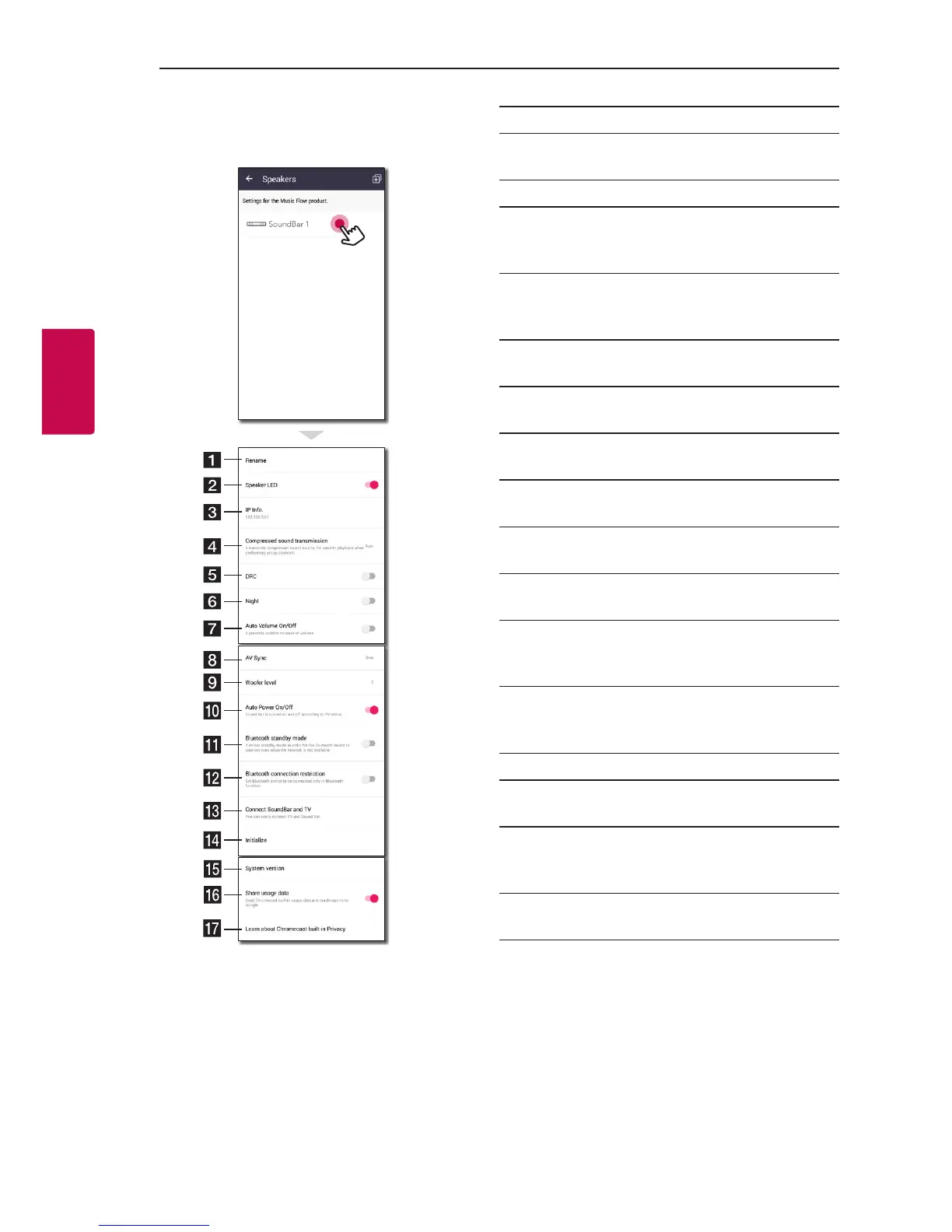
[Speakers] Menu
You can adjust speakers connected to your network.
a
Rename – Renames the speaker.
b
Speaker LED – Turns on or off speaker’s LED
indicator.
c
IP Info. - Shows the IP address of the speaker.
d
Compressed sound transmission – Adjusts
the compression of audio source according to
network status.
e
DRC – It reduce the volume of loud sounds
or amplies quiet sounds. (Dolby Digital only)
Turns on or off DRC function.
f
Night – Turns on or off Night Mode function.
(Page 60)
g
Auto Volume On/Off – Turns on or off Auto
Volume function. (Page 60)
h
AV Sync – Adjust the audio and video
Synchronization. (Page 57)
i
Woofer level – Adjust Woofer level. (Page
60)
j
Auto Power On/Off – Turns on or off Auto
Power function. (Page 58)
k
Bluetooth standby mode – Turns on or off
Bluetooth standby mode. (Page 61)
l
Bluetooth connection restriction – It enables
you to connect Bluetooth device only on
Bluetooth or LG TV function. (Page 57)
m
Connect SoundBar and TV – Guide you to
connect to your TV. (through Optical (Page
12) or HDMI (Page 14))
n
Initialize – Resets the speaker.
o
System version – Displays the current system
version.
p
Share usage data – Select whether to send
Chromecast usage data and crash reports to
Google.
q
Learn about Chromecast built-in Privacy –
Shows Privacy policy of Chromecast.


 To Next Page