3 System Setting
System Setting22
System Setting
3
Settings
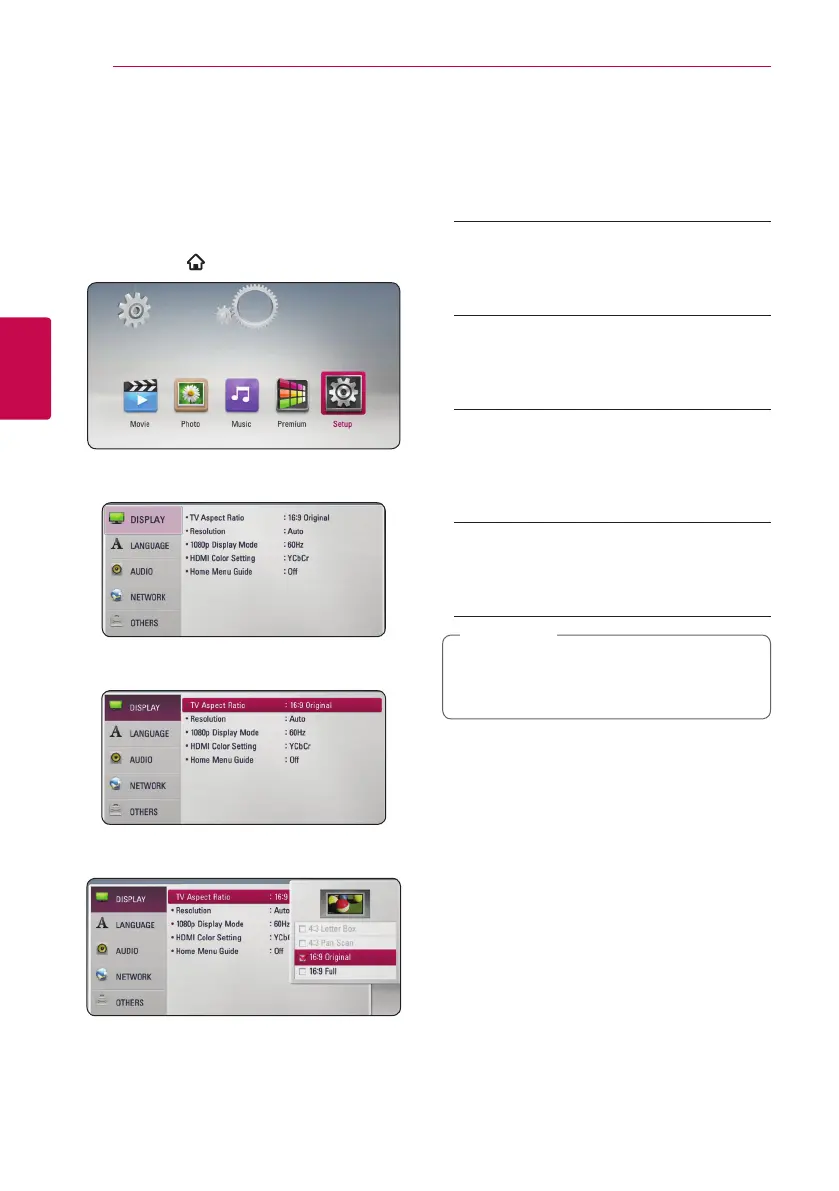
Adjust the setup settings
You can change the settings of the unit in the
[Setup] menu.
1. Press HOME (
).
2. Use
A/D
to select the [Setup] and press ENTER
(
b
). The [Setup] menu appears.
3. Use
W/S
to select the first setup option, and
press
D
to move to the second level.
4. Use
W/S
to select a second setup option, and
press ENTER (
b
) to move to the third level.
5. Use
W/S
to select a desired setting, and press
ENTER (
b
) to confirm your selection.
[DISPLAY] menu
TV Aspect Ratio
Select a TV aspect ratio option according to your TV
type.
[4:3 Letter Box]
Select when a standard 4:3 TV is connected.
Displays theatrical images with masking bars
above and below the picture.
[4:3 Pan Scan]
Select when a standard 4:3 TV is connected.
Displays pictures cropped to ll your TV screen.
Both sides of the picture are cut o.
[16:9 Original]
Select when a 16:9 wide TV is connected. The
4:3 picture is displayed with an original 4:3
aspect ratio, with black bars appearing at the
left and right sides.
[16:9 Full]
Select when a 16:9 wide TV is connected. The
4:3 picture is adjusted horizontally (in a linear
proportion) to ll the entire screen.
You cannot select [4:3 Letter Box] and
[4:3 Pan Scan] option when the resolution is
set to higher than 720p.
,
Note


 To Next Page