Copyrightⓒ. 2015. All Rights Reserved.
1. Appearance Description for PoE Wi-Fi Bridge
WPS
Reset
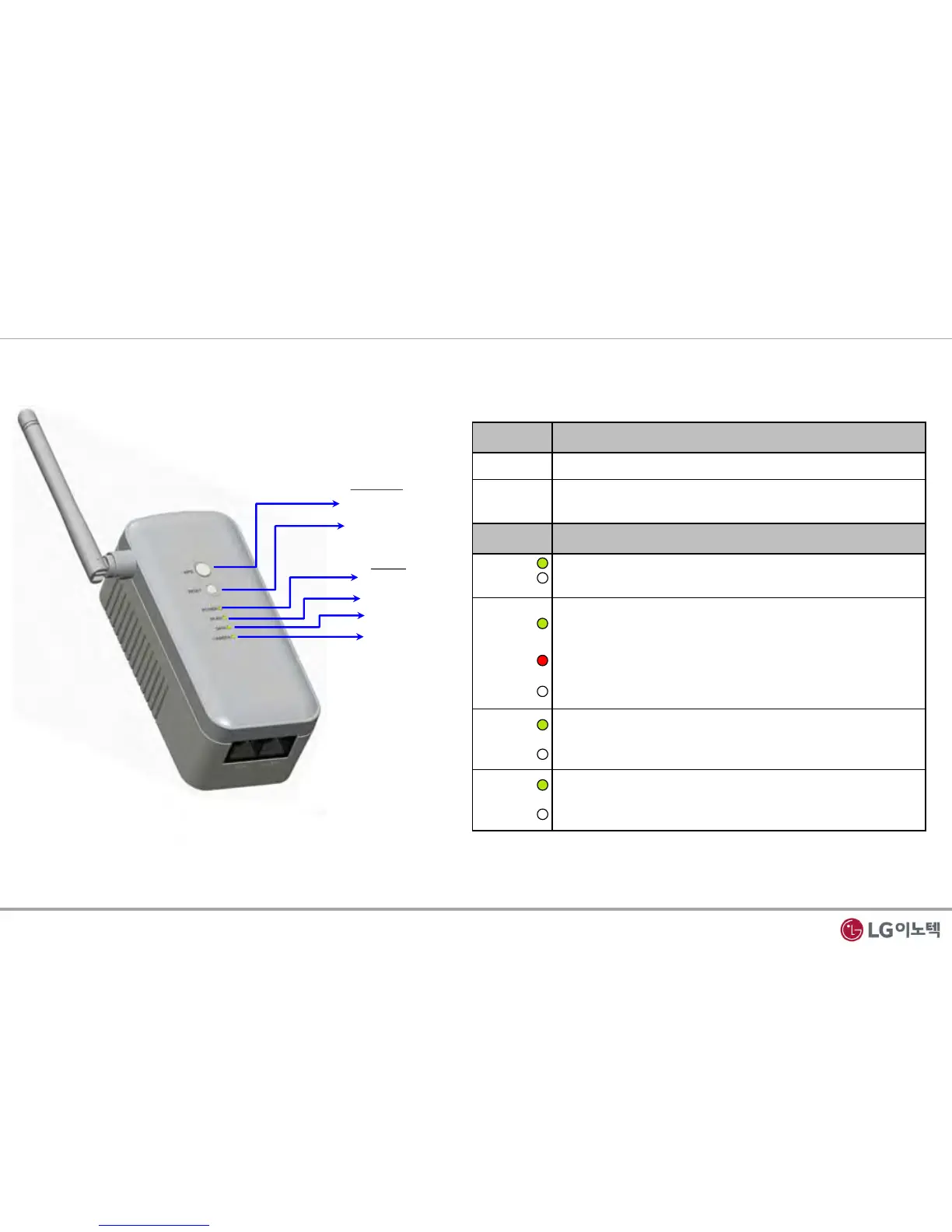
Fig 1. Front View
1. Front Panel
- The front panel has the 2-Button and status LEDs in the following figure.
LEDs
POWER
WLAN
DATA
CAMERA
Buttons
Button Description
WPS • To connect WPS to AP(Access Point)
Reset
• Reboot
• Reset to Factory Default
LED Description
Power
• Solid Yellow Green : Power on
• Off : Power is not supplied to the PoE Wi-Fi Bridge
WLAN
• Solid Yellow Green : Wi-Fi Activity are in process
• Blinking Yellow Green : Wireless data is being sent or
received.
• Blinking Red : The Wireless signal is weak signal
• Off : Wi-Fi access fail
DATA
• Blinking Yellow Green : Ethernet link is detected
Data Transmission on the port
• Off : No data transmission
CAMERA
• Blinking Yellow Green : CAMERA link is detected
Data Transmission on the port
• Off : No data transmission
Table 1. Front Description
1 / 12


 To Next Page