Connecting 13
Connecting
2
Speaker Connection
Attaching the speakers to the
player
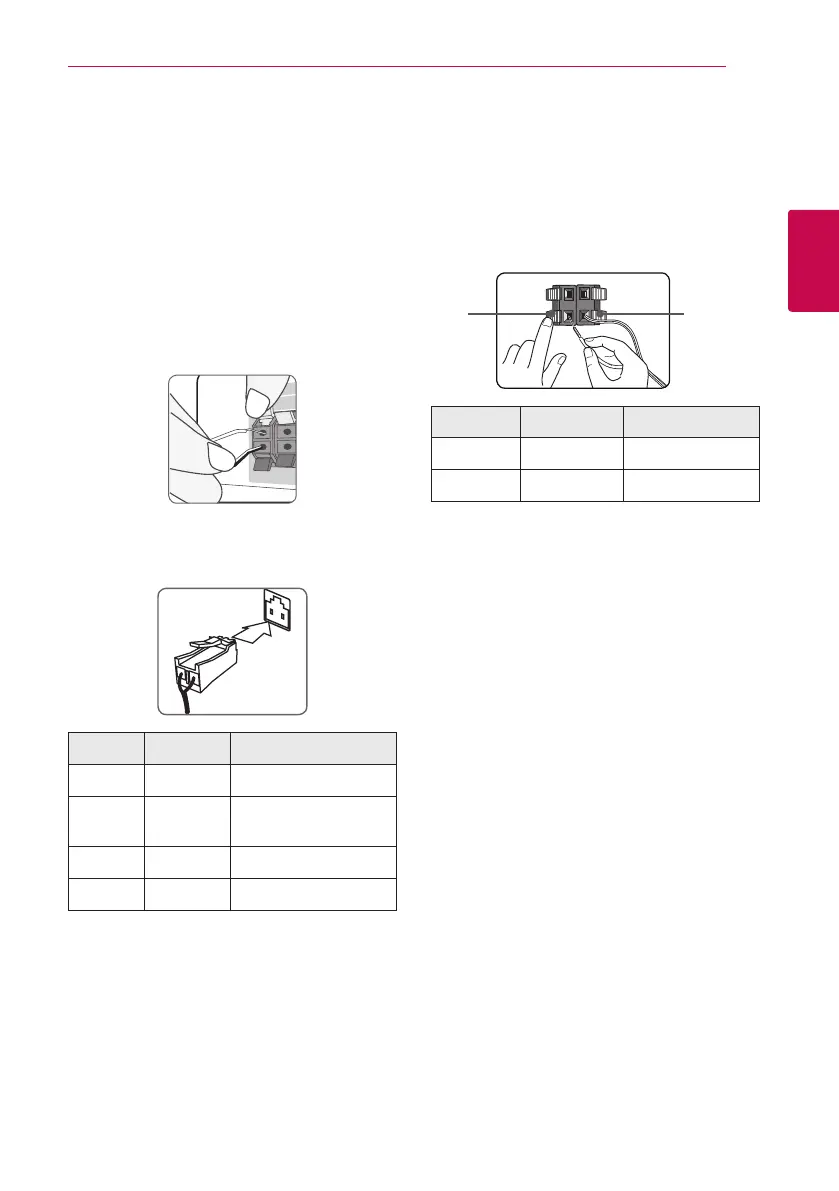
1. Connect speaker wires to the player.
Each speaker wire is color-coded. Use matching
color wires for corresponding speakers.
Make sure the wire marked black goes in to the
terminal marked “–” (minus) and the other wire
goes in to the terminal marked “+” (plus).
Connect a woofer cord to the player. When
connecting a woofer cord to the player, insert
the connector until it clicks.
Color Speaker Position
Green Center Center
Orange
Sub
woofer
Any front position
Red Front Front right
White Front Front left
2. Connect the speaker wire to the terminal on the
speaker.
Make sure the wire marked black goes in to the
terminal marked “–” (minus) and the other wire
goes in to the terminal marked “+” (plus).
Attaching the rear speakers to
the wireless receiver
Connect the rear speakers to the wireless receiver
with the speaker cords.
Make sure the wire marked black goes in to the
terminal marked “–” (minus) and the other wire
goes in to the terminal marked “+” (plus).
(+)
(-)
Color Speaker Position
Grey Rear right Rear right
Blue Rear left Rear left



 To Next Page