Operating 29
Operating
4
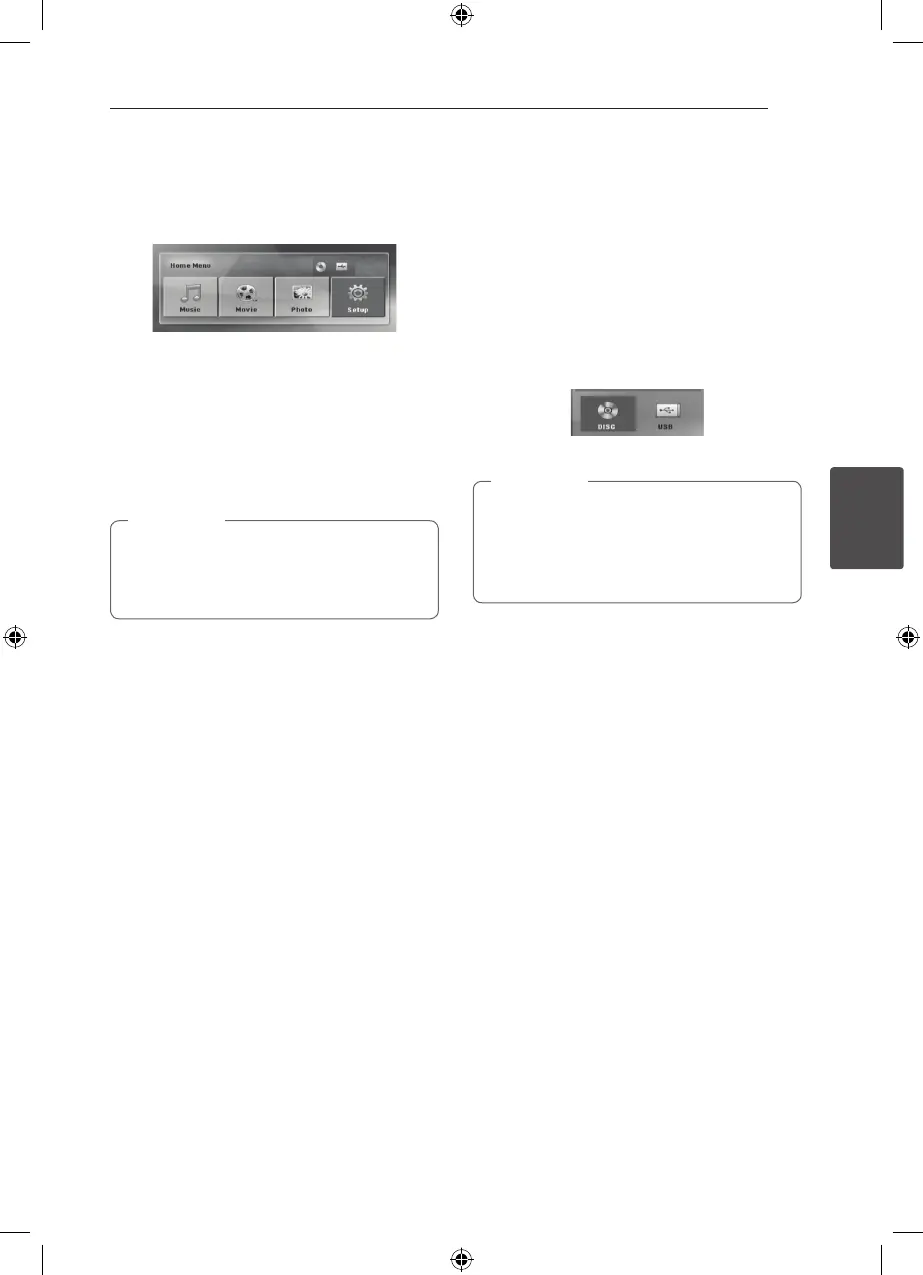
Using the Home Menu
1. Press
n
HOME.
Displays the [Home Menu].
2. Select an option by using
AD
.
3. Press
b
ENTER then selected option menu.
[Music] – Displays [MUSIC] menu.
[Movie] – Start video media’s playback or displays
the [MOVIE] menu.
[Photo] – Displays [PHOTO] menu.
[Setup] – Displays the [Setup] menu.
You can not select the [Music], [Movie] or
[Photo] option when the USB device is not
connected or a disc is not inserted.
,
Note
Basic Operations
1. Insert the disc by using the
B
OPEN/CLOSE or
Connect the USB device to the USB port.
2. Press
n
HOME.
Displays the [Home Menu].
3.
Select an option by using
AD
.
If you select the [Movie], [Photo] or [Music]
option when you connect up to two devices,
it appears as belows. Select a media then press
b
ENTER.
4. Press
b
ENTER then selected option menu.
y
For the most Audio CD and DVD-ROM discs,
playback starts automatically.
y
The unit plays only music le contained in
the USB storage device or disc automatically.
,
Note
HT806THW-A2_BMARLLK_ENG_0404.indd 29 2011-05-04 �� 2:12:32



 To Next Page