22
EN
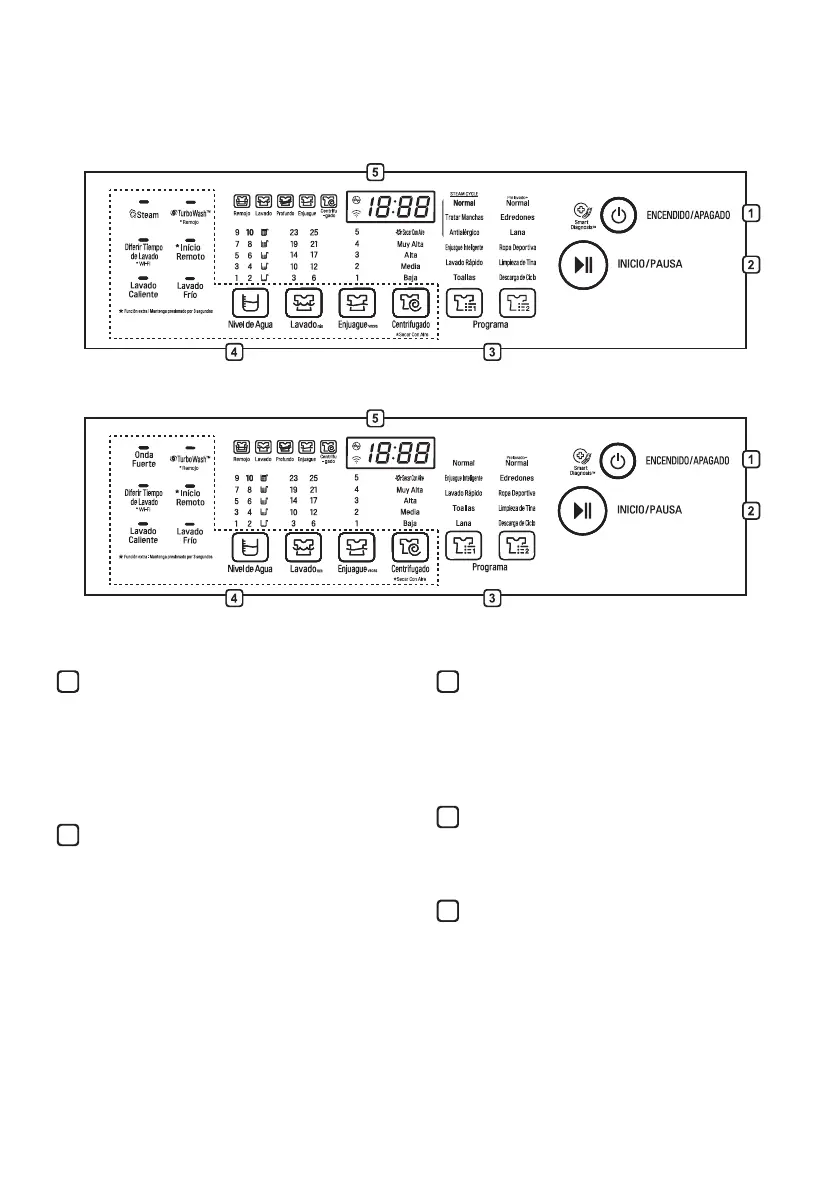
Control Panel
For Steam Models
For Non-Steam Models
ENCENDIDO/APAGADO Button
• Press the ENCENDIDO/APAGADO button
to turn the washing machine on.
• The appliance will automatically turn off
once a certain time has passed after the
wash has completed.
INICIO/PAUSA Button
• Press the INICIO/PAUSA button to start
the wash cycle or pause the wash cycle.
• If a temporary stop of the wash cycle is
needed, press the INICIO/PAUSA button.
NOTE
• For customer safety, the door will be
locked automatically during operation. If
there are additional laundry to put in,
press INICIO/PAUSA to unlock.
• Press INICIO/PAUSA button again to
resume operation.
1
2
Programa Button
• Programmes are available according to
laundry type.
• Lamp will light up to indicate the selected
programme.
Option Button
• Press buttons to select the desired
options.
Display
• The display shows the settings, estimated
time remaining, options, and status
messages. When the product is turned on,
the default settings in the display will
illuminate.
• The process lamp will remain prior to it
beginning. The process lamp will blink
during that process, and the lamp will then
turn off when that process has completed
3
4
5


 To Next Page