EasyManua.ls Logo

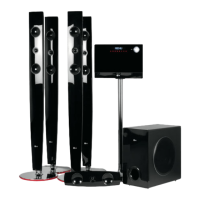
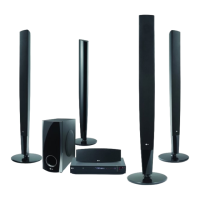
LG XH-TK953TV - User Manual

LG XH-TK953TV
26 pages
Print Icon
To Next Page IconTo Next Page
Loading...
Model: XH-TK953TV(XH-TK953TV, SH93TV-S/C/A, ST3TV)
Unique Features
P/NO : MFL57690304
5.1ch ez Set-up
Listen sound from TV, DVD
and Digital Device with vivid
5.1ch mode.
Go to page 16
Full HD up-scaling
(1080p)
View Full HD picture quality
with simple setup.
Go to page 11
HDMI In
Simple connection with Set
Top Box through HDMI.
Go to page 7
USB Direct Recording
Record music from CD to
your USB device.
Go to page 18
Portable In
Listen to music from your
portable device (MP3,
Notebook, etc).
Go to page 18
The working life of this product is 7 years since the date of purchase
Internet address ; http://ua.lge.com
Customer Information Center LG ; (380-44) 490-7777, 8-800-303-0000
.

HT953TV-XK_BRUSLLK_ENG_0304 7/17/08 7:15 PM Page 1

Questions and Answers

  • G
    George MillerAug 20, 2025
    How to fix no picture on LG Home Theater System?
    • A
      andreabrooksAug 20, 2025
      If your LG Home Theater System shows no picture, ensure the TV is set to the correct video input mode to receive the DVD signal. Also, check that the video cables are securely connected to both the TV and the DVD receiver.
  • G
    gramirezAug 22, 2025
    What to do if my LG XH-TK953TV has little or no sound?
    • C
      Christopher KiddAug 22, 2025
      If you're experiencing little to no sound with your LG Receiver, there are a few things to check: * Make sure the equipment connected via the audio cable is set to receive the DVD signal output by selecting the correct input mode on your audio receiver. * Verify that the audio cables are correctly and securely connected to both the speakers and the receiver. * Inspect the audio cables for any damage and replace them if necessary.
  • P
    Paul McdonaldAug 25, 2025
    Why is there no sound coming from my LG Home Theater System?
    • D
      Derek GloverAug 25, 2025
      If you're experiencing little to no sound from your LG Home Theater System, verify that the connected equipment is set to receive the DVD signal output. Ensure the audio cables are correctly and securely connected to the speakers or receiver. If the issue persists, the audio cables may be damaged and require replacement.
  • S
    Susan SanchezAug 26, 2025
    How to stop humming noise on LG Home Theater System?
    • J
      Jeffrey BrownAug 26, 2025
      If you hear a humming noise while playing a DVD or CD on your LG Home Theater System, clean the disc with a soft cloth using outward strokes. Additionally, try moving the DVD receiver and audio components further away from the TV to prevent feedback.
  • S
    Stacy Burton MDAug 28, 2025
    Why is there no picture on my LG XH-TK953TV?
    • A
      Ana JohnsonAug 28, 2025
      There could be a couple of reasons why you're not seeing a picture on your LG Receiver. First, ensure that your TV is set to the correct video input mode to receive the signal from the DVD Receiver. Also, check that the video cables are securely connected to both the TV and the DVD Receiver.
  • H
    Heather JacobsAug 29, 2025
    Why is there little or no sound from my LG XH-TK953TV?
    • J
      John NormanAug 29, 2025
      If you're experiencing little to no sound from your LG Receiver, it could be due to several reasons. First, ensure that the equipment connected via the audio cable is set to receive the DVD signal output by selecting the correct input mode on your audio receiver. Also, verify that the audio cables are securely connected to both the speakers and the receiver. If the problem persists, the audio cables may be damaged, and you should replace them.
  • D
    davidgarciaAug 31, 2025
    What to do if my LG Home Theater System won't play a DVD?
    • M
      Melissa ClarkAug 31, 2025
      If your LG Home Theater System isn't playing a DVD or CD, first, make sure a disc is inserted correctly with the label side facing up. Ensure the disc is playable by checking its type, color system, and regional code. If a menu is open, press SETUP to close it. Finally, check if a parental lock is preventing playback and enter your password or adjust the rating level if necessary.
  • C
    Charles RamosSep 2, 2025
    What to do if radio stations can’t be tuned in properly on LG XH-TK953TV?
    • E
      emily32Sep 2, 2025
      If you're having trouble tuning into radio stations with your LG Receiver, consider the following: * Check the antenna connection and adjust its position for better reception. * If the signal strength of the radio station is weak, try tuning to the station manually. * Ensure that radio stations have been preset; if not, preset them. * Point the remote directly at the unit. * Use the remote within 23 feet (7m) of the DVD receiver. * Remove any obstacle in the path between the remote control and the unit.
  • D
    Douglas PrinceSep 4, 2025
    What to do if a DVD/CD will not play on LG XH-TK953TV?
    • T
      Thomas MaddoxSep 4, 2025
      If your LG Receiver is not playing a DVD or CD, consider the following: * Ensure that a disc is inserted. * Verify that the inserted disc is playable by checking the disc type, color system, and regional code. * Make sure the disc is inserted correctly, with the label or printed side facing upwards. * If the menu is open on the screen, press SETUP to close it. * If there is a parental lock, enter your password or change the rating level.
  • M
    Matthew EvansSep 6, 2025
    How to stop humming noise when playing DVD or CD on LG XH-TK953TV?
    • K
      Kyle CruzSep 6, 2025
      If you hear a humming noise while playing a DVD or CD on your LG Receiver: * Clean the disc using a soft cloth with outward strokes to remove any dirt. * Try moving the DVD receiver and audio components further away from your TV to reduce feedback.

LG XH-TK953TV Specifications

General IconGeneral
BrandLG
ModelXH-TK953TV
CategoryReceiver
LanguageEnglish

Related product manuals