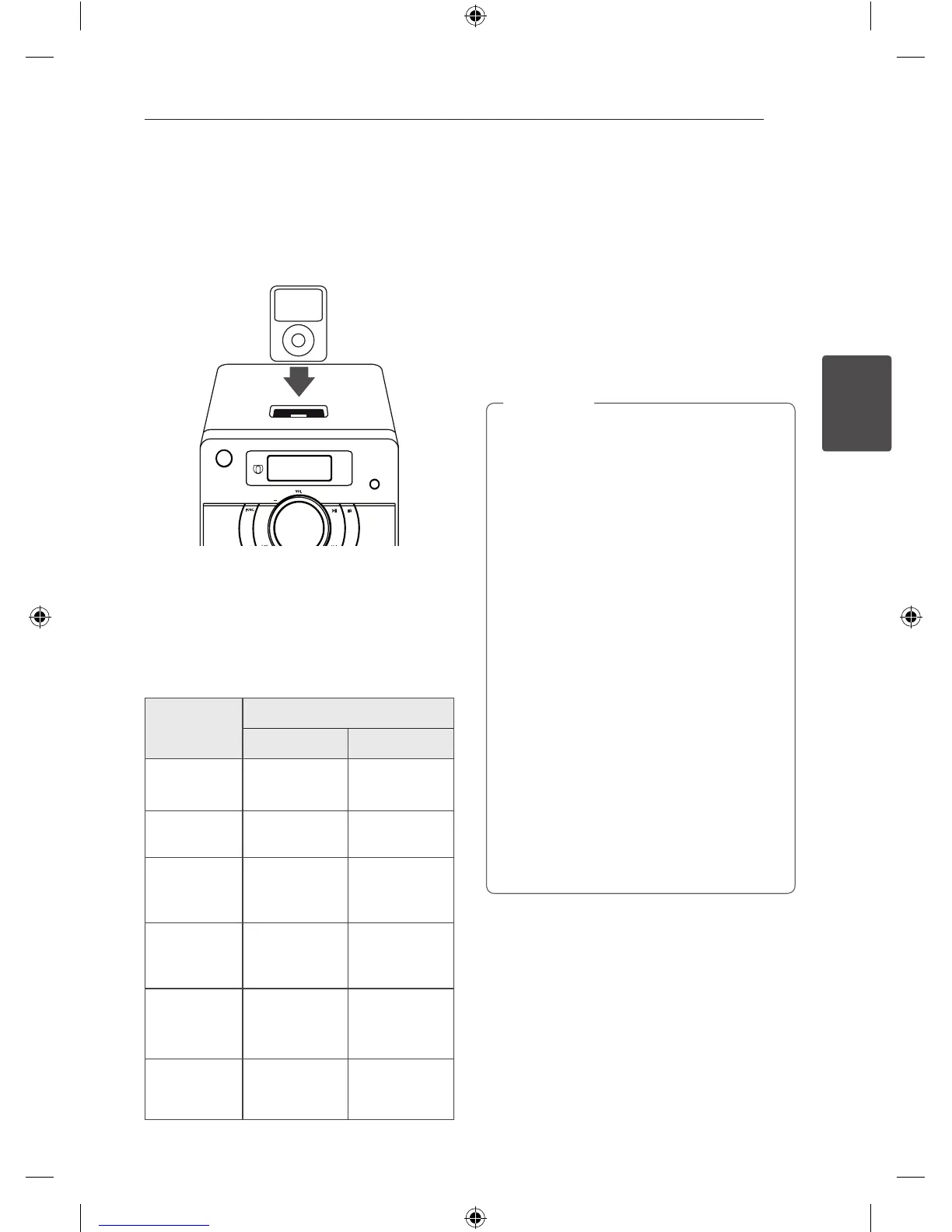
If you turn this unit on, your iPod is
automatically turned on and recharging starts.
2. Press FUNC. on the unit or FUNCTION on the
remote control to select iPod function. You can
operate your iPod through an iPod’s display
by using the supplied remote control and also
control on your iPod.
To
Do this
ON UNIT ON REMOTE
Pauses or
restart
T
d
/
M
Skip
Y/U
Cc
/
vV
Search
Press and hold
Y/U
Press and hold
Cc
/
vV
Move to the
Previous
menu
- MENU/REPEAT
Move to the
desired item
-
PRESET/
FOLDER
W
/
S
Choosers a
item
-
Z
ENTER
Compatible iPod/iPhone
y
We recommend installing the latest software
version.
y
The unit supports the models as follows/ iPod
nano 1 G, 2 G, 3 G, 4 G, 5 G, 6 G/
iPod classic/ iPod 4 G, 5 G/
iPod touch 2 G, 3 G, 4 G/ iPhone 3 G, 4. For some
models, the unit may not operate depending on
the rmware version.
y
Depending on your iPod’s software version, you
may not control your iPod from the player.
y
If this unit displays an error message, follow
the message. An error message “ERROR”.
- Your iPod is not connected firmly.
- This unit recognizes your iPod as an
unknown device.
- Your iPod is exceptionally low in power.
/
The battery needs to be charged.
/
If you charge the battery while iPod
is extremely low in power, it may take
longer to be charged.
y
iPod does not support recording function
when connected.
y
Depending on your iPod’s software version,
it may not be possible to control your iPod
from this unit. We recommend installing the
latest software version.
y
If you use an application, make a call, or
send and receive SMS text message, etc. on
iPod touch or iPhone, disconnect it from
iPod dock of this unit and then use it.
y
If you have a problem with your iPod, please
visit www.apple.com/support/ipod.
,
Note



 To Next Page