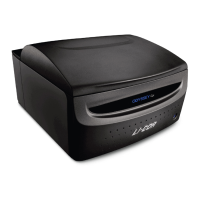
The Odyssey® M Imager is a versatile laboratory instrument designed for capturing various assays across 18 channels, including white light, luminescence (bioluminescence and chemiluminescence), and fluorescence (near-infrared/visible). It provides reliable data for membranes, plate-based assays, slides, nucleic acid gels, and protein gels. The Odyssey M is available in two models: 3340 and 3350. The Model 3350 includes additional hardware for imaging chemiluminescence, while the Model 3340 does not.
Function Description:
The imager utilizes laser technology for fluorescence detection, offering narrow wavelength excitation (e.g., 488nm ± 1nm) and high-intensity light. This method is preferred for accurate quantification of samples, as it illuminates specific structures that fluoresce at the incident laser's wavelength while leaving non-fluorescent areas unilluminated. Examples of applications include fluorescent Western blots and In-Cell Western™ Assays.
Transillumination (transmitted light) is employed for samples that are translucent or transparent. This technique passes visible or UV light through the sample, recording the attenuated light to generate contrast. It's suitable for observing highly contrasted, stained, or naturally pigmented samples, such as Coomassie or silver-stained protein gels and H&E stained tissue sections. Images can be captured in RGB (red, green, blue) format, which are composites of three independent grayscale images corresponding to the intensity of red, green, and blue light transmitted.
Epi-illumination (reflected light) is the method of choice for imaging opaque samples. In this mode, light reflected from the sample is recorded, with absorption and diffraction creating discernible variations in the image. This provides even illumination for observing highly contrasted, stained, or naturally pigmented samples. Similar to transillumination, grayscale or RGB images can be generated. Applications include Western blot membranes with colorimetric substrates or stains, and colorimetric MW markers in chemiluminescent blots.
The imager is controlled by LI-COR® Acquisition Software, which provides step-by-step workflows for different assay types. The system is designed for continuous operation, and during idle times, it can remain powered on or be powered off.
Important Technical Specifications:
- Laser Source: The Odyssey M is a Class 1 laser product, meaning hazardous laser radiation is confined within the instrument. It contains four lasers:
- 488 nm: 30 mW maximum output, 0.038° beam divergence, 40,000 hours expected lifetime.
- 520 nm: 50 mW maximum output, 0.046° beam divergence, 40,000 hours expected lifetime.
- 685 nm: 450 mW maximum output, 0.085° beam divergence, 20,000 hours expected lifetime.
- 785 nm: 1.2 W maximum output, 0.060° beam divergence, 20,000 hours expected lifetime.
- Detectors:
- sCMOS image sensor.
- CCD sensor for chemiluminescence (Model 3350 only).
- Light Sources:
- RGB LED (trans-illumination).
- RGB LED (reflective illumination).
- Solid-state diode lasers at 488 nm, 520 nm, 685 nm, and 785 nm.
- LED Risk Group: Exempt group in accordance with IEC 62471:2006, posing no photobiological hazard.
- Focus Offset Range: -1.00 mm to 5.00 mm.
- Pixel Resolution: Available imaging resolutions are 5 µm, 10 µm, 20 µm, 50 µm, and 100 µm. Resolution for chemi images is 100 µm.
- Maximum Height of Samples: Items must be 23 mm or less from the Scan Surface to the top of the item.
- Operating Conditions: Indoor use only, temperature 15 - 35 °C, dew point not greater than 22 °C (non-condensing), altitude not to exceed 2000 m.
- Transport Conditions: -40 °C to 65 °C.
- Power Requirements: Universal input range 100-240 VAC (voltage fluctuations not to exceed 10% of nominal voltage); < 3 Amp maximum; At 120 V: 0.5 Amp typical when idle; 50-60 Hz. The provided power supply converts wall voltage to 24 VDC (5 Amp).
- Dimensions: 24" width x 30" depth x 15" height (61 cm width x 76 cm depth x 38 cm height). With the lid fully open, the height is 28" (71 cm).
- Scan Surface: Total Scan Area: 25 cm W x 18 cm D (9.8" W × 7.1" D). Scan Area of Chemi Region (Model 3350 only): 15 cm W x 11 cm D (5.9” W x 4.3" D).
- Dynamic Range: >6 logs for chemiluminescence (Model 3350) and fluorescence in a single acquisition.
- Weight: Model 3350: 121 lbs (55kg). Model 3340: 115 lbs (52kg).
- Network: TCP/IP protocol, uses a provided Category 6 network cable.
Usage Features:
- Power Button: A single button on the front panel controls power. It illuminates solid blue when on, flashes blue during power-on/off, and turns off when the Scan Surface is moved to the rear.
- Display Panel: Shows the connected username, lid status, time remaining in a scan, and scan type.
- Front Panel Indicator Light: Provides status feedback: Off (no connection), Green (ready/done), Yellow/Orange (scanning/lid open), Red (error).
- Scan Surface: Accessed by gently lifting the front lid. It automatically moves to the rear during imaging and returns to the front when a scan is complete. It can also be manually moved forward if there's a power outage during a scan.
- Sample Enclosure: A frame surrounding the Scan Surface, held by magnets, which can be removed for maintenance.
- Tray Holder: Stores accessories like the Plate Alignment Guide (926-18972), Slide Alignment Guide (926-18971), and Silicone Mat (926-70003). It pivots open for access and can be removed for maintenance.
- Alignment Guides: Magnetic guides (Plate Alignment Guide for multiwell plates, Slide Alignment Guide for microscope slides) ensure precise sample positioning.
- Rear Lid: Safety interlocked, removing it cuts power to illumination sources and motors. It can be removed to retrieve samples or clean the chemi module glass.
- Imaging Membranes: Place wet or dry membranes sample-side down. For wet membranes, use a soft roller (926-71000) and silicone mat (926-70003) to ensure flatness and moisture. For dry membranes, use the silicone mat.
- Imaging Gels: Place gels face-up on the Scan Surface after rinsing. Do not use the silicone mat.
- Imaging Multiwell Plates: Supports 6, 12, 24, 48, 96, and 384 well formats. Use the Plate Alignment Guide. Avoid plates taller than 23 mm or those with white walls. For Greiner plates, remove the lid before imaging; plate tape can mitigate evaporation.
- Imaging Slides: Use the Slide Alignment Guide. Place slides with coverslips sample-side up, and membrane-coated slides sample-side down. Carefully load slides at an oblique angle to prevent breakage.
Maintenance Features:
- Routine Inspection: Regularly inspect the system and Scan Surface.
- Cables and Cords: Inspect for fraying, exposed wire, or loose connections.
- Scan Surface Maintenance: Remove chemical spills immediately. Clean with ultrapure water and a lint-free tissue. Use 70% ethanol for smears, methanol for residues. Do not use scouring compounds or abrasive pads.
- Imager Exterior: Remove chemical spills. Clean with warm water and a damp cloth. Do not use scouring compounds or solvents (e.g., acetone, benzene, carbon tetrachlorides, lacquer thinner, or alcohol).
- Fan Filter: Inspect and clean at least once a year, or more frequently if surroundings are dirty. Remove the Tray Holder, unscrew the retaining plate, and flush the filter with water (or hot water and detergent for oil/particles). Allow to dry completely before reinstallation.
- Grid Below Scan Surface: Not part of regular maintenance, but can be cleaned if needed. Move the Scan Surface to the rear, then gently wipe with a microfiber cloth, mild soap, and water. Do not allow soap/water to enter the imager or get on greased bearings.
- Underside of Scan Surface: Not part of regular maintenance. Can be removed for cleaning by loosening three sets of screws on the frame. Clean with ultrapure water, 70% ethanol, and methanol. Do not remove the glass from the frame.
- Silicone Mat: Rinse under warm water after each use. Gentle lab soap can be used, but must be completely rinsed off. Isopropanol can also be used. Air dry.
- Alignment Guides: Clean with soap and warm water away from the imager.
- Chemi Module Glass (Model 3350): Do not attempt to clean. Contact LI-COR Technical Support if contaminated.

 Need help?
 General

 To Next Page