Introduction
3
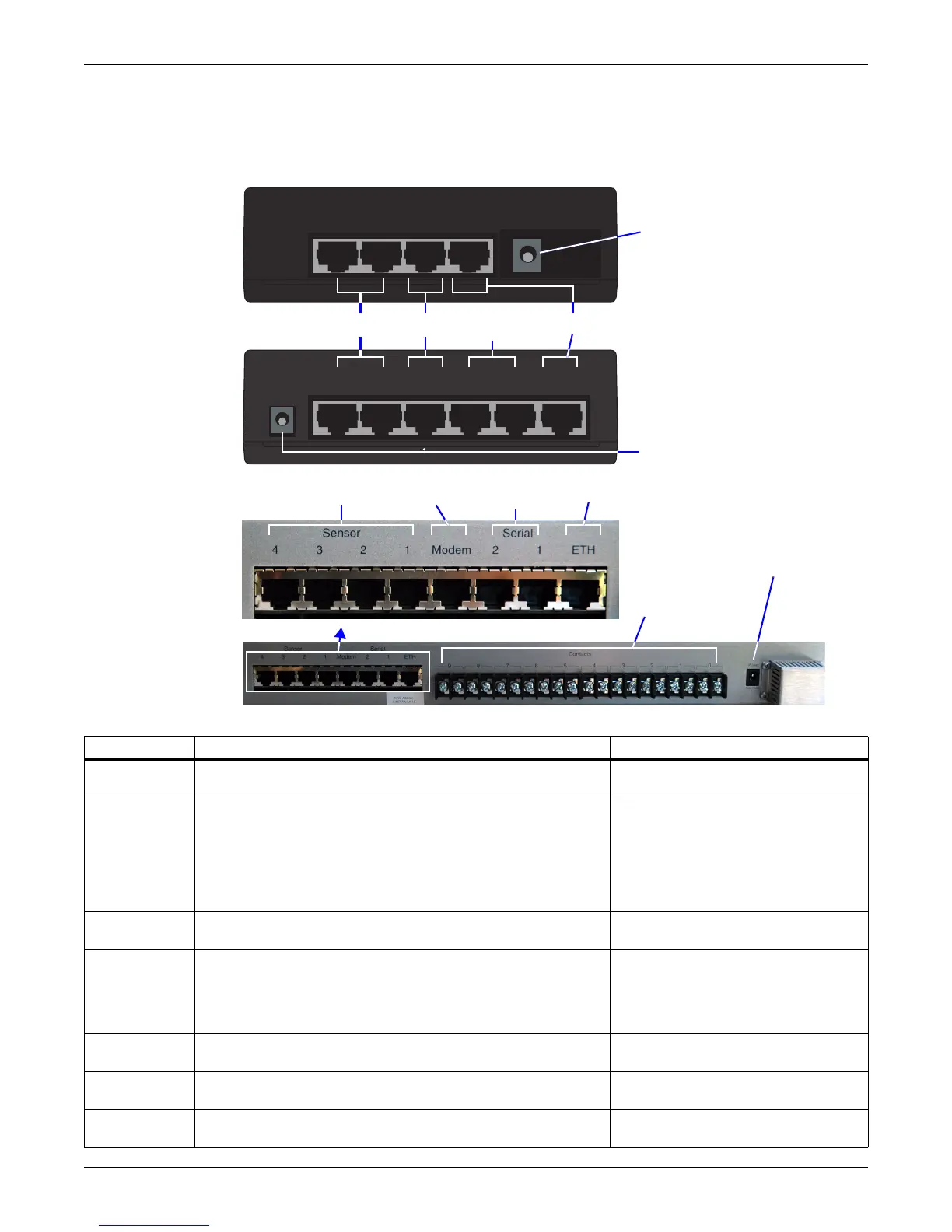
1.1.3 Connectors on Back of Unit
The back of the OpenComms EM, shown in Figure 2, has an input power source, sensor ports, a
modem port and an Ethernet port. The EM PDU and vEM-14 controllers have serial ports, and
vEM-14 controllers also have 10 dry contact inputs.
Figure 2 Rear view
Table 1 Description of indicators and connectors
Item Description For more information, see:
A - Power and
port indicators
Indicators on the front of the unit show the status of input power
and other connections (see Figure 1).
1.2: Indicators
B - Sensors
Sensor ports to connect compatible sensors:
• Temperature sensor
(provided with TMNET & TMPDUNET kits)
• Temperature & humidity combination sensor
(provided with THCMNET & THCMPDUNET kits)
• Humidity, water detection or dry-contact sensor
(available separately)
2.3.4: Connect Sensors
5.3: Sensors Window
C - Modem
Port for connection to a modem.
• Requires RJ45 cable (customer-supplied)
2.3.3: Connect to a Modem
D - Serial
devices
Serial 1 and Serial 2 ports to connect serial devices
(EM PDU and vEM-14 controllers).
• Requires serial cable (one provided)
2.3.5: Connect Serial Devices
(EM PDU/vEM-14 Controllers)
5.4: Power Window (EM PDU &
vEM-14 Controllers)
5.7.4: Serial Ports
E - Ethernet
Port for connection to an Ethernet network.
• Requires RJ45 cable (customer-supplied)
2.3.2: Connect to an Ethernet Network
5.7.1: Network Connectivity
F - Power
Power connection for the OpenComms EM.
• Requires 9VDC
2.3.1: Connect Power to the Unit
G - Dry
contact inputs
10 dry contact inputs for auxiliary devices (vEM-14 controller).
• Requires Form C dry contacts
—
Sensor
2
Sensor
1
Modem DCN Ethernet
EM
CONTROLLER
F - Power
B - Sensors C - Modem
EM PDU
CONTROLLER
Sensor
2
Sensor
1
Serial
2
Serial
1
Modem DCN Ethernet
F - Power
D - Serial
devices
E - Ethernet
vEM-14
CONTROLLER
F - Power
B - Sensors C - Modem
D - Serial
devices
E - Ethernet
G - Dry
contact
inputs



 To Next Page