Need help?
Do you have a question about the LIFE home integration AC 8R DL and is the answer not in the manual?
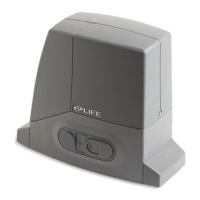
The ACER DL is an electromechanical operator designed for sliding gates, intended for residential use. This device facilitates the automated opening and closing of gates, enhancing convenience and security for homeowners. The operator is designed for horizontal installation with a dedicated anchorage plate, ensuring stable and secure mounting.
The primary function of the ACER DL operator is to automate the movement of sliding gates. It integrates an optical/magnetic encoder and a built-in Electronic Control Unit (ECU) to manage gate operations. The system allows for both "gate open" and "gate closed" limit switch brackets to be assembled at the ends of the rack, which are crucial for defining the gate's travel limits. The operator is equipped with an internal linear electromechanical wiring system, pre-performed by the manufacturer, which should not be modified.
The manual release mechanism is a key safety and convenience feature. In the event of a power outage or malfunction, the operator can be manually disengaged, allowing the gate to be moved by hand. This involves sliding a lock protection cover, inserting a key, turning it 90 degrees, and gently pulling it outwards until the hatch protrudes and stops. This action frees the operator, and a microswitch prevents the motor from operating when the power returns until the transmission is reconnected by manually moving the gate until it hitches up.
The operator's control unit manages the various automation devices, including the motor, encoder, and autotransformer. It requires a 230 Vac 50 Hz electricity supply, with specific cable requirements (3x1.5 mm2 cable, yellow and green wire for earth, polychloroprene sheath). For safety, the motor must be earthed, with the yellow and green wire crimped to a loop on the upper sleeve. The ECU is designed for easy removal from its housing to facilitate wiring and programming, allowing it to be rested on the edge of the operator base or held, and then re-inserted by pressing lightly until the clips snap in.
The ACER DL operator is specifically designed for opening and closing residential-type sliding gates. It is crucial that the gate structure is suitable for automation, meaning it must be perfectly aligned with its sliding tracks, properly hung, and resistant to flexion. The gate's movement should be uniform, without excessive resistance or friction, and it should not move when left in any position on the sliding tracks. The operator is not suitable for gates with built-in doors unless the automation is prevented from functioning when the door is open.
The installation process involves several steps to ensure proper functionality. First, the anchorage plate must be positioned according to specific dimensions and orientation (left or right hand). Electric cable pipes need to be laid, protruding from the concrete base and plugged to prevent debris. The anchorage plate can be fastened with expanding screw anchors or sunk into fresh concrete, especially for heavy-duty applications or gates over 300 kg.
Once the anchorage plate is secure, the operator is placed on it. The lid is removed, and the operator is rested on the plate, with M10 screws loosely turned. Vertical adjustment is then performed using dowels and a spanner to ensure the operator is parallel to the gate. Finally, the M10 screws are tightened, and covers are assembled on the clamping feet.
The limit switch brackets, "gate open" (A) and "gate closed" (B), are assembled at the ends of the rack. It's important to note that the gate will travel an additional 2-3 cm after the limit switch intervention, so the brackets must be positioned to prevent the gate from colliding with mechanical stop plates.
For safety, users should never touch the gate or moving parts when it is in motion and should remain at a safe distance, only passing when the gate is completely open and immobile. Children, disabled persons, and animals should be kept away from the gate and control organs (e.g., radio control). Any malfunctions, such as noisiness or jerky movements, require immediate suspension of use and contact with a professional fitter, with manual gate operation enabled in the interim.
Maintaining the ACER DL operator is essential for its efficient and safe operation. The manufacturer emphasizes that cleaning, checking, and routine maintenance procedures, as described in the manual, are the owner's responsibility and must be conducted by a PROFESSIONAL FITTER.
Before any maintenance or repair work, the electricity supply to the automation must always be switched off to prevent accidental activation. The owner is not authorized to remove the operator lid, as it contains live parts. If the power cable is damaged, it must be replaced by the manufacturer, its technical assistance service, or a similarly qualified person to avoid risks. The owner is also not authorized to use the programming keyboard or perform technical or programming modifications on the operator, as this can cause malfunctions or accidents.
Routine maintenance, performed every six months by a professional fitter, includes:
The installation area should be kept clean to prevent malfunctions. This involves sweeping stones, gravel, and mud off the gate's track and clearing the area around the pinion to prevent debris like stones, gravel, mud, dry leaves, and pine needles from accumulating, which could damage the pinion, rack, limit switch, and operator.
It is crucial not to wash the operator using water sprays or washing devices, and corrosive substances, solvents, thinners, or spirit should not be used for cleaning. If liquids penetrate inside the operator, the power supply must be disconnected immediately, and the manufacturer's assistance service contacted. All maintenance, repair, or replacement of parts must be recorded in a maintenance log, which is initially filled in by the fitter. Regular inspections are necessary to ensure there are no signs of mechanical unbalance, wear, or damage to wires and assembled parts, and any necessary repairs or adjustments must be made before using the automation again.
 General
| Power supply | 230V AC |
|---|---|
| Motor power supply | 24V DC |
| Limit switch input | Yes |
| Photocell input | Yes |
| Safety edge input | Yes |
| Operating temperature | -20°C to +55°C |

 To Next Page