13
Note: These keys are NOT used for workout program data entry.
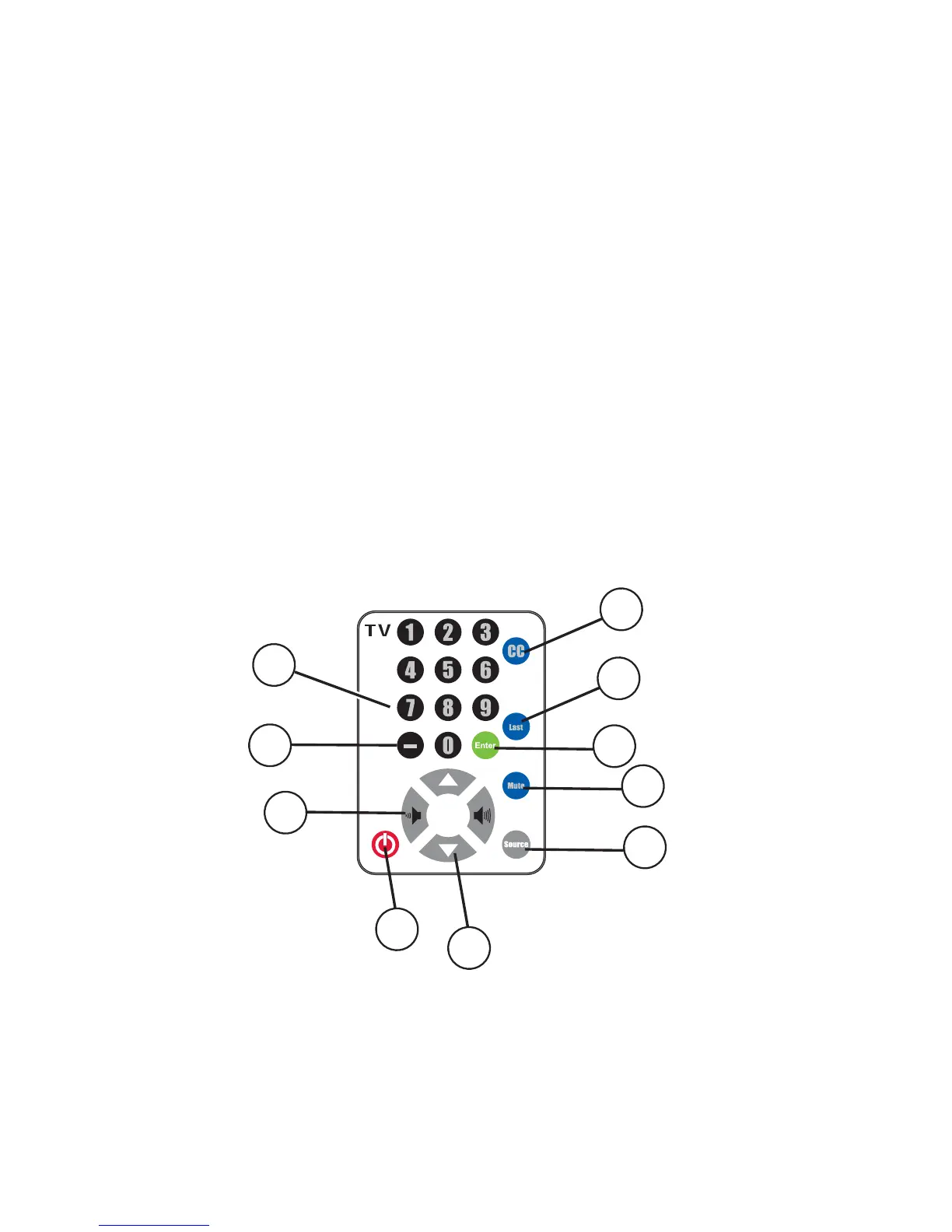
M1 NUMERIC KEYS: Press these keys to enter channels.
M2 CC: Use this key to enable the Closed Caption Choice.
M3 LAST: Press this key to see the last channel viewed.
M4 ENTER: Use this key to enter entertainment selections.
M5 MUTE: Press this key to turn off the sound (Current Selected Source).
M6 SOURCE SELECT: Use this key to select TV or optional AUX (auxiliary) audio source.
M7 UP/DOWN ARROW KEYS: Use these keys to change channels.
M8 POWER: Use this key to turn the power On and Off.
M9 LEFT and RIGHT VOLUME KEYS: Use these keys to adjust the volume up and down (Current Selected Source).
M10 DIGITAL TV TUNER SUB-CHANNEL ENTRY KEY ( - ): Use this key to enter Digital TV channels.
M1
M2
M3
M4
M5
M6
M7
M8
M9
M10



 To Next Page