Need help?
Do you have a question about the LifeFitness DISCOVER CONSOLE and is the answer not in the manual?
Covers electrical hazards, heart rate monitoring, modifications, and proper use of power cords.
Addresses usage in specific environments, user capabilities, and safe interaction with equipment.
Details safety instructions for Treadmills, Cross-Trainers, FlexStriders, Lifecycle Bikes, and PowerMill Climbers.
Details cleaning, console normalization, and the importance of warning labels.
Addresses potential health risks and chemical warnings.
Explains icons used to differentiate features for Treadmill, Cross-Trainer, Bike, FlexStrider, and PowerMill.
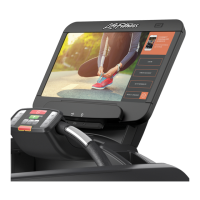
Describes the touch screen for selecting, setting up, monitoring, and saving workouts.
Details the ports for external storage, media devices, and optional RFID.
Explains the integrated holder for reading material and mobile devices.
Describes the external controls for incline, speed, stop, and go.
Explains how to select language, go, identify, use screen jump buttons, and understand indicators.
Details the energy-saving Hybrid Mode and the Heart Rate readout functionality.
Describes how to use the "+" and "-" buttons to adjust incline and speed.
Covers controls for active media, cool down, pause/stop, and viewing workout data.
Explains the Walk/Jog/Run presets and how to view different workout profile visualizations.
Lists the available languages for the console interface.
Explains how to press "Go" to start a workout immediately without setup.
Details the process of signing up for a free account and its benefits.
Explains how registered users can sign in using their User ID and passcode.
Describes how to select workouts from Classic, Healthy Heart, and Performance categories.
Explains how to view saved workouts and access fitness assessment tests.
Details Manual Goals, Hill, Random, Rolling Hills, Cross-Train Aerobics, and Cross-Train Reverse workouts.
Explains Moderate Burn, Vigorous Burn, Fixed Time Interval, and Variable Time Interval workouts.
Provides a formula and table for calculating target heart rates based on age.
Describes 2-Speed Interval, 3-Speed Interval, Starter Interval, Watts/METs, 5K, and 10K workouts.
Details various fitness tests like Life Fitness Fit Test, U.S. Navy PRT, and CPAT.
Explains how to perform the test, its duration, and factors affecting heart rate readings.
Provides guidelines for exertion levels and relative fitness classifications for men and women.
Explains how to select a goal, input data for parameters, and use the keypad.
Describes how to press START after inputting data to begin the workout.
Details user input requirements for Manual Goals, Hill, Random, Rolling Hills, and interval-based workouts.
Lists the user input parameters for Performance and Evaluate workout types.
Details user input for Cross-Train Aerobics, Reverse, Watts/METs, and fitness evaluation tests.
Provides the acceptable ranges for various workout parameters.
Details configurable levels and SPM ranges for the PowerMill.
Explains how to use the toggle indicator to show or hide specific data fields.
Details options for Calories, Distance, Time, Pace, and Heart Rate data displays.
Describes how to save changes or exit the data display options.
Details the metrics displayed for RPM, Resistance, and various stride measurements.
Explains the FitPower energy output calculation and the stride icon visualization.
Explains how to go to the Workouts Selection Screen to change the current workout.
Details the specific mode options available for Cross-Trainers and Lifecycle Exercise Bikes.
Explains how to manually start cool down or how it automatically engages, and how to adjust the time.
Details the summary screen showing completed workout metrics and energy savings.
Explains options for saving workouts to LFconnect, mobile devices, or USB.
Shows the summary screen with metrics like Floors Climbed, Total Steps, and Average Speed.
Shows the summary screen with metrics like Maximum Stride and Average Stride.
Explains the blue runner line, track line, and distance markers for progress tracking.
Describes the lap counter functionality and how progress labels indicate position relative to a pacer.
Explains the runner line, trail line, and distance markers for the 5K trail simulation.
Details the lap counter and progress labels used in the 5K trail view.
Explains the runner line representing progress and the mountain counter for climbs.
Describes how to toggle between standard and full-screen views of the mountain profile.
Explains the function of the center, left, and right dials showing workout data.
Details how to use the incline/resistance and speed keypads, and the Walk/Jog/Run options.
Explains the blue progress column and the white backdrop representing the workout profile.
Explains the circle representing user progress and the floors climbed counter.
Details how to choose from available courses, view descriptions, and previews.
Explains how to press the "Start Course" button to begin the immersive video experience.
Describes the TV viewing area, all TV channels list, and channel buttons.
Details channel list, audio controls, and closed captioning options.
Explains how to toggle video aspect ratio and screen size.
Describes how to enter channel numbers using the keypad.
Explains how to switch between the channel list and the channel keypad interface.
Details using the set-top box menu, electronic program guide, and generic color buttons.
Explains how to use the numeric keypad, arrow keys, and closed captioning.
Explains how to connect Apple devices, access media, and track workouts via LFconnect.
Details the media menu options like Workouts, Videos, Artists, and Songs.
Explains how to connect Android devices, access media, and track workouts via LFconnect.
Details the media menu options like Movies, Workouts, Audio, and Books.
Explains how to browse for ePub files and navigate through pages or chapters.
Details how to decrease/increase font size and return to the book catalog.
Explains how to access enabled websites and saved internet favorites.
Describes how to restore previous site selections and minimize the internet browser.
Explains how to insert a USB device and access media like movies, workouts, audio, and books.
Explains how to view featured apps on the console, including Solitaire.
Details how to view game data and start a new game.
Explains how to view featured apps on a connected mobile device and lists compatible third-party apps.
Describes how to select a featured on-demand music video and queue the next one.
Explains how to select featured on-demand videos and queue the next selection.
Details the touch sequence required to access the Systems Options Menu from the Workouts Selection Screen.
Describes accessing system tests, viewing information, and managing configuration.
Details settings for the media center, including TV setup and touch screen calibration.
Covers exporting/importing settings, app management, and network configuration.
Details options for product usage statistics, software updates, and custom workouts.
Covers internet presets and TV channel editing for facility customization.
Explains how to set default language and measurement units for the system.
Details the configuration of inactivity timers, auto power off, and system sound feedback.
Covers setting maximum workout duration limits and pause time.
Describes enabling telemetry for heart rate monitoring and configuring secure channels.
Details settings for treadmill speed, incline, activity zone keys, stride sensor, and fit tests.
Covers PowerMill settings for calorie display, steps, acceleration/deceleration rates, and speed levels.
Explains accessing the TV setup screen and setting picture modes.
Details zoom settings, electronic program guide, and muting TV audio.
Covers using the keypad, secondary audio programming, closed captioning, and displaying channel information.
Details selecting IPTV settings and managing TV resolution.
Explains searching for brands/models and configuring channels.
Details the process of searching for and selecting the correct IPTV set-top box brand and model.
Explains how commands are sent to set-top boxes and details functions like EPG, SAP, and Subtitles.
Explains how to change TV resolution and the effect of exiting the setup menu.
Describes how to enable or disable the Lifescape feature and check gateway status.
Explains how to enable on-product apps like Solitaire and manage mobile apps.
Details selecting networks like LFconnect and setting internet access levels.
Explains how to set up Google SafeSearch and require user identification for internet access.
Describes how to enable or disable specific RFID tag types.
Explains how to enable wireless connectivity and add wireless networks.
Details how to select between 5 GHz and 2.4 GHz frequency bands.
Provides tips for keeping the product in cool, dry place and cleaning surfaces.
Lists approved cleaners and guidelines for their use on equipment.
Addresses issues like no power, belt slipping off-center, and reduced treadmill speed.
Covers troubleshooting rubbing sounds from the treadmill and display illumination problems.
Addresses issues with lost heart rate signals due to interference or connection problems.
Covers troubleshooting abnormally high or inconsistent heart rate readings.
Details console screen types, touch screen sizes, and power requirements.
Lists port types, operating and storage temperature ranges, and humidity limits.
Provides specifications for heart rate systems and speed ranges for different equipment.
Details incline levels, resistance ranges, and lists of available workouts for each equipment type.
Describes USB charging capabilities and broadcast receiver standards.
Lists the physical and shipping dimensions and weight for different console configurations.
Details the scope of the warranty, including covered defects and eligible users.
Explains the warranty period for different components and who pays for service transportation.
Outlines Life Fitness's commitment to correcting defects and exclusions from warranty coverage.
Emphasizes the owner's duty to maintain the product and read the operation manual.
Covers terms not authorized, effect of state laws, and exclusive warranty clauses.
 General
| Display Type | LCD |
|---|---|
| Connectivity | Bluetooth |
| Entertainment Options | Video |
| Workout Programs | Multiple pre-set programs |
| Metrics Displayed | Time, Distance, Calories, Speed, Heart Rate |
| Heart Rate Monitoring | Yes (wireless and contact) |
| Languages | Multiple |
| Power Source | AC Power |

 To Next Page