EasyManua.ls Logo

Lifemax Talking Atomic Watch - User Manual

Lifemax Talking Atomic Watch
4 pages
Print Icon
To Next Page IconTo Next Page
Loading...
Speaks the time and date in a clear voice with radio controlled accuracy
40 pence (exc. VAT) per product sold is paid to REL, which covenants all its taxable profits to RNIB, registered charity (no. 226227).
Thank you for purchasing your Lifemax Talking Atomic
Watch. Your watch is radio controlled, enabling it to set the
time and date automatically, as well as adjust for daylight
savings. It announces the time and date in a natural male
English voice at the touch of a button.
Your watch is preset to receive the UK time signal. The UK
transmitter is located in Anthorn, Cumbria and broadcasts
up to 620 miles (approx 1,000km). In addition to the UK,
an atomic signal is available in Germany, Japan and USA
(Pacific, Mountain, Central and Eastern).
In regions where an atomic signal cannot be received, the
time can be set manually.
The date function is only available when the watch has
received the atomic signal.
IMPORTANT- THIS WATCH IS IN POWER SAVING MODE WHEN RECEIVED
In the power saving mode the hands are stopped at the 1 o’clock position.
To turn the watch on, press and hold the button at 2 o’clock until the
hands start to spin. The hands will stop when they match the internal
timekeeping.
Button Functions
The following functions are applicable when the watch is in NORMAL mode
S1: Located at 2 o’clock, the watch will announce
the time when pressed once and the date when
pressed twice. If pressed three times, the watch
will announce the country signal it is set to
receive and whether this has been updated.
S2: Recessed at 4 o’clock, when pressed the watch
will announce the alarm time and whether the
alarm is on or o.
C: Located at 3 o’clock, pulling out the crown will stop
the watch and reset the hands. You should not use
the crown when the hands are turning quickly
S1
S2
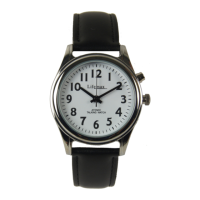
Talking Atomic Watch
C
IF YOU HAVE PURCHASED THIS WATCH FROM THE RNIB PLEASE
ENSURE YOU CONTACT LIFEMAX DIRECTLY WITH ANY FAULTS,
WARRANTY CLAIMS OR BATTERY REPLACEMENTS. THIS IS TO
ENSURE YOUR ENQUIRY IS DEALT WITH SWIFTLY AND WILL HELP
TO REDUCE THE AMOUNT OF TIME YOU ARE WITHOUT YOUR
WATCH DURING REPAIR. PLEASE CALL 01635 874323.
Models covered by this manual include: 407GL, 407GB, 407LL & 407LB
Page 1
407_Range_IM_240720V2.indd 1407_Range_IM_240720V2.indd 1 24/07/2020 11:5624/07/2020 11:56
Question and Answer IconNeed help?

Do you have a question about the Lifemax Talking Atomic Watch and is the answer not in the manual?

Summary

Button Functions

S1 Button Operation

Announces time, date, or signal status when pressed.

S2 Button Operation

Announces alarm time and status when pressed.

Crown Function

Stops and resets watch hands when pulled out.

Watch Menu Operations

Set Alarm

Set a specific time for the daily alarm.

Alarm On;Off

Enable or disable the daily alarm.

Chime On;Off

Control hourly time announcements.

Global Signal Selection

Choose the radio signal reception country.

Manual Time Setting

Set time manually when atomic signal is unavailable.

Watch Maintenance and Troubleshooting

Adjusting Watch Hands

Synchronize voice time with watch hands.

Resetting After Battery Replacement

Steps to re-initialize the watch after battery change.

Caring for Your Watch

Guidelines for watch care and avoiding water damage.

Battery Replacement Advice

Indicators of low battery and service recommendations.

Troubleshooting Common Issues

Solutions for signal reception and sync problems.

Overview

The Lifemax Talking Atomic Watch is a sophisticated timepiece designed to provide accurate time and date information through both visual display and spoken announcements. This watch is radio-controlled, meaning it automatically sets its time and date, and adjusts for daylight savings, ensuring precision without manual intervention. It features a natural male English voice that announces the time and date at the touch of a button, making it particularly useful for individuals who are visually impaired or prefer auditory feedback.

Function Description

The primary function of the Lifemax Talking Atomic Watch is to display and announce the current time and date. Its radio-controlled mechanism allows it to receive time signals from designated transmitters, ensuring accuracy. The watch is pre-set to receive the UK time signal from Anthorn, Cumbria, which broadcasts up to 620 miles (approximately 1,000km). In addition to the UK, the watch can receive atomic signals from Germany, Japan, and the USA (Pacific, Mountain, Central, and Eastern time zones). In areas where an atomic signal cannot be received, the time can be set manually. The date function, however, is exclusively available when the watch has successfully received an atomic signal.

The watch includes several key features accessible through its buttons:

  • Time and Date Announcement (S1 button): Pressing the S1 button once announces the time. Pressing it twice announces the date. A third press will announce the country signal the watch is set to receive and whether it has been updated.
  • Alarm Function (S2 button): This button allows users to hear the alarm time and check if the alarm is currently active (on or off).
  • Crown (C): Located at 3 o'clock, pulling out the crown stops the watch and resets the hands. It is important not to use the crown when the hands are turning quickly.

Usage Features

The Lifemax Talking Atomic Watch offers a range of user-friendly features to customize its operation:

Power Saving Mode: When first received, the watch is in power saving mode, with its hands stopped at the 1 o'clock position. To activate the watch, press and hold the button at 2 o'clock (S1) until the hands begin to spin. The hands will then stop when they synchronize with the internal timekeeping.

Watch Menu Mode: To access advanced settings, press and hold the S2 button until the watch announces, "Set alarm, press 2 o'clock button to set." Subsequent presses of S2 will cycle through the menu options:

  1. Set Alarm: Allows setting a specific time for the daily alarm.
  2. Alarm On/Off: Enables or disables the daily alarm.
  3. Chime On/Off: Turns the hourly time announcement on or off.
  4. Global Signal Selection: Used to select the desired time signal region (UK, Germany, Japan, USA).
  5. Set Time: For manually setting the time in regions without an atomic signal.

Setting the Alarm:

  1. Enter Menu Mode.
  2. Select "SET ALARM" and confirm with S1.
  3. Press S1 to select the hour, confirming with S2. Pay attention to AM or PM announcements.
  4. Press S1 to select the minute, confirming with S2.
  5. Press S2 to confirm the alarm time. When active, the alarm sounds for 30 seconds and can be silenced by pressing any button. It will sound daily until deactivated.

Alarm On/Off:

  1. Enter Menu Mode.
  2. Select "ALARM ON/OFF" and confirm with S2.
  3. Press S1 to toggle the alarm ON or OFF.
  4. Press S2 to confirm. To check the alarm status in normal mode, press S2.

Chime On/Off:

  1. Enter Menu Mode.
  2. Select "CHIME ON/OFF" and confirm with S1.
  3. Press S1 to toggle the chime ON or OFF.
  4. Press S2 to confirm. When the chime is on, the watch will announce the time every hour.

Global Signal Selection: This feature allows users to choose the time signal region (Germany, Japan, USA - PST, MST, CST, EST, or UK). When a new country is selected, the watch hands will quickly adjust before returning to normal operation.

  1. Enter Menu Mode.
  2. Select "GLOBAL SIGNAL SELECTION" and confirm with S1.
  3. Repeatedly press S1 to cycle through and choose the desired time zone.
  4. Press S2 to confirm the selection.

Manual Time Setting: This function is useful when an atomic signal is unavailable, such as during travel. The watch will need to be reset when returning to a region with a signal.

  1. Enter Menu Mode.
  2. Select "SET TIME" and confirm with S1.
  3. Press S1 to select the hour, confirming with S2. Listen carefully for AM or PM.
  4. Press S1 to select the minute, confirming with S2.
  5. Press S2 to confirm the time. The hands will spin rapidly to adjust to the selected time. Manual date setting is not possible.

Adjusting Watch Hands: If the spoken time does not match the visual time displayed by the hands, the hands can be adjusted using the crown at 3 o'clock. Pull the crown away from the watch body and turn it to move the hands. Ensure the crown is fully depressed back into the watch after adjustment.

Maintenance Features

Caring for Your Watch: The Lifemax Talking Atomic Watch is not water-resistant and should not be immersed in water. If it accidentally gets wet, wipe it dry quickly and avoid operating it until completely dry. For long periods of non-use, store the watch in a cool, dry place.

Battery Replacement: If the watch hands move one step every two seconds and the talking function is inactive, it indicates a low battery that needs replacement. It is recommended to return the watch to Lifemax for battery replacement or other service, which is available for a fee (inclusive of return P&P within the UK).

Resetting After Battery Replacement: If you choose to replace the battery yourself, a reset procedure is necessary for the watch to function correctly:

  1. After battery replacement, the second hand will move at twice the normal speed.
  2. Pull the crown out to stop the hands.
  3. Push the crown back in and press the S1 button three times. The second hand will then move at normal speed, and the voice function will activate.
  4. When the second hand reaches 12, pull the crown out again. Adjust all hands to the 12 o'clock position using the crown.
  5. Push and hold S1 for 3 seconds, then push the crown in. The second hand will spin and synchronize with the spoken time.
  6. Press and hold S1 again for 3 seconds. The second hand will spin and stop, indicating the watch is now searching for the atomic signal. Place the watch near a window for up to 30 minutes to allow it to set itself.

Troubleshooting:

  • No Time Update: If the watch is not receiving a time update (e.g., outside UK, Germany, USA, Japan signal areas), follow the manual time setting instructions. If the watch is in the wrong time zone, follow the global signal selection instructions.
  • Signal Interference: In built-up areas or where electronic devices interfere with the signal, place the watch near a window overnight to get the strongest signal. If it cannot receive an update, it will continue to function as a standard watch and will correct itself upon receiving the next signal.
  • Voice/Hands Out of Sync: If the voice announces "UK time updated" but the hands are out of sync, refer to the "Adjusting Watch Hands" section.

Warranty: The Lifemax watch comes with a 1-year return-to-base warranty, covering mechanical failures and full repair. If the watch cannot be repaired, it will be replaced with a like-for-like model. Watch batteries are not covered under warranty. Users can register their warranty online.

Contact Information: For faults, warranty claims, or battery replacements, users who purchased the watch from RNIB should contact Lifemax directly to ensure swift service and minimize the time the watch is out of use.

Lifemax Talking Atomic Watch Specifications

General IconGeneral
DisplayDigital
Power SourceBattery
Radio ControlledYes
Time SynchronizationAutomatic
Voice FeatureYes
BacklightYes
AlarmYes
StopwatchYes
CalendarYes
TypeAtomic Watch
FeaturesAtomic timekeeping
TimekeepingAtomic timekeeping
Water ResistanceWater-resistant

Related product manuals