Wellness Recovery Collection 7
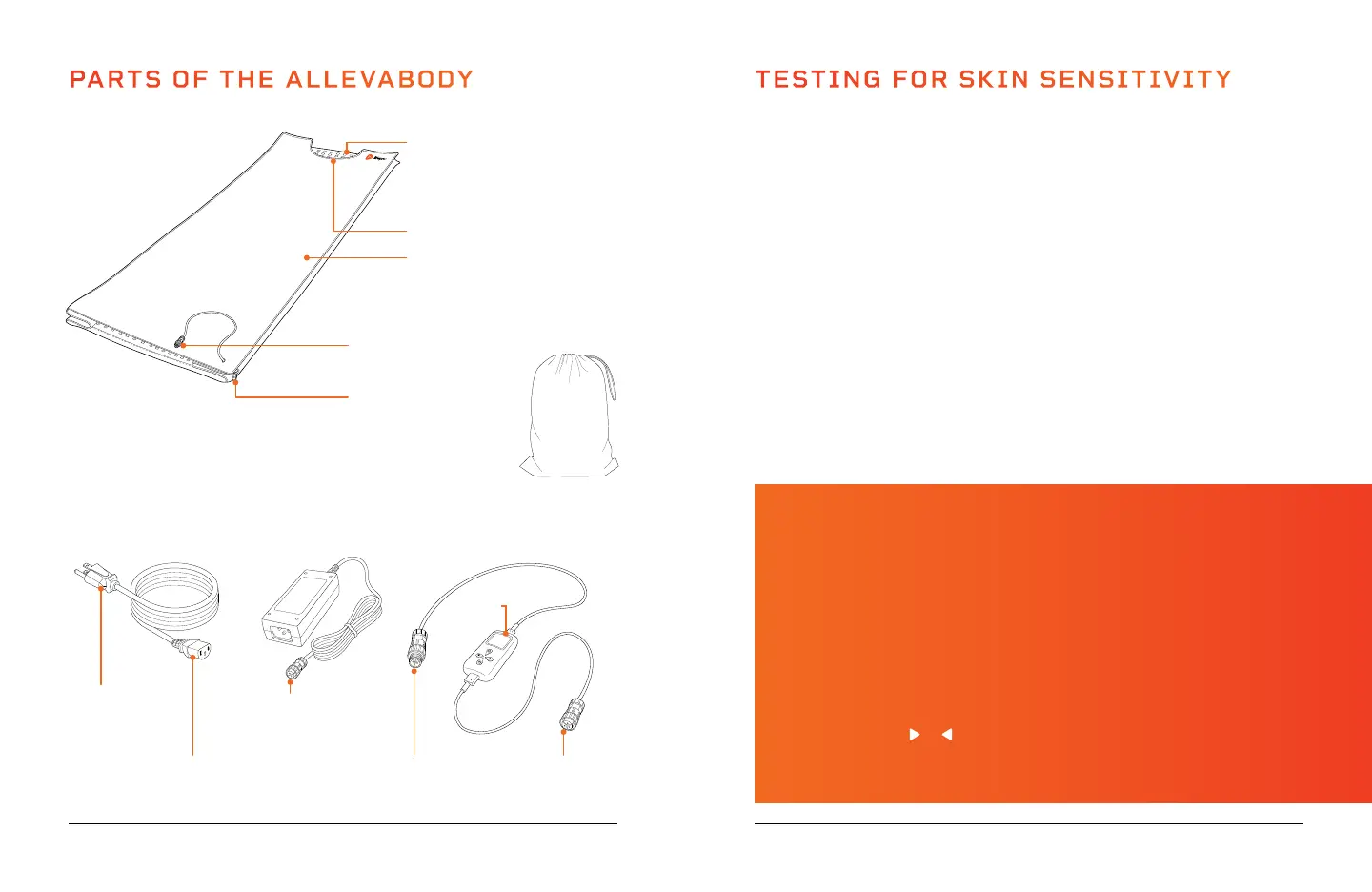
PARTS OF THE ALLEVABODY
Remote
Control
2-Pin Male
Connector
(to Power Supply)
Plugs into the
Power Supply
Socket
Plugs into a
Wall Outlet
Remote Control & Cables (2)Power Cord (2)
3-Pin Female
Connector
(to Red Light Mat)
Lifepro AllevaBody
Red Light Therapy Wrap
2-Pin Female
Connector
(to Remote Control)
Mat Connectors (2)
(3-Pin Male)
Red Light Mats
(Top and Bottom)
Neck Hole
Zipper (2)
6 AllevaBody User Manual Lifepro
Carrying
Bag
2-in-1 LED Chips (2320)
Each chip contains:
• One 660 nm LED and
• Two 850 nm LEDs
Power Supply (2)
TESTING FOR SKIN SENSITIVITY
Before your first treatment, it is important to perform a skin sensitivity
test to ensure you won’t experience any adverse reactions to light therapy.
To do a sensitivity test:
1. Hold one of the red light mats to your inner arm, with some of the LEDs
against your skin.
2. The remote control will turn on automatically when connected to
power. Adjust the time by pressing the Settings button once and
the Decrease button five times, until “5 min” is shown in the display
window. Press the On/Off button to begin the session. The mat will
turn off automatically when the 5-minute program is complete.
3. If your skin feels uncomfortable or hot at any point during the test
treatment, stop using the AllevaBody immediately.
4. Wait at least 6 hours after the sensitivity test. If your skin becomes red
and/or itchy, you may be sensitive to light therapy, and you should not
continue to use the AllevaBody.
NOTE: See a list of contraindications (people who should not use this
device) on page 16.
WHAT IS PULSED-LIGHT THERAPY?
Pulsed-light therapy is phototherapy that uses rapid pulses of light to
produce improved results. Emerging research shows that the short pause
between light pulses encourages cells to regenerate more efficiently,
meaning pulsed light has a greater effect on cell regeneration and recovery.
Frequency is a measure of the pause between one “on” time and the next.
For example, if a frequency of 10 Hz is selected, the LEDs will pulse on and
off 10 times per second. By default, the AllevaBody uses continuous waves
of light (the frequency is set to “Null” or off). When turned on, the LEDs will
turn on and off rapidly at the set frequency.
When the AllevaBody is powered on, press the Settings button to toggle to
Pulse, and use the
or button to set the frequency from 1–1000 Hz. The
LED lights will emit rapid pulses of red and/or near-infrared light, depending
on the mode selected.


 To Next Page
 Loading...