6 AllevaRed Pro User Manual Lifepro
GET STARTED
WHAT’S IN THE BOX
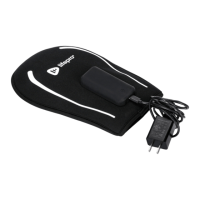
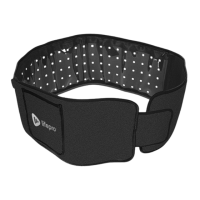
• Lifepro AllevaRed Pro Light Therapy Belt • Travel Case
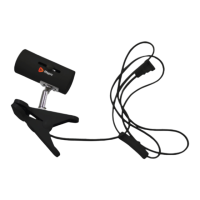
• Remote Control and Cable • Velcro
®
Extension Belt
• AC Power Adapter • User Manual
FIRST STEPS
1. Remove the AllevaRed Pro from the shipping box and remove all
packaging from the unit and accessories.
2. Inspect the device and accessories for shipping damage.
3. Read carefully through this user manual and all safety instructions
before using the AllevaRed Pro.
4. Go to allevaredpro.lifeprofitness.com and register your product within
14 days of purchase to activate your lifetime warranty.
5. Complete the steps in the EASY-START SETUP GUIDE on page 7 to
begin using the AllevaRed Pro.
CUSTOMER SUPPORT
If you have any questions about setting up the AllevaRed Pro, we’re
here to help. Call or email us and an experienced customer support
representative will be happy to assist you: (800) 563-6604 or
support@lifeprofitness.com.
ALLEVARED PRO
LIGHT THERAPY BELT
WELLNESS RECOVERY
PREPARING TO USE THE ALLEVARED PRO
• Place the therapy belt in position around your waist, or other
area to be treated, with the adjustment strap in the front.
• Use the Velcro
®
adjustment strap to secure the belt. It
should be snug, but not too tight.
• Attach the Velcro
®
extension belt to the AllevaRed Pro if
you need more length, such as when treating your shoulder,
chest, or upper back.
CONNECT THE ALLEVARED PRO TO POWER
• Connect the remote control cable to the USB port on the belt
near the pocket.
• Connect the power adapter to the female DC input at the
end of the remote control cable.
• Plug the power adapter into a wall outlet.
POWER ON THE ALLEVARED PRO
• Press the On/Pulse/Off button once to turn on the
AllevaRed Pro.
• Adjust intensity level, time, vibration, and mode as desired.
• Turn on the pulsed-light feature, if desired.
EASY-START SETUP GUIDE
2
3
1
Wellness Recovery Collection 7
FLASHING LIGHT WARNING: The pulsed-light feature may affect users
who are susceptible to photosensitive epilepsy or other photo-sensitivities. If
you or anyone in your household has ever had symptoms related to epilepsy
(seizures or loss of consciousness) when exposed to flashing lights, consult
your physician before using the device.
If you, or anyone in your household, experience symptoms while using the
device, such as dizziness, blurred vision, eye or muscle twitching, loss of
consciousness, disorientation, involuntary movements or convulsions, stop
using the device IMMEDIATELY and consult your physician.
WARNING: Never look directly into the LED lights while the device is on.


 To Next Page