16 InfraZen User Manual Lifepro
Wellness Recovery Collection 17
PEMF + FIR Therapy
BEGINNING A PEMF + FIR SESSION
Before beginning your first PEMF + FIR session, read carefully through
PEMF Frequency (Hz) Settings, PEMF Therapy Frequency and Duration,
Tips for Beginning PEMF Therapy, Tips for Beginning FIR Therapy, and
Temperature Settings on pages 11–15.
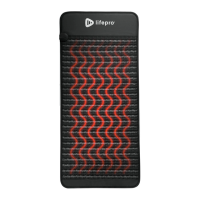
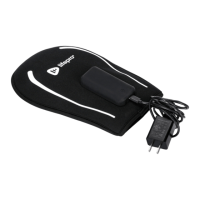
1. Set up the InfraZen mat following the setup instructions in the EASY
START SETUP GUIDE on page 6.
2. Press the Power button on the remote control to turn on the InfraZen.
3. Press the Frequency button to turn on PEMF. The PEMF frequency
display will light up.
4. Press the Frequency button a second time to select the frequency. The
frequency display will flash to indicate it can now be adjusted.
5. Press the + / - buttons to increase/decrease the frequency in 1-Hertz
increments, from 1–30 Hz. Press and hold the buttons to adjust the
frequency rapidly.
6. Press the Temperature button to turn on FIR. The temperature and
time display windows will light up.
7. Press the Temperature button a second time to select the temperature.
The temperature display will flash to indicate it can now be adjusted.
8. Press the + / - buttons to increase/decrease the temperature in
1-degree increments, from 86–176 °F. Press and hold the buttons to
adjust the temperature rapidly.
9. Press the Time button to select the time. The time display will flash to
indicate it can now be adjusted.
10. Press the + / - buttons to increase/decrease the session time in
5-minute increments, from 5–60 minutes.
11. Place the remote control on a heat-resistant surface, such as a table or
the floor, for the duration of your session.
12. The mat will take about 15 minutes to warm up.
13. You may press the Power button at any time to stop the session. The
InfraZen will automatically turn off when the set time completes.
14. Always turn off and unplug the InfraZen after each use.
15. Allow the mat to completely cool (wait at least 30 minutes) before
cleaning, folding, or storing.
FCC STATEMENT
This device complies with part 15 of the FCC Rules. Operation is subject
to the following two conditions: (1) this device may not cause harmful
interference, and (2) this device must accept any interference received,
including interference that may cause undesired operation.
NOTE: Changes or modifications not expressly approved by the party
responsible for compliance could void the user’s authority to operate the
equipment.
NOTE: This equipment has been tested and found to comply with the
limits for a Class B digital device, pursuant to part 15 of the FCC Rules.
These limits are designed to provide reasonable protection against harmful
interference in a residential installation. This equipment generates, uses
and can radiate radio frequency energy and, if not installed and used in
accordance with the instructions, may cause harmful interference to radio
communications. However, there is no guarantee that interference will
not occur in a particular installation. If this equipment does cause harmful
interference to radio or television reception, which can be determined by
turning the equipment off and on, the user is encouraged to try to correct the
interference by one or more of the following measures:
• Reorient or relocate the receiving antenna.
• Increase the separation between the equipment and
receiver.
• Connect the equipment into an outlet on a circuit
different from that to which the receiver is connected.
• Consult the dealer or an experienced radio/TV technician
for help.


 To Next Page
 Loading...