14 RevitaGlow Pro User Manual Lifepro
Wellness Recovery Collection 15
USING THE REVITAGLOW PRO LIGHT THERAPY MASKS
1. Prepare to use the RevitaGlow Pro by following the instructions in
steps 1–3 of the EASY START SETUP GUIDE on page 9.
2. Lie down on a flat comfortable surface, such as a bed or couch.
3. Place the face mask in position on your face, with the LEDs against
your skin, and attach the Velcro
®
straps to secure it.
4. Adjust the face mask until the eye protectors fit comfortably around
your eyes.
5. Lay the neck and chest mask on your upper chest and attach the
Velcro
®
straps to secure it around your neck.
6. Press and hold the On/Off button on the remote control to turn on
the RevitaGlow Pro. The default treatment program will appear on
the home screen, RED (630 nm) mode, at 100% brightness level, for
10 minutes. Pulse is set to “Null” (off) by default.
7. Press the Settings button to toggle through the settings, time, mode,
brightness level, and pulse frequency, if desired An orange dot indicates
the selection. Then press the or button to adjust your desired
setting(s)
a. Timer: Press the or button to adjust the time from
1–30 minutes. The default time is 10 minutes. See DETERMINING
TREATMENT FREQUENCY AND DURATION on the next page.
b. Mode: Press the or button to toggle between the four modes,
RED (630 nm + 830 nm), BLUE (415 nm), NIR (830 nm), and
PINK (630 nm + 415 nm). RED mode is selected by default. See
CHOOSING A COLOR THERAPY MODE on the next page.
c. Level: Press the or button to adjust the brightness intensity
level from 1–100% in increments of 1%. 100% is selected by default.
d. Pulse: Press the or button to adjust the pulse frequency from
1–10 Hz in increments of 1 Hz.“Null” (pulsed-light therapy off) is
selected by default. :
8. Press and hold the On/Off button for three seconds to stop the session
at any time. The RevitaGlow Pro will shut down automatically when the
set treatment time completes. Press and hold the On/Off button again
if you wish to begin another session.
9. Always power off the RevitaGlow Pro after each use.
REPLACING THE EYE PROTECTORS IN THE FACE MASK
If you ever need to replace the silicone eye protectors:
1. Locate the replacement pair of eye protectors.
2. With the face mask LEDs facing towards you, pull each eye protector
firmly to remove it.
3. Insert the replacement eye protectors into the eye slots. The raised,
curved edges of the eye protectors will be on the inside of the mask.
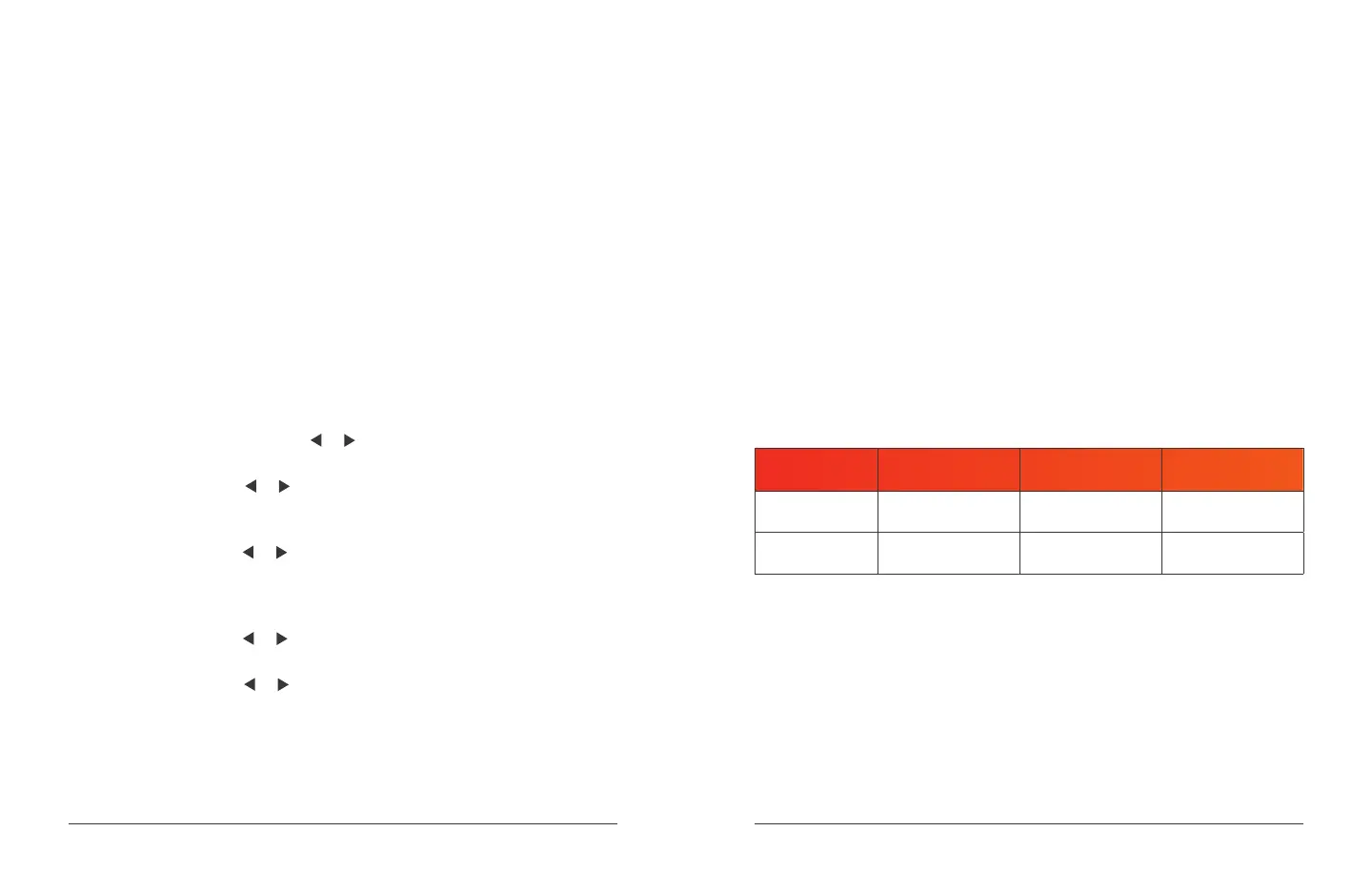
DETERMINING TREATMENT FREQUENCY AND DURATION
ISSUE/
SEVERITY
ACUTE CHRONIC MAINTENANCE
Frequency
(How Often)
1–2 times daily 1–2 times daily 3–4 times weekly
Duration
(How Long)
20–25 minutes 15–20 minutes 15–20 minutes
NOTE: Do not use for more than 30 minutes per day.


 To Next Page
 Loading...