12 RevitaGlow Pro User Manual Lifepro
OPERATING INSTRUCTIONS
Please read the operating instructions before using the RevitaGlow Pro
Light Therapy Mask. Keep this manual for reference.
CHARGING THE BATTERY
• Do not use the RevitaGlow Pro while it is charging. Always ensure it is
powered off before charging.
• To charge:
1. Ensure the RevitaGlow Pro is turned off.
2. Plug the micro-USB charging cable into the micro-USB port on the
bottom of the remote control.
3. Plug the standard USB end of the charging cable into:
a. A USB port on a computer or laptop, OR
b. A 5V–1A USB charging adapter. Then, plug the charging adapter
into a wall outlet.
• Your RevitaGlow Pro will typically take about 40 minutes to fully charge.
• The battery icon on the display screen shows the remaining battery.
• We recommend charging the device right away when less than 20%
battery remains.
• The RevitaGlow Pro will automatically power off when the battery is
depleted.
• The average run-time is about 2 hours per charge.
USING THE REMOTE CONTROL
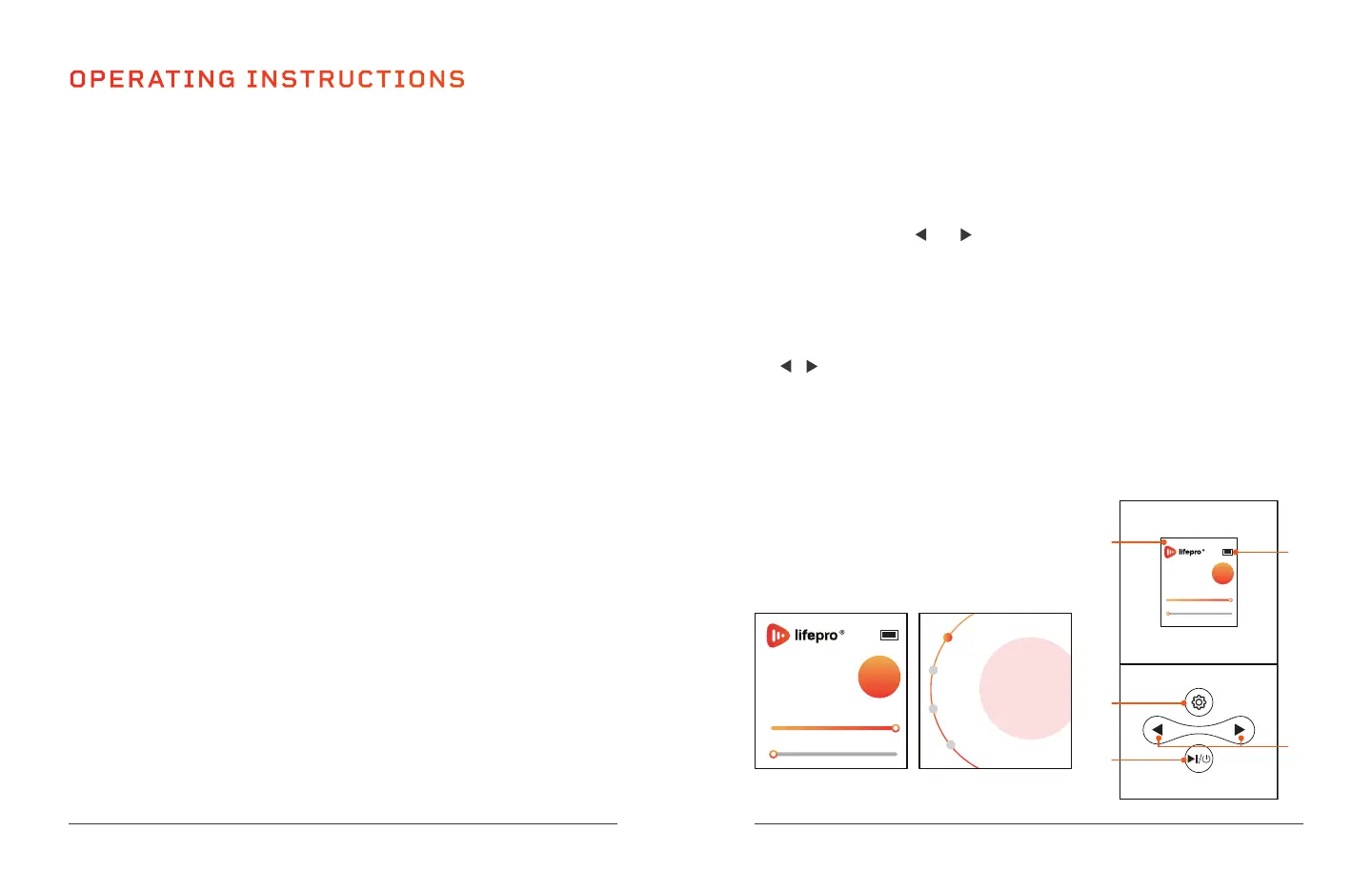
1. Display Window: Shows the battery level and selected working time,
mode, brightness level, and pulse.
2. Battery Status and Icon: Shows the remaining battery charge.
3. Settings Button: Press to enter the settings menu and toggle
through each of the settings options, timer, mode, level, and pulse
(the frequency for pulsed-light therapy). An orange dot indicates the
selection. Use the and buttons to adjust the selected option.
4. On/Off Button: Press the button once to turn on the remote control.
The home screen will show the default treatment program. Press a
second time to begin the session (either using the default settings or
after adjusting the settings). Press a third time to turn off the remote
control and the device.
5. / (Increase/Decrease) Buttons: Press to adjust the selected
setting. For time, set the number of minutes, from 1–30 minutes, in
increments of 1 minute. For mode, toggle through the four modes,
RED (630 nm + 830 nm), BLUE (415 nm), NIR (830 nm), and
PINK (630 nm + 415 nm). For brightness level, set the brightness from
1–100% in increments of 1%. For pulse, set the frequency from 1–10 Hz
in increments of 1 Hz. “Null” indicates a pulse of 0 Hz (pulsed-light
therapy is off).
NOTE: On start-up, the home screen shows
the default program: 10-minute working time,
RED mode, 100% brightness level, and
“Null” (0 Hz) pulse frequency.
Wellness Recovery Collection 13
Timer
Mode
Level
Pulse
10
mins
10
mins
RED
Level
Pulse
100%
Null
100%
Settings Menu
Home Screen
10
mins
RED
Level
Pulse
100%
Null
100%
1
5
2
4
3


 To Next Page
 Loading...