Note: program touch sensor per manufacturer instructions before installing case
Programmieren Sie den Touch-Sensor entsprechend der Herstelleranweisungen, bevor Sie das Gerät in das Case einbauen.
Remarque: veuillez programmer la touche capteur conformément aux instructions du fabricant avant de mettre la coque en place
Nota: prima di installare la custodia, programma il sensore a tocco seguendo le istruzioni del produttore
Nota: Programe el sensor táctil siguiendo las instrucciones del fabricante antes de instalar el protector.
Nota: Antes de colocar a capa, programe o sensor tátil conforme as instruções do fabricante
注:ケースを装着する前に、メーカーの説明に従ってタッチセンサーを設定してください。
註:請於安裝保護殼前,根據手機製造商的說明設定指紋辨識功能。
注:请于安装保护壳前,根据手机制造商的说明设定指纹辨识功能。
INSTALL DEVICE / EINLEGEN DES GERÄTS / INSTALLATION DE L’APPAREIL
INSTALLA IL DISPOSITIVO / INSTALAR EL DISPOSITIVO / INSTALAR O DISPOSITIVO
デバイスの装着方法 / / 安裝裝置 / 安裝裝置
1
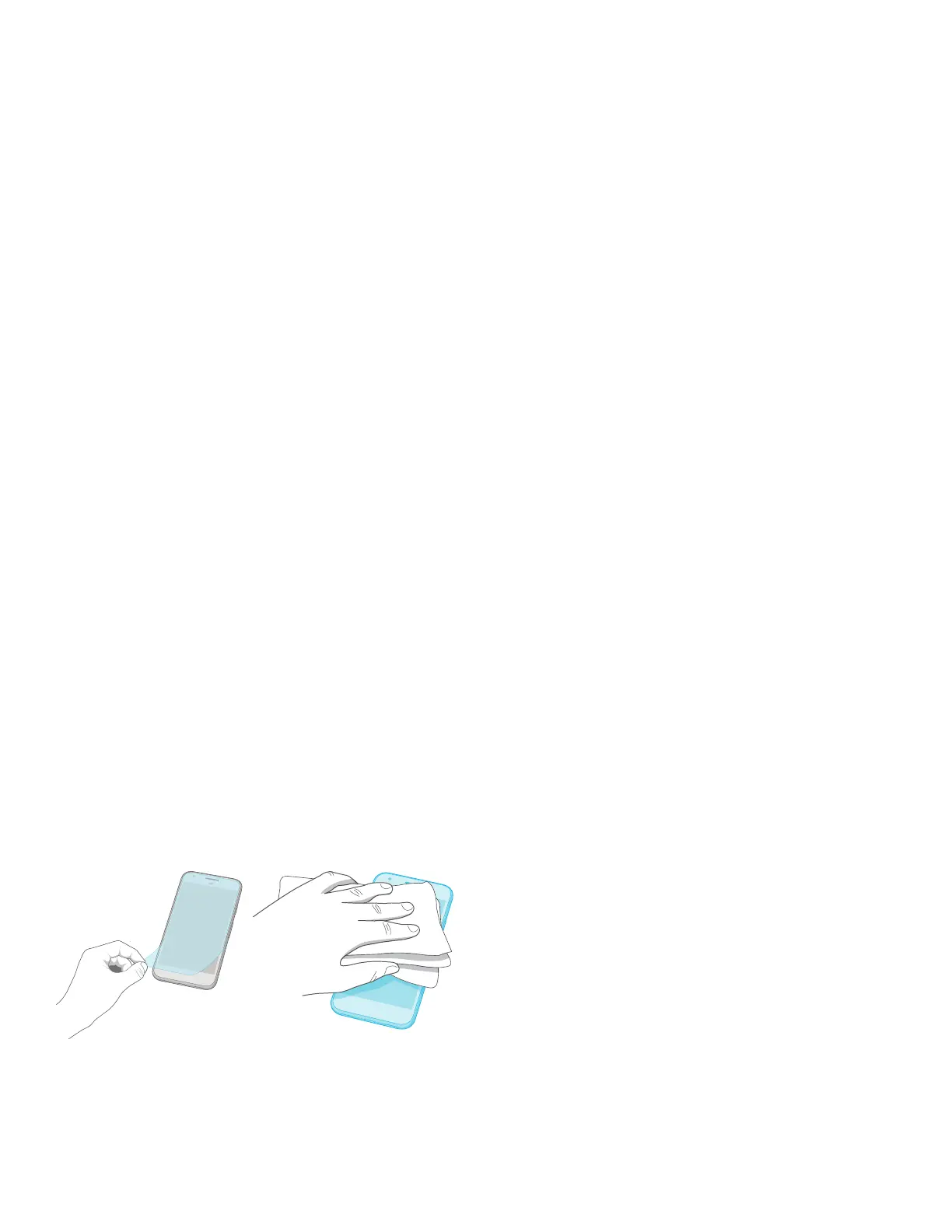
Remove any screen protectors and clean device with included cloth
Entfernen Sie alle Display-Schutzvorrichtungen und reinigen Sie Ihr Gerät mit dem mitgelieferten Tuch.
Retirez au besoin la protection d’écran et nettoyez votre appareil à l’aide de la lingette fournie.
Rimuovi eventuali protezioni per lo schermo e pulisci il dispositivo con il panno in dotazione
Retira los protectores de pantalla y limpia el dispositivo con el paño proporcionado
Remova todas as proteções de ecrã e limpe o dispositivo com o pano incluído
スクリーンプロテクターを取り付けている場合は取り外して、付属のクロスでデバイスをきれいに拭きます。
拆下所有螢幕保護貼並用所附的擦拭布清潔裝置
拆下所有屏幕保护贴并用所附的擦拭布清洁设备


 To Next Page