8 LifeSize Video Communications Systems User Guide
If the system is registered to a gatekeeper, the system displays its status. If you wish
LifeSize Phone to automatically discover an H.323 gatekeeper, set the Gatekeeper Mode
preference to Auto (from the Communications : H.323 : Gatekeeper menu). You can also
set the gatekeeper to Manual to manually choose a gatekeeper. If set to Manual, specify the
IP address and port for the primary gatekeeper. Configuration of a secondary H.323
gatekeeper is optional.
Configuring NAT/Firewall Settings
A firewall filters traffic coming into your private network from another network with a different
zone of trust, such as the Internet. Firewalls often include Network Address Translation
(NAT) to enable communication between devices on your LAN that have private IP
addresses and devices that are accessed through a public IP network. Static NAT ensures
that the same public IP address always maps to a system’s private IP address so that data
from the public network intended for the private system can be routed to it reliably.
You can configure the phone to communicate through your firewall with or without static NAT
by setting preferences in Communications : NAT/Firewall. If you configure your phone to
communicate through a firewall, you must configure your firewall to allow incoming and
outgoing traffic through:
• TCP port 1720
• UDP port 5060
Configuring Quality of Service
You can specify network Quality of Service (QoS) settings in the Communications :
Network QoS preferences. You should set these preferences according to the settings used
in your network.
Using Your LifeSize Phone
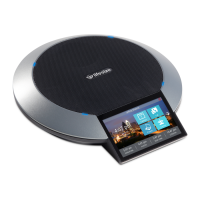
Before using your LifeSize Phone, familiarize yourself with its features. The display indicates
the phone status, displays configuration menus, and user input. Identification LEDs
illuminate or flash to indicate certain conditions.


 To Next Page
 Loading...