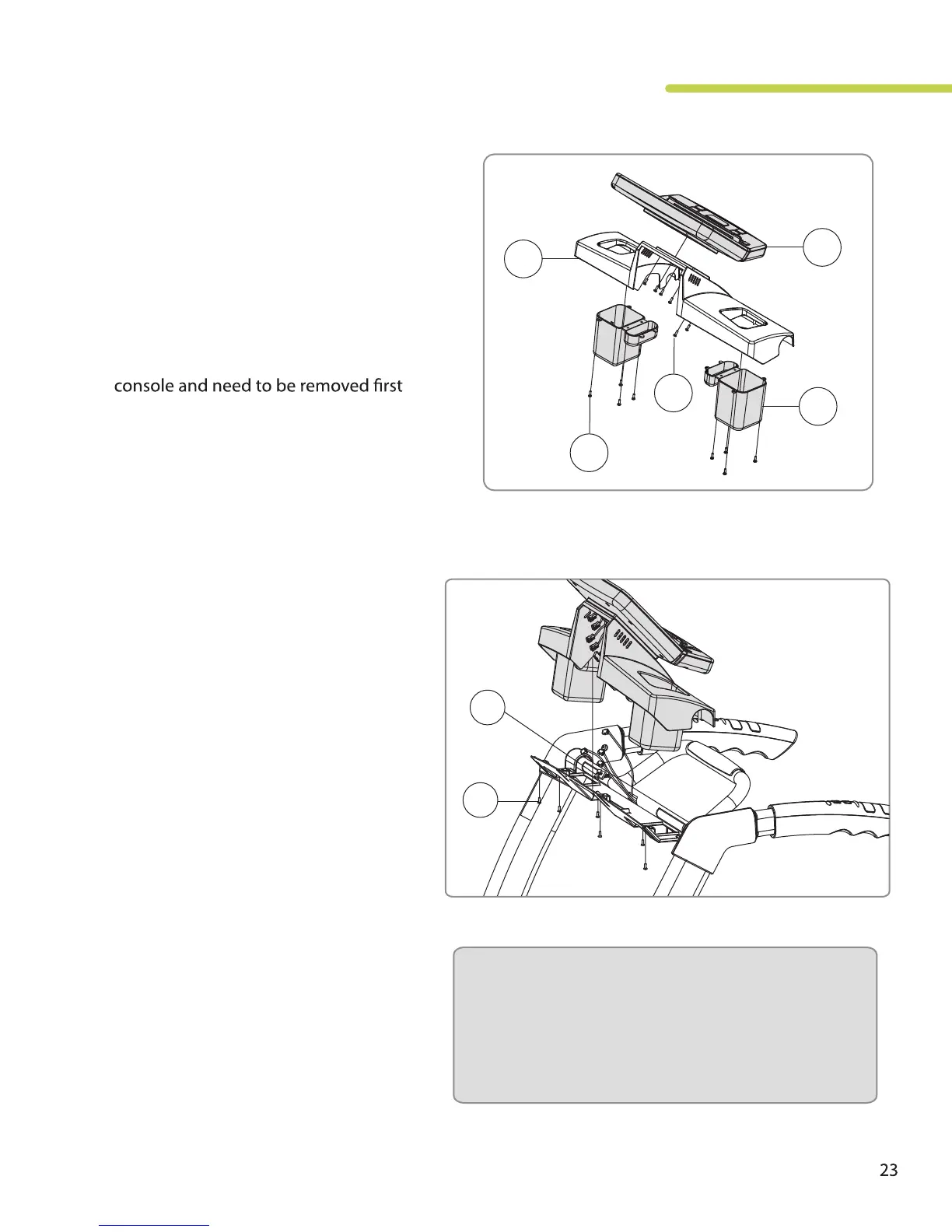
Step 3: Assemble Console Components
A. Attach the blue accessory trays (6) to the
bottom of the console housing using 8
self tapping screws (G).
B. Attach the console (5) to the console
housing using 6 screws (G). These screws
are pre-installed on the back of the
and then reinstalled with the console in
place.
TR800 / TR1200i
Folding Treadmill
G
G
25
5
6
Step 4: Attach Console Assembly
A. Place the console assembly onto the
console support bracket and attach
the assembly using the 7 screws (F).
Be sure not to pinch wire harnesses
during this step.
i. Main Harness: 5-pin and 7-pin
ii. Hand Pulse harness: 2-pin
iii. Speed Control Harness: 3-pin
(the wire colors need to be
matched.)
iv. Incline Control Harness: 3-pin
(the wire colors need to be
matched)
Note: Be careful to properly connect all wiring
connectors with their correct corresponding
wiring harness. Pay attention not to bend any
pins and make sure the connectors click in
place.
F
24
B. Connect all wire harnesses including:
C. Tuck extra wiring harness into the
opening behind the console.






 To Next Page