70
TOOLS AND HARDWARE REQUIRED / OUTILS ET QUINCAILLERIE REQUIS / HERRAMIENTAS Y HERRAJE REQUERIDOS
X SECTION 2 (CONTINUED) / SECTION 2 (SUITE) / SECCIÓN 2 (CONTINUACIÓN)
2.41
2.53
!
• If there is diffi culty completing this step, loosen the local hardware. Tighten
all hardware once the pole is installed.
• S’il est diffi cile de terminer cette étape, desserrer la quincaillerie
avoisinante. Serrer toute la quincaillerie une fois le poteau installé.
• Si tiene difi cultad para completar este paso, afl oje los elementos locales.
Apriete todos los elementos una vez que instale el poste.
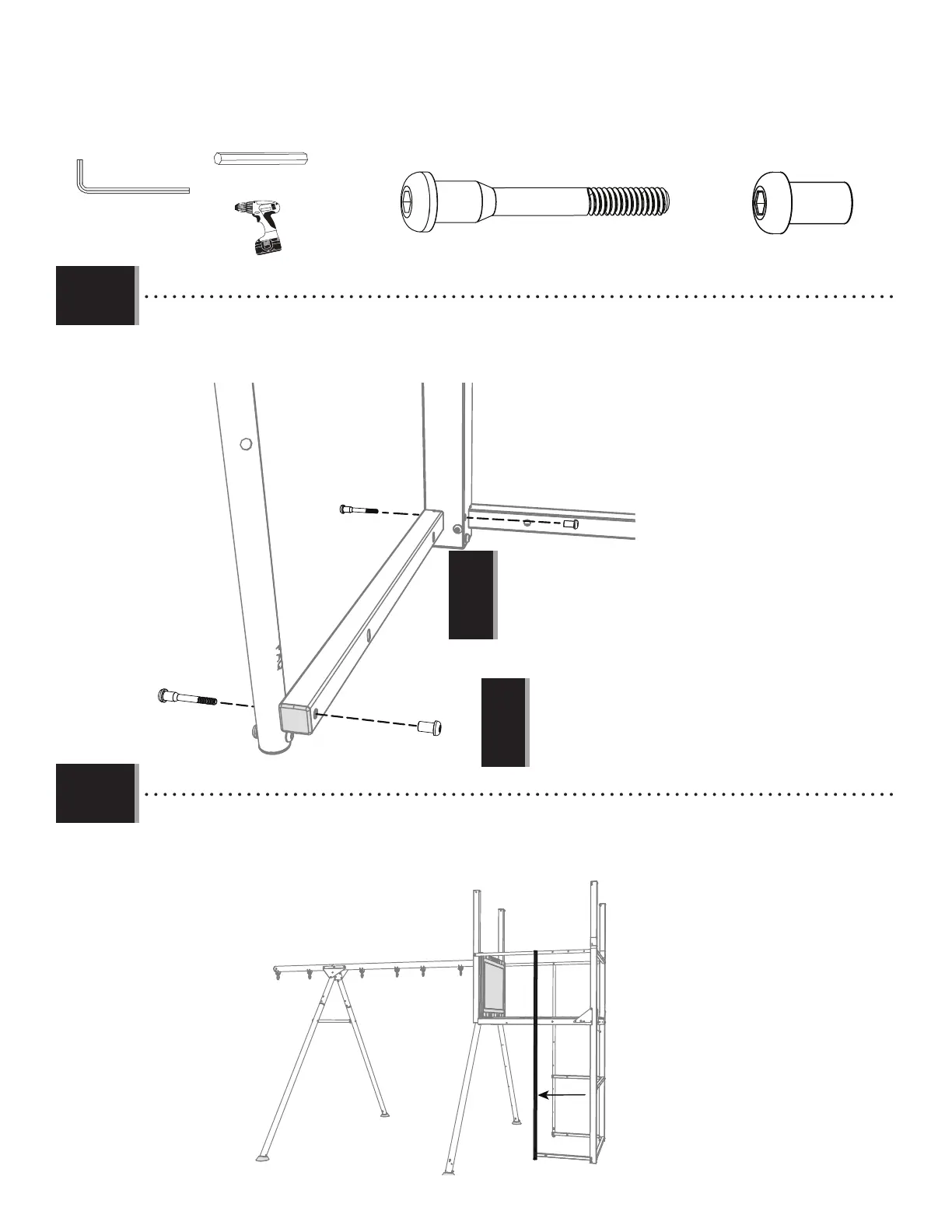
• Attach the Panel Support Pole (FAX) to the deck with the hardware indicated.
• Fixer le poteau de support du panneau (FAX) au pont avec la quincaillerie indiquée.
• Fijar el poste de soporte del panel (FAX) a la plataforma con el herraje indicado.
DXD
DXD
BTS
BTS
FAX
BTS (x2)
3/16 in/po (≈5 mm)
(2)
DXD (x2)
(1)
(1)
2.41
2.54
!
• DO NOT OVERTIGHTEN THE HARDWARE! Overtightening the hardware
will cause the metal frame to bend.
• NE PAS TROP SERRER LA QUINCAILLERIE! Le cadre en métal pliera si la
quincaillerie est trop serrée.
• ¡NO APRETAR DEMASIADO EL HERRAJE! Si el herraje se aprieta
demasiado, el marco metálico se doblará.
• Below is the placement for the vertical Cargo Net Pole (FCC).
• Vous trouverez ci-dessous l’emplacement du poteau du fi let à grimper vertical (FCC).
• Debajo está la colocación del poste vertical de la red de carga (FCC).


 To Next Page