REMOTE REGISTRATION FOR FLEXCAT PODS
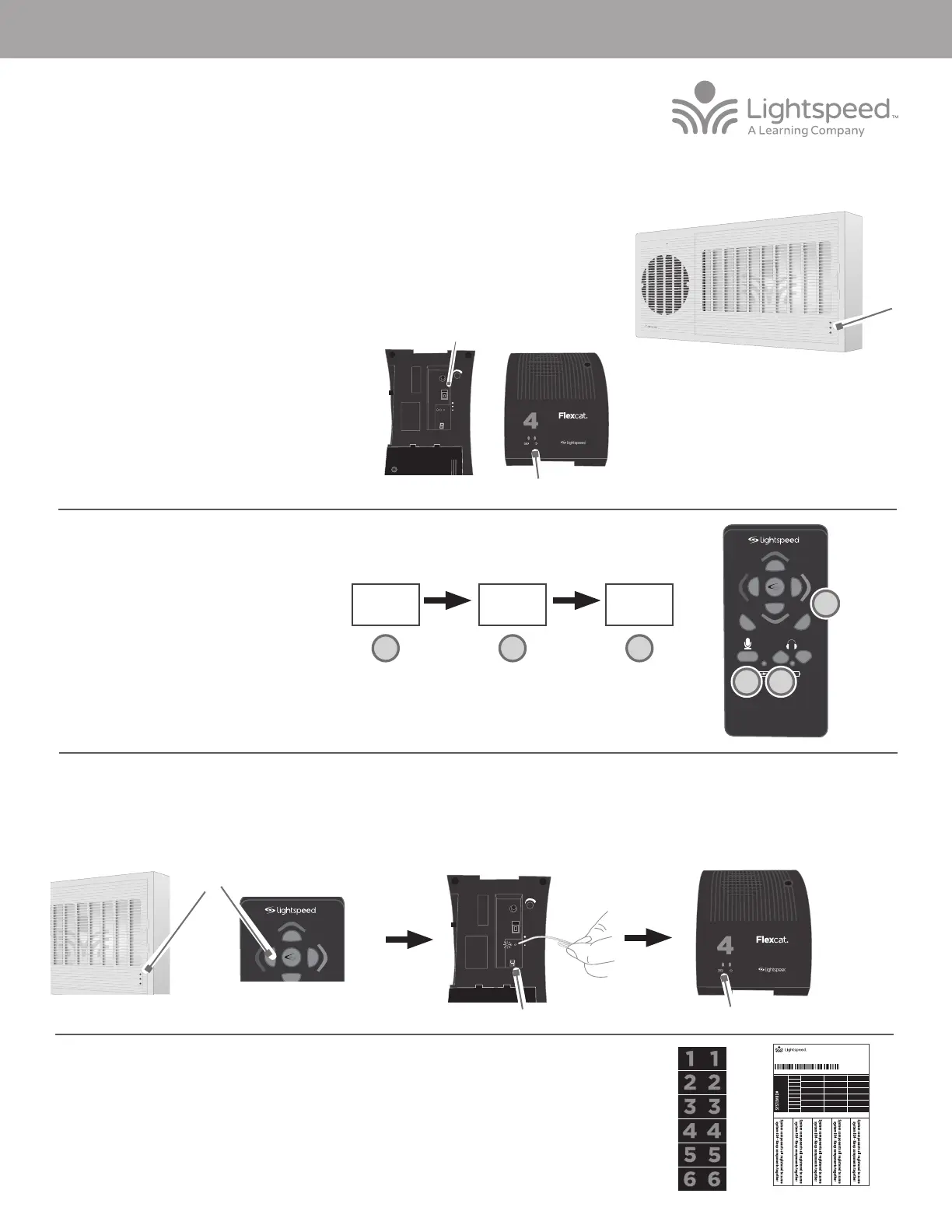
ADDING OR REPLACING A FLEXCAT POD USING THE REMOTE
3. Power on the new pod. The blue power light on
the top should be blinking.
4. Determine what number pod you wish to register
#1-6:
• If replacing a pod, match the number of the
bad pod.
• If adding a pod, choose the next one in
succession (for example, choose number 5 if
there are already 4 pods in place).
1. Start with the Topcat plugged in and powered on. To verify it is
powered on, there will be a blue power light on the front of the Topcat.
2. If replacing a pod, make sure the malfunctioning unit is powered o.
Blinking light
5. On the remote, in rapid succession, press:
6. The center button on the remote will begin
blinking and the #1 light on the Topcat will
begin blinking.
7. Using a paperclip with the end straightened out, briefly press the registration button on the bottom of the pod. The registration light will turn on.
8. Aer several seconds, a number will light in the group # display, the green ready light will turn on, and the blinking power light on top will go solid blue.
9. The registration is complete. Using the remote, select the new pod and begin speaking into the Flexmike to check for audio.
10. Once verified, apply the appropriate pod number sticker on top of the unit for easy identification.
11. Place system ID number (attached to the Topcat Quickstart Guide) on the replacement pod.
NOTE: if at any point, the Topcat or speaker pod lights begin blinking rapidly, that indicates a registration
error. Turn o the pod, then repeat steps 3-8.
Vol
Vol
Mute
6
5
1
3
2
4
UP DN
A
B
C
Volume Up
Mute #1 - 6
A
B
C
VOL
ON
REG
READY
REGISTER
GROUP
#
OFF
POWER
Solid Blue
VOL
ON
REG
READY
REGISTER
GROUP
#
OFF
POWER
Power On
Group #
MN0505US01-1
SYSTEM ID#
SYSTEM ID#
SYSTEM ID#
SYSTEM ID#
RETAIN EXTRA LABELS IN THE EVENT A COMPONENT IS REPLACED OR ADDED.
Match components
to this system ID#
Apply to system components to indicate which parts are registered
as a system. Keep registered items together when storing away.
Registration ID Labels
00-01
00-01
00-01
00-01
00-01
00-01
00-01
00-01
00-01
00-01
00-01
00-01
00-01
00-01
00-01
00-01
00-01
00-01
00-01
00-01
00-01
00-01
00-01
00-01
00-01
00-01
00-01
00-01
00-01
00-01
00-01
00-01
334-0162-02-00-01
10101
Topcat ACCESS REGISTRATION GUIDE
1
2
4
Blinking lights
Topcat Access
Solid light


 To Previous Page
 Loading...






