Need help?
Do you have a question about the Lilytech ZL-6231A and is the answer not in the manual?
Displays the model number and software version successively on startup.
Procedure to adjust the temperature set-point using the keypad controls.
Procedure to access and modify system parameters using a password.
Detailed list of configurable parameters, their codes, ranges, and default values.
Conditions for R2 energizing based on temperature limits and set-points.
Operational logic for cooling mode based on temperature and timer settings.
Operational logic for heating mode based on temperature and timer settings.
Protects output by delaying energization after power or de-energization.
Describes buzzer behavior for key presses, confirmations, and errors.
Conditions for displaying warning and buzzing due to exceeding temperature limits.
Configuration and behavior of external warning input signals.
Action taken when a sensor failure (short or open) is detected.
Method to calibrate the temperature sensor using parameter U20.
Procedure to reset all settings to their factory default values.
Step-by-step instructions for physically installing the controller into a mounting hole.
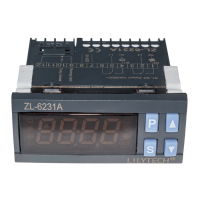
The ZL-6231A is a temperature controller designed for both cooling and heating applications. It features an IP65-rated front panel, a buzzer for audible alerts, and warning functions. A notable feature is its multifunction timer, which can be used for tasks such as incubator air exhaustion, egg tray turning, or other time-based applications.
The controller's operation is managed through a keypad with specific icons for R1 output, R2 output, work mode (cooling/heating), maintenance, warning, and egg turn times reached. The display shows various status indicators and error codes, including:
Upon power-up, the device displays its model ("6231") and software version ("A 1.2").
To set the temperature set-point, press and hold the 'S' button for 3 seconds. The current set-point value will be displayed. Use the '▲' or '▼' buttons to adjust the value (holding them down allows for faster adjustment). Press 'S' again to exit and save the settings. If no key operation occurs within 30 seconds, the status will exit without saving. The factory default set-point is 37.8°C.
To access system parameters, press and hold the 'P' button for 3 seconds. The display will show "---0". Use the '▲' button to select the digit of the password and set its value. Press 'S' to confirm. If the password is correct, the device enters parameter setting status; otherwise, it displays "Err" and exits.
Within the parameter setting status, use '▲' or '▼' to select parameter codes. Press 'S' to display the value of the selected code, then use '▲' or '▼' to adjust it. Press 'S' again to return to parameter code selection. To exit and save all settings, press and hold 'P' for 3 seconds. Similar to set-point setting, if no key operation occurs within 30 seconds, the status will exit without saving.
When Troom ≥ SP + U54 or Troom ≤ SP – U55, a warning is displayed, and the buzzer activates.
If the sensor fails, R1 output stops energizing.
The sensor can be calibrated using parameter U20.
To restore all settings to factory defaults, press and hold 'P' and '▲' simultaneously for 5 seconds. A beep will sound, and "UnL" will display. Press '▲' or '▼' twice, another beep will sound, and all settings will be restored.
 General
| Brand | Lilytech |
|---|---|
| Model | ZL-6231A |
| Category | Thermostat |
| Language | English |

 To Next Page