9
English
4. Break the current path to be tested. Connect the red test lead to
the more positive side of the break and the black test lead to the
more negative side of the break.
5. Turn on power to the circuit. The measured value shows on the
display.
Resistance measurement
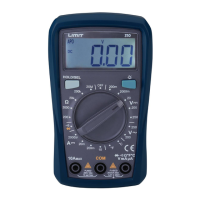
1. Insert the red test lead into the VΩmA terminal and the black test
lead into the COM terminal.
2. Set the rotary switch to an appropriate measurement position in
Ω range.
3. Connect the test leads across with the object being measured.
The measured value shows on the display.
Note
• The test leads can add 0.1Ωto 0.3Ωof error to resistance measu-
rement. To obtain precision readings in low-resistance measure-
ment, that is the range of 200Ω, short-circuit the input terminals
beforehand and record the reading obtained. This is the addi-
tional resistance from the test lead. When 1 displays the resistance
are higher than selected range.
Diode test (see fig 3)
Use the diode test to check diodes, transistors, and other semicon-
ductor devices. The diode test sends a current through the semicon-
ductor junction, and then measures the voltage drop across the
junction. A good silicon junction drops between 0.5V and 0.8V.
To test a diode out of a circuit, connect the as follows:
1. Insert the red test lead into the VΩmA terminal and the black test
lead into the COM terminal.


 To Next Page