EasyManua.ls Logo

LIMIT 7000 - User Manual

LIMIT 7000
100 pages
Print Icon
To Next Page IconTo Next Page
Loading...
Question and Answer IconNeed help?

Do you have a question about the LIMIT 7000 and is the answer not in the manual?

Overview

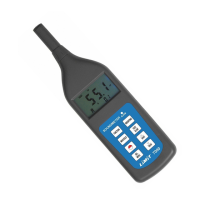
The Limit 7000 is a sound level meter designed for measuring environmental sound levels in various settings, including homes, workplaces, and from sources like traffic and machinery. It offers flexibility with two different weighting options (A or C) and two response times (Fast or Slow).

Function Description:

The device measures sound levels instantaneously or as an average over a period ranging from 10 seconds to 24 hours.

  • A-weighting: This setting responds similarly to the human ear and is commonly used for environmental sound measurements.
  • C-weighting: This provides a much flatter response, making it suitable for analyzing sounds from machinery and engines.
  • Fast response (125 ms): Ideal for capturing quick noise peaks and very short-duration sounds, such as hammer blows.
  • Slow response (1 second): Recommended for most applications, especially for sound sources with consistent noise levels or for averaging quickly changing levels.
  • Leq (Equivalent continuous A sound): Provides an average noise level over a preset time period. Longer periods yield more accurate readings. The time period can be set from 10 seconds up to 24 hours. A-weighting is automatically selected when measuring Leq.
  • Ln function: Displays the percentage of all measured values that are above or equal to a selected alarm value.
  • Max Hold function: Automatically registers and displays the maximum sound level measured.
  • Alarm function: Features an LED light that illuminates when the sound level exceeds a user-defined alarm threshold. It also indicates the percentage of measured values that are above this alarm level. The default alarm level is 85 dB, adjustable between 30-130 dB.
  • Memory: Stores up to 30 groups of measurement results.
  • PC Communication: Can connect to a PC via an optional RS-232 cable and software for statistical analysis, printing, and further data analysis.
  • Calibration: Includes a built-in 94 dB calibration signal. It also supports external calibration using a sound level calibrator (94 dB or 114 dB).
  • Automatic/Manual Off: The device is preset to automatically turn off after 5 minutes of inactivity, but this time can be adjusted (1 to 9 minutes) or set to manual off (0 minutes).

Important Technical Specifications:

  • Measuring range: 30 – 130 dB
  • Reading resolution: 0.1 dB
  • Accuracy: ± 1 dB
  • Time weighting: Fast (125 ms), Slow (1 second)
  • Equivalent time periods: 10 sec, 1 min, 5 min, 10 min, 15 min, 30 min, 1 h, 8 h, 24 h
  • Memory capacity: 30 groups of results
  • Frequency range: 20 – 12500 Hz
  • Battery: 4 x 1.5V LR03 AAA batteries
  • Dimensions: 236 x 63 x 26 mm
  • Weight: 170 g
  • Standards compliance: IEC 651 Type 2, ANSI 1.4 Type 2

Usage Features:

  1. Power On/Off: Press the Θ-button.
  2. Parameter Selection: Choose desired parameters.
  3. Response Time Selection: Press the FAST/SLOW button to select either FAST (125 ms) or SLOW (1 second).
  4. Function Selection: Press the FUNCTION button to choose between Lp (current sound level), Leq (equivalent continuous A sound), or Ln (percentage of values exceeding alarm).
  5. Leq Time Period Setting: Hold the MENU button for 8 seconds until "LEQ" appears on the display. Use the ▲▼ buttons to select the desired time period (10 sec, 1 min, 5 min, 10 min, 15 min, 30 min, 1 h, 8 h, 24 h), then confirm with the FUNCTION button.
  6. Weighting Selection: Press the WEIGHING button to select A or C weighting. A-weighting is automatically selected for Leq measurements.
  7. Max Value Display: Press the MAX HOLD button to show only the peak value. Press again to return to instantaneous reading.
  8. Alarm Level Adjustment: Hold the DEL/MENU button for 5 seconds until "AL" appears. Use the ▲▼ buttons to select the alarm value (30-130 dB), then confirm with the FUNCTION button.
  9. Saving Measurements: When "M" is shown on the display, press the SAVE button. The display will show the number of stored values.
  10. Reading Stored Values: Press the READ button. "R" will appear, showing the latest stored value. Use the ▲▼ buttons to scroll through other stored values.
  11. Deleting Stored Values: While a stored value is displayed, press the DEL/MENU button.
  12. Return to Function: Press the FUNCTION button to exit memory or alarm settings.
  13. Automatic Off Time Adjustment: Hold the DEL/MENU button for 10 seconds until "AUTO" appears. Use the ▲▼ buttons to select a new off time (1-9 minutes) or "0" for manual off.

Maintenance Features:

  • Calibration (External):
    1. Turn on the meter (Θ-button).
    2. Select A-weighting and SLOW response.
    3. Place the microphone into an external calibrator (e.g., 15152-0301) and turn on the calibrator.
    4. Adjust the CAL potentiometer on the right side of the meter with a small screwdriver until the display matches the calibrator's output (94 dB or 114 dB).
  • Calibration (Built-in signal):
    1. Press the FUNCTION button until "CAL" appears on the display.
    2. The display should show 94 dB. If not, adjust the CAL potentiometer on the right side of the meter with a small screwdriver until it reads 94 dB.
  • Battery Replacement: When the battery symbol appears on the display, remove the battery lid on the back and replace the 4 x 1.5V LR03 AAA batteries. Always remove batteries if using an AC adapter or when the meter will not be used for an extended period.

LIMIT 7000 Specifications

General IconGeneral
BrandLIMIT
Model7000
CategoryMeasuring Instruments
LanguageEnglish

Related product manuals