English
30 groups of measurings can be stored.
1. When M is showed on the display push SAVE button.
The Display show number of stored values.
2. Push READ button for reading stored values. R
shows on the display and latest value are showed. Push
▲▼- buttons for reading the other stored values.
3. Push DEL/MENU-button to delete stored value on the
display.
4. Return by push FUNCTION-button.
Calibration
Standard method for calibration requires an external
calibrator. Code no 15152-0301.
1. Push the Ө-button.
2. Select A-weighing and SLOW.
3. Place the microphone into the calibrator. Turn the
calibrator on.
4. Adjust the meters CAL potentiometer on the meters
right side with a small screwdriver so the value on the
display matches the output of the calibrator 94 dB or
114 dB.
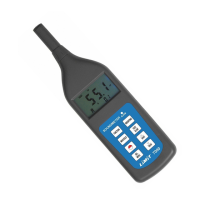
Limit 7000 have a built in signal for calibration.
1. Push FUNCTION-button till CAL shows on the display.
2. The value on the display should be 94. If not, adjust
the meters CAL potentiometer on the meters right side
with a small screwdriver so the value on the display is
94 dB.


 To Next Page