2
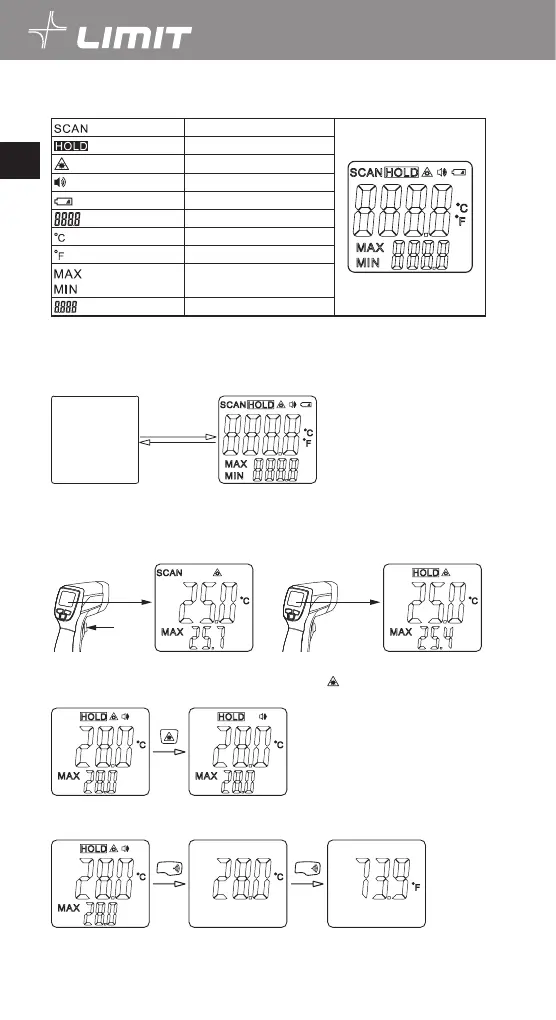
Display symbol
Temperature measuring
Measurement data locked
Laser ON
Buzzer on
Low battery
Main display value
Temperature in Celsius
Temperature in Fahrenheit
Selected function
Max / Min readout
Operations:
1. Power On and Off
1.1 Press the measurement trigger (Pos.1) to turn on the thermometer, LCD screen (Pos 5).
1.2 The thermometer will turn off automatically if there is no operation in 8 s.
2.
Manual measurement
2.1 Aim at the target then press and hold the trigger, SCAN icon will indicate the targets temperature is
being measured.
2.2 Release trigger and the SCAN icon will disappear, and HOLD icon appear indicating that the measuring
has stopped, and the last value will be saved in the display.
3.
Laser beam setup
Press laser key (Pos.2) to turn ON or OFF the laser beams. When symbol disappear from the display you
can measure without laser beam.
4.
Unit setup
Press and hold °C / °F - buzzer button (Pos. 3) in for 2 seconds to switch between Celsius and Fahrenheit.
°C/°F
°C/°F
English
GB


 To Next Page