12
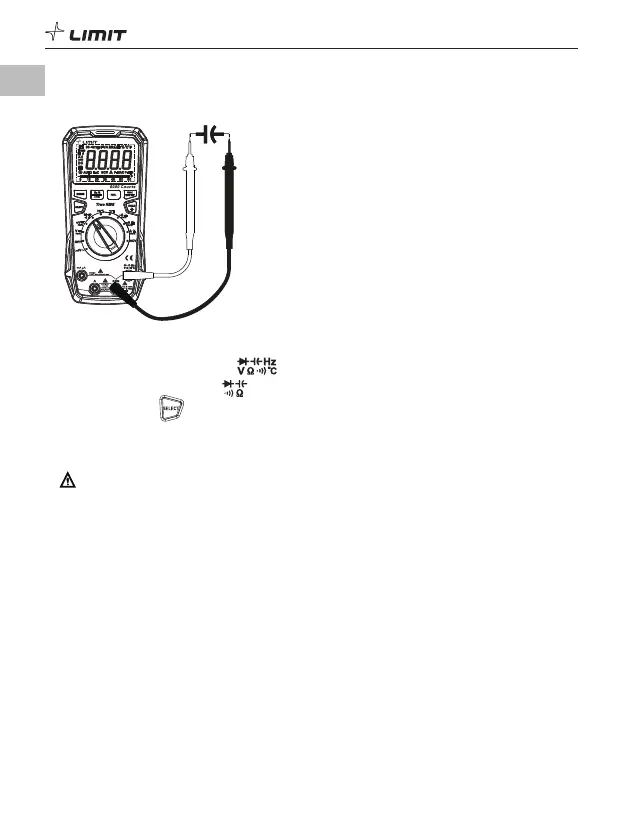
8. Capacitance measurement (P 10)
DM 620
USB
P 10
8.1 Insert the red test lead into the jack and the black test lead into the COM jack.
8.2 Turn the function dial to the position.
8.3 Short-press the button to switch to capacitance measurement.
8.4 Touch the probes to the capacitor pins.
8.5 Read the capacitance value on the display after it stabilizes.
Caution:
• Take care when working with voltages above AC 30 V RMS, 42 V peak or DC 60 V. Such voltages
pose a shock hazard.
• Before measuring, fully discharge all capacitors (especially high-voltage capacitors) to avoid
damage to the meter and user.
• If the measured capacitor is short-circuited or the capacitance exceeds the maximum range, the
LCD will display “OL”.
• When measuring high capacitance, it is normal to take a few seconds to stabilize the reading.
• For small capacitance measurements, it is recommended that REL mode is used to avoid the
influence of distributed capacitance and to obtain a correct reading.
GB



 To Next Page