13
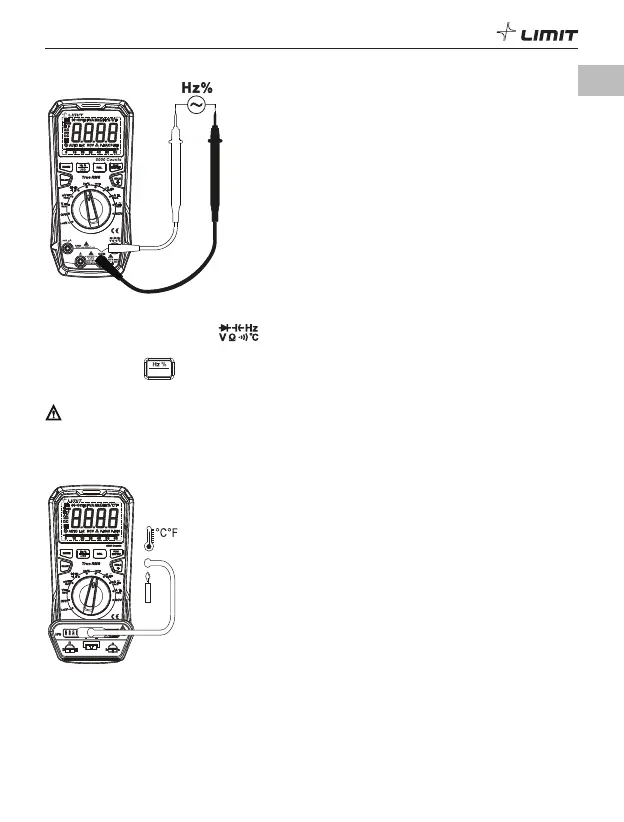
9. Frequency/Duty ratio measurement (P 11)
DM 620
USB
P 11
9.1 Insert the red test lead into the terminal, and the black test lead into the COM terminal.
9.2 Turn the function dial to the Hz% position.
9.3 Short-press the
US B
button to switch to frequency/duty ratio measurement if required.
9.4 Read the frequency/duty ratio value on the display.
Caution:
Take care when working with voltages above AC 30 V RMS, 42 V peak or DC 60 V. Such voltages pose a
shock hazard.
10. Temperature measurement (P 12)
DM 620
A
FUSED
1000V max
MAX 10sec
E
ACH 15min
USB
P 12
10.1 Turn the function dial to the °C°F position, “OL” appears on the display.
10.2 Insert the K-type thermocouple into the adapter socket, then insert the adapter socket into the
input terminals.
10.3 Put the temperature sensing end of the thermocouple close to the object surface under test.
10.4 Read the temperature value on the display after it stabilizes.
GB



 To Next Page