14
10.5 Short-press the button to switch between °C and °F.
Caution:
• Only a K-type thermocouple can be used.
• Max. temperature 230°C/446°F (°F = °C × 1.8 + 32)
11. AC/DC current measurement (P 13)
RL
RL
DM 620
USB
P 13
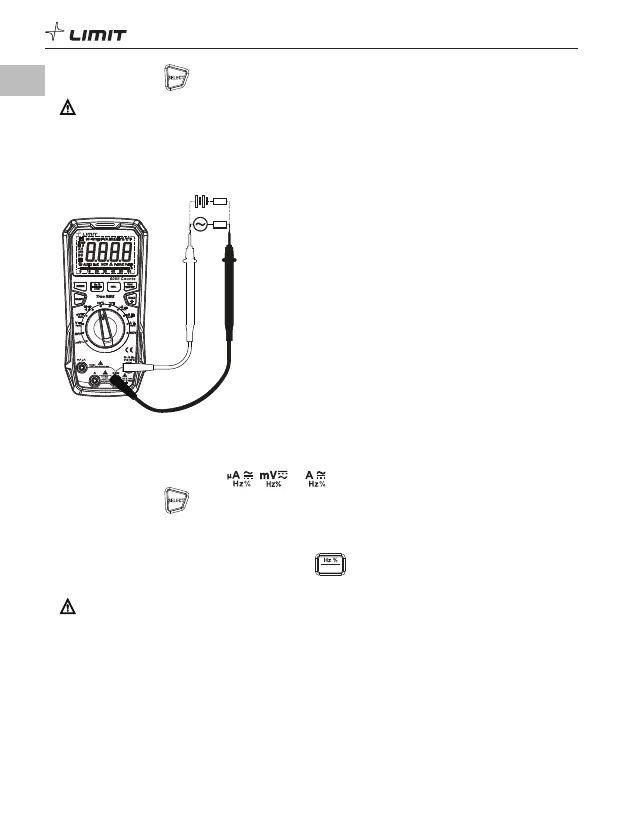
11.1 Insert the red test lead into the mA/
μ
A or A terminal, and the black test lead into the COM
terminal.
11.2 Turn the function dial to the , or position.
11.3 Short-press the button to switch to AC/DC current measurement if required.
11.4 Connect the test leads in series with the measured load or power supply.
11.5 Read the current value on the display (if the current is >10 A, the red indicator light will be on and
the buzzer will sound an alarm).
11.6 When measuring AC current, short-press the
US B
button to display the frequency/duty ratio of
the measured current.
Caution:
• To prevent possible electric shock, fire, or personal injury, switch off the power supply to the circuit,
then connect the meter in series with the circuit before measuring the current.
• If the range of the measured current is unknown, select the maximum range and then reduce
accordingly.
• There are fuses inside mA/
μ
A and A input terminals. Do not connect the test leads in parallel with
any circuit.
• If the measured current is >5 A, each measurement time should be
≤
10 s and the rest interval should
be
≥
15 minutes.
• If the temperature of the meter rises above 75°C after measurement of a large current, the yellow
indicator light will come on, the buzzer will beep, and the LCD will display “CUT”. When the
temperature drops to <40°C, the yellow indicator light will turn off, and the measurement can be made.
GB



 To Next Page