6
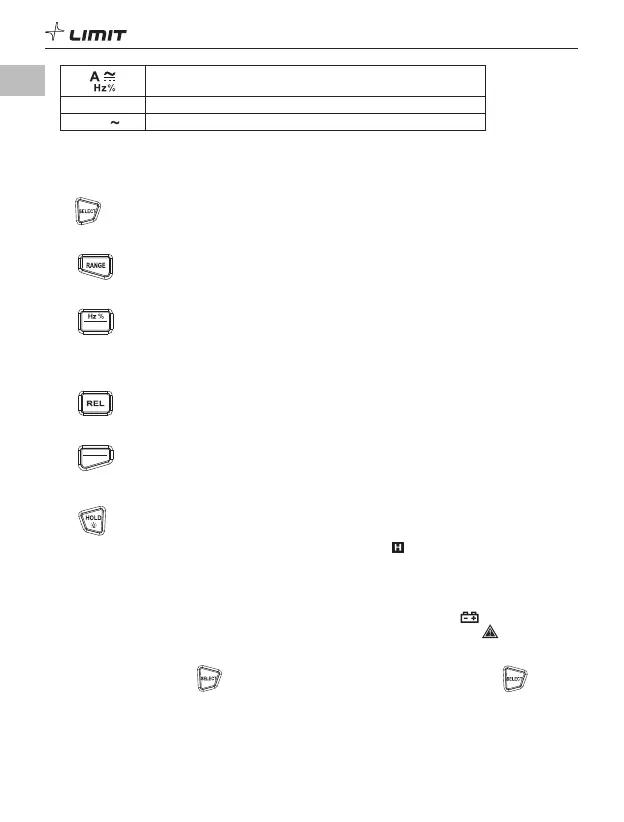
AC/DC ampere current measurement/Frequency and duty ratio
measurement
NCV Non-contact voltage detection
LozV Low impedance measurement
2. Function Buttons
Short press: Press a button for less than 2 seconds.
Long press: Press a button for more than 2 seconds.
2.1 Button
Short press to switch between functions in each multi-function position.
2.2 Button
Short press to enter the manual range mode and change the range. Long press to enter auto mode.
2.3
US B
Button
Short press to switch between frequency and duty ratio measurement.
Long press to turn on/off data communication (note: only available when USB communication module
is inserted into the meter casing).
2.4 Button
Short press to enter/exit the relative value measurement mode.
2.5
PEAK
MAX MIN
Button
Short press to cycle through the measured maximum and minimum.
Long press to cycle through the peak maximum and peak minimum.
2.6 Button
Short press to hold the measurement on the display. The symbol “ ” will be displayed.
Short press again to cancel data hold.
Long press to turn on/off the backlight.
OPERATING INSTRUCTIONS
• To avoid false reading, replace the battery if the battery low power symbol appears (when the
battery voltage is
≤
4.6 V ± 0.2 V). Also pay special attention to the warning sign next to the test
lead jack, indicating that the tested voltage or current must not exceed the values listed on the meter.
• The meter automatically shuts down if there is no operation for 15 minutes. You can wake up the
meter by pressing this button. To disable auto shutdown, press and hold the button in
the off state, and then turn on the meter. Restart the meter to restore auto function.
• Buzzer alarm during measurement: When the input voltage >1000 V or current >10 A, the buzzer
will sound an alarm.
GB



 To Next Page