7
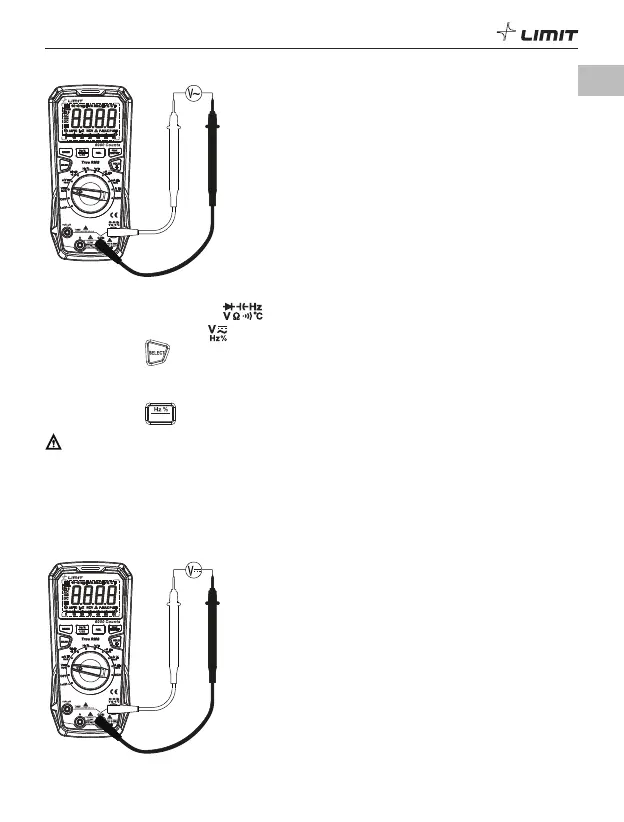
1. AC voltage measurement (P 3)
DM 620
USB
P 3
1.1 Insert the red test lead into the jack, and the black test lead into the COM jack.
1.2 Turn the function dial to the position.
1.3 Short-press the button to switch to AC voltage measurement.
1.4 Connect the test leads in parallel with the measured load or power supply.
1.5 Read the voltage value on the display (if the voltage is >1000 V, the red indicator light will be lit
and the buzzer will sound an alarm).
1.6 Short-press the
US B
button to display the frequency/duty ratio of the measured voltage.
Caution:
• Do not input a voltage over 1000 V or it may damage the meter.
• Take care to avoid electric shock when measuring high voltages.
• After completing the measurement, disconnect the test leads from the circuit under test.
• Before each use, verify meter operation by measuring a known voltage.
• The input impedance of the meter is about 10 M
Ω
. The effect of this load may cause measurement
errors in high-impedance circuits. In most cases, if the impedance of the circuit is below 10 k
Ω
, the
error can be ignored (
≤
0.1%).
2. DC voltage measurement (P 4)
DM 620
USB
P 4
GB



 To Next Page