IS425 ECN 3607 Page 6 of 13
First Use
Only qualified or trained personnel should use this appliance.
Switch on the water and electricity supplies. Leave the boiler to fill for 30 minutes.
Drain off approximately 5 litres of water to remove any loose carbon particles from the
filter.
Regular Operation
The boiler starts automatically when the water supply is turned on. During the heating
cycle, only small quantities of water are added to ensure hot water is always available
at the dispenser.
The boiler is designed to be permanently switched on: it is only necessary to turn it off
for de-scaling or maintenance.
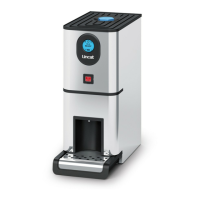
Water is drawn off through the dispenser (G).
Adjustment – Water temperature, screen backlight and contrast
Consult Fig 1.
Turn power off and on again. The FilterFlow screen (B) is displayed on the control
panel (A).
Press and hold the power button (D) until the software version is displayed. Press the
function button Fn (C) and the temperature will be displayed.
Press the power button to cycle through the values 70 to 96 Deg C. Press the Fn
button to select the required value.
The backlight adjustment screen is displayed next. Press the power button to cycle
through the values 1-25. Press the Fn button to select the required value.
The contrast adjustment screen is displayed next. Press the power button to cycle
through the values 35 to 60. Press the Fn button to select the required value.
Press the power button to exit.


 To Next Page