IS590 ECN 3846 Page 6 of 12
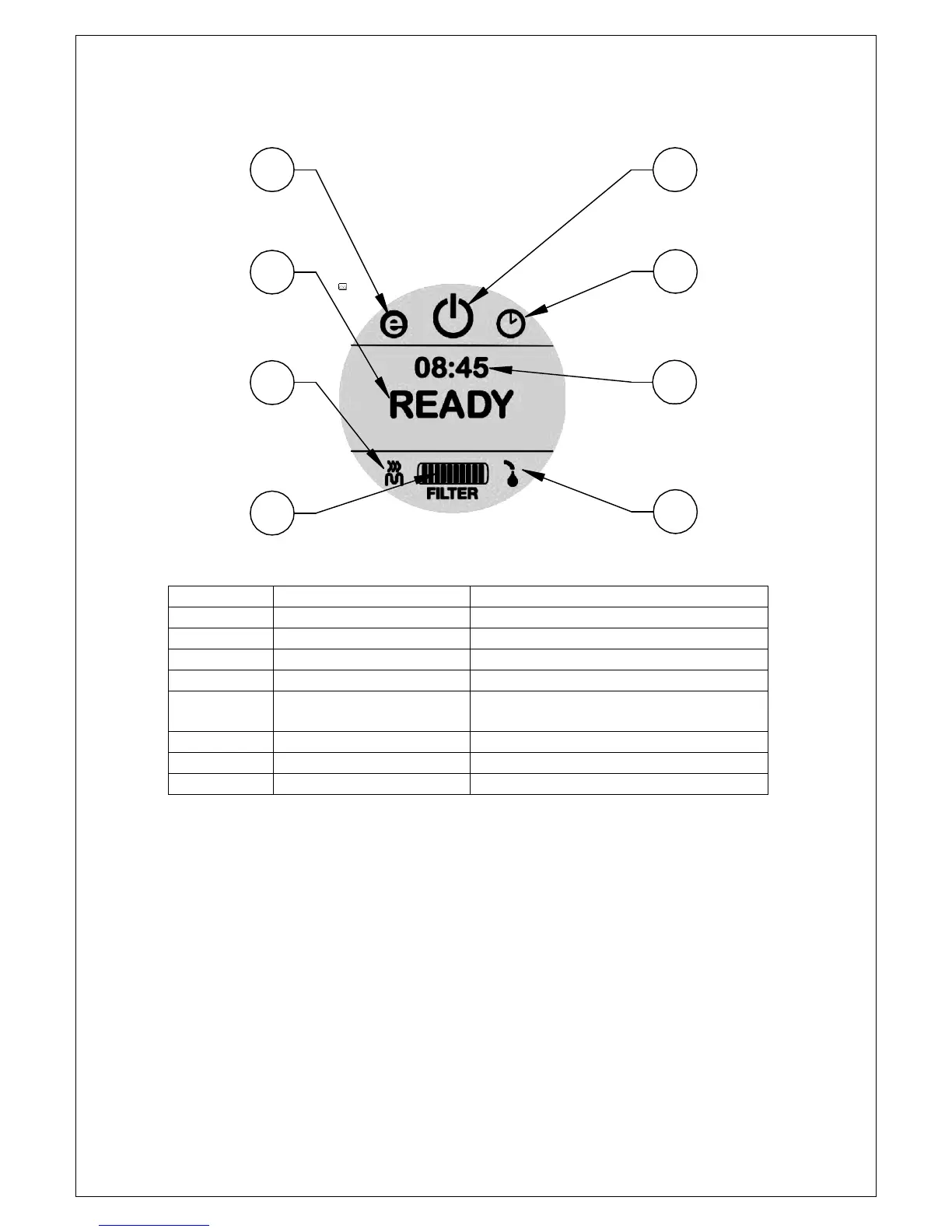
Touchscreen display configuration
A
B
C
D
E
F
G
H
KEY Pressing allows
A Power button On, off, Timed and ECO modes
B Timed operation Access to timer settings
C ECO operation Access to ECO options
D Clock Access to clock settings
E Ready, Wait Clock, descale, PIN lock and
temperature
F Element on
G Filter life icon Reset filter life after replacement
H Water in
When the boiler is supplied the ECO mode, timed mode and clock function are all
turned off.
To select these options press the “Power button”, select the feature required and
follow the on-screen instructions.
To adjust the temperature, clock or to perform a boiler descale press “Ready”, select
the option and follow the on-screen instructions.
Eco mode only fills the tank to the mid-way point. It reduces the rapid draw-off but
saves energy and reduces heat-up time from cold



 To Next Page