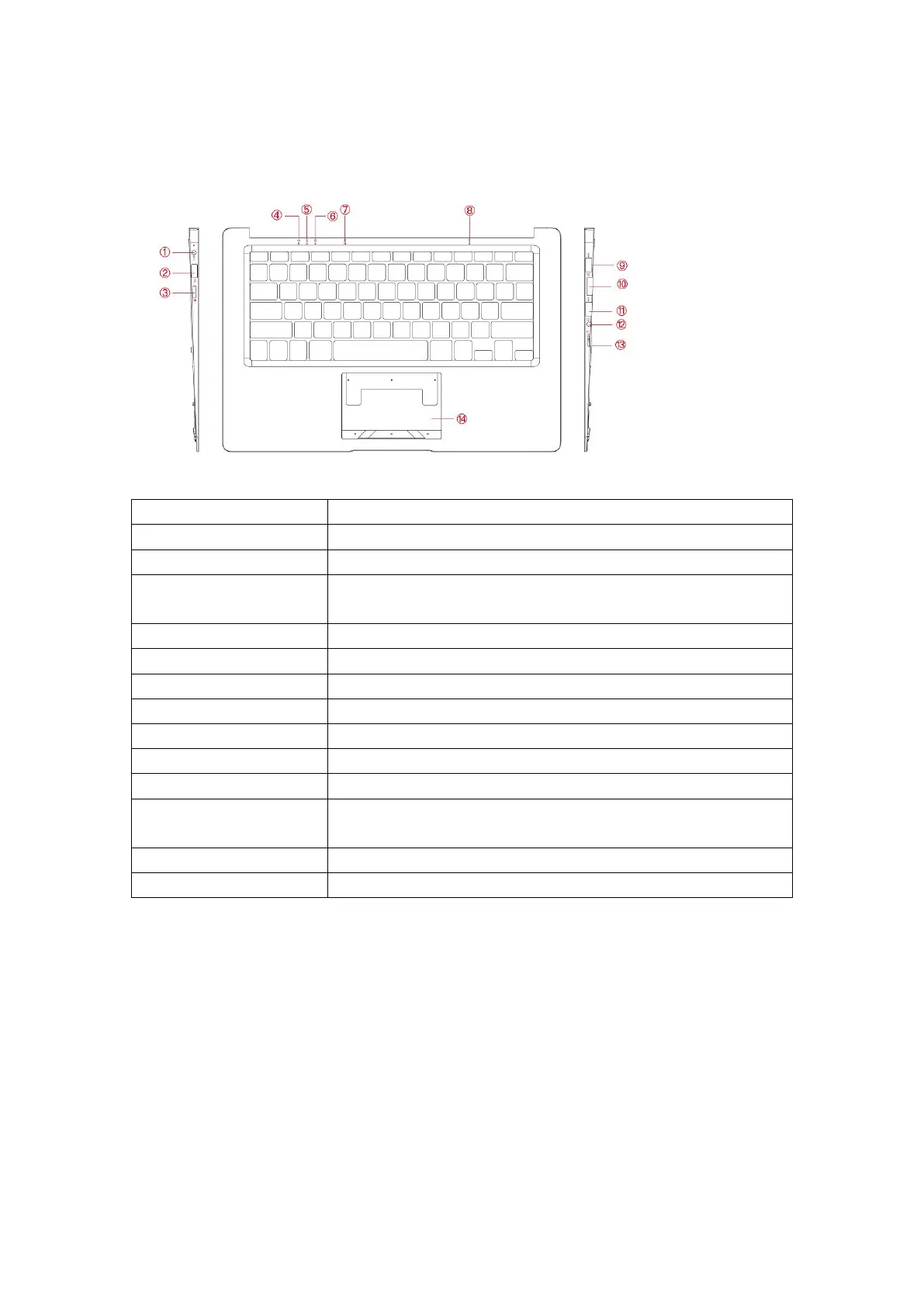
LAYOUT
Connect the supplied power adapter
Connect HD television via optional MINI HDMI cable and switch the display to a wider
screen (Not Included)
4.Power light/Charging Indicator
Indicates the battery-charge status
Indicates when all letters are capitalized
Indicates that you can use the numeric keypad on the keyboard
Indicates that your microphone is activated
Connect a headset, headphones, microphone, or other audio equipment, to listen to
stereo sound, record audio, or make web phone calls
Reads and writes files stored on a MicroSD Card
Functions like a computer mouse
USING YOUR DEVICE FOR THE FIRST TIME
Charging the device
You might need to charge the battery before using your LincPlus P3.
1.Plug the power adapter into the DC-In socket;
2.Connect the power adapter to an electrical outlet and charge the LincPlus P3 until the battery is fully charged.
Note:
1. The battery is not fully charged when you unpack your Device;
2. A fully discharged battery takes about 5 hours to fully charge;
3. When the battery is being charged, the LED indicator light is red. When the battery has been fully charged, the LED
indicator light is green.


 To Next Page