This product is subject to continuous technological development.
The OSD and the functionality may differ slightly from the one described here 5
Network and Matrix Switching Menu and Options
The matrix KVM Switching option has been added to this KVM extender series in 2015. It is available as a
fee-based option and is activated via an unlock code. Older extender boxes require an additional firmware
update to enable their switching option. In a Matrix switching network the options must be purchased and
installed on all RX units. The RS232 option requires special hardware in order to function.
Main menu item "W" - network settings provides access to the advanced menus to configure the network
and switching options. Please note that this menu item is only active when the Switching Option has been
unlocked on the RX. In order to prevent unauthorized access to the Network Settings this menu is protected
by password. Access is only allowed for users with administrator rights. The factory settings provide an
administrator user with User: admin and Password: admin. Please change at least the password and record
the new settings in a secure place.
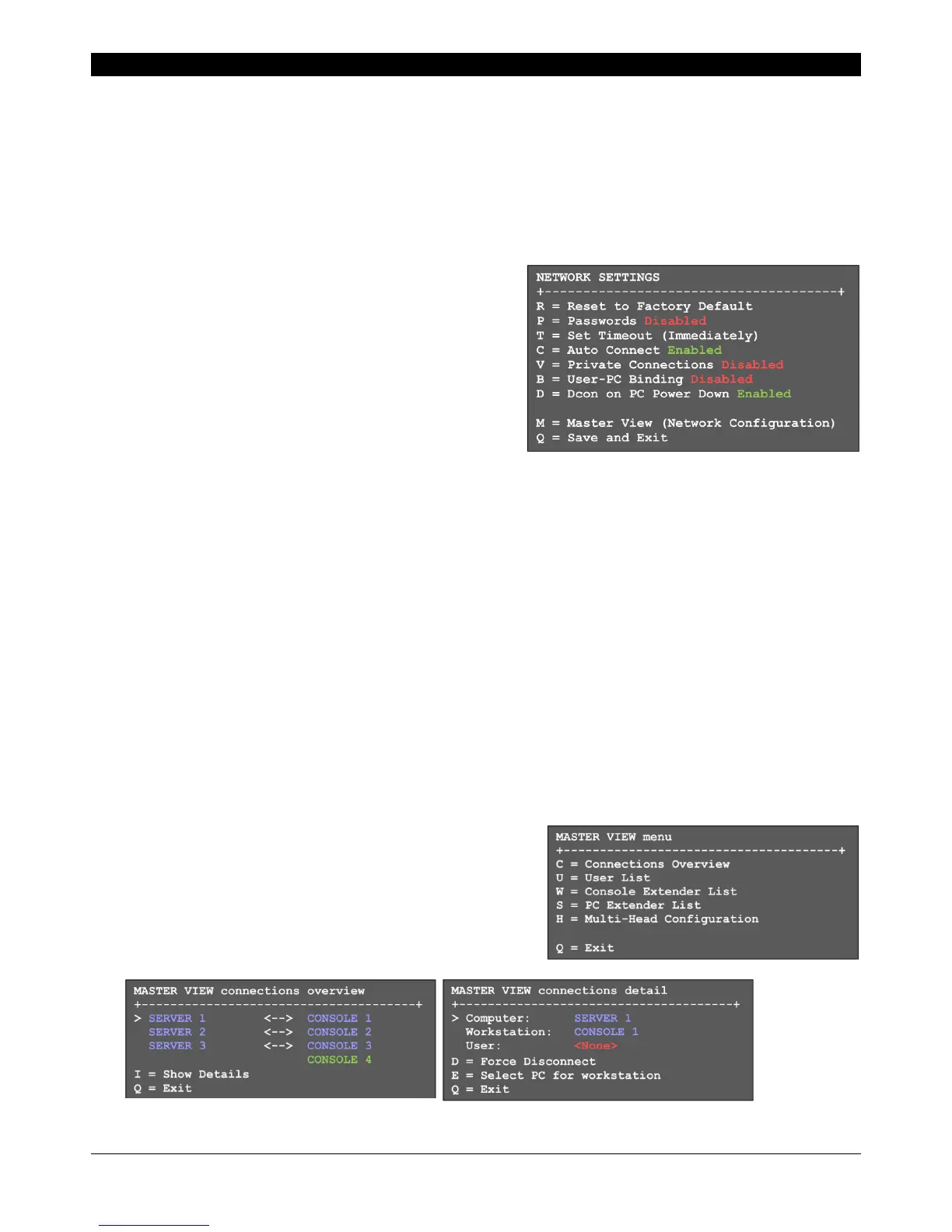
Sub-menu item "R" – sets all settings to factory default,
also all user, console and computer settings will be deleted.
Sub-menu item "P" – turn on the password system for
users and groups, see further below. This password system
is different and independent from the password access to
the network settings.
Sub-menu item "T" – Timeout settings, the following
options are available:
I – Immediately – enables password security to every switch, activated without reboot.
N – Never – password is required only after logout.
T – Time in minutes – time period with inactivity for automatic logout
Sub-menu item "C" – Auto-Connect. Available only if the password system is disabled: switches to the next
free port/computer if the KVM connection is separated by another user.
Sub-menu item "V" – Private Connection. To prevent the takeover of the connection by other users. To
enable this feature the SHIFT key (uppercase) must be pressed when establishing the connection (via OSD
or hotkey).
Sub-menu item "B" – User–PC binding. Upon activation, the switch network introduces restrictions for
standard users. Each console shows the password login screen. The admin has to assign a computer to
every user. After login users are automatically connected to their assigned computer, they cannot switch to
other computers. A user may log out with CTRL-ALT-F11. Only master and admin accounts can also access
other computers.
Sub-menu item "D" – Disconnect on Power Down / Switch off. Enabled: If a computer is switched off, also
the KVM connection the TX unit is disconnected.
Sub-menu item "M" – Master View – Network configuration. Admin console to manage the users, consoles
and computers. The following menu items are accessible only for the master:
Master View Menu "C" – Connections Overview. Shows the
existing connections and the free consoles and computers.
Connections can be interrupted or assigned as well.



 To Next Page