5
Expansion Hub Setup
Additional hubs and power supplies can be added to the system
to increase the number of speaker zones available. Up to seven
additional hubs can be connected for a maximum of 32 speaker
zones.
Expansion hubs share the same four source inputs as the fi rst hub
and each control their own four speaker zones.
Expansion Hub Installation
Expansion hubs can be mounted near the fi rst hub, or mounted in
a remote location near the speaker zones to be controlled.
Mount the expansion hubs and power supplies in structured wiring 1.
enclosures or on the universal mounting brackets.
Connect the power supply output cable to each associated hub.2.
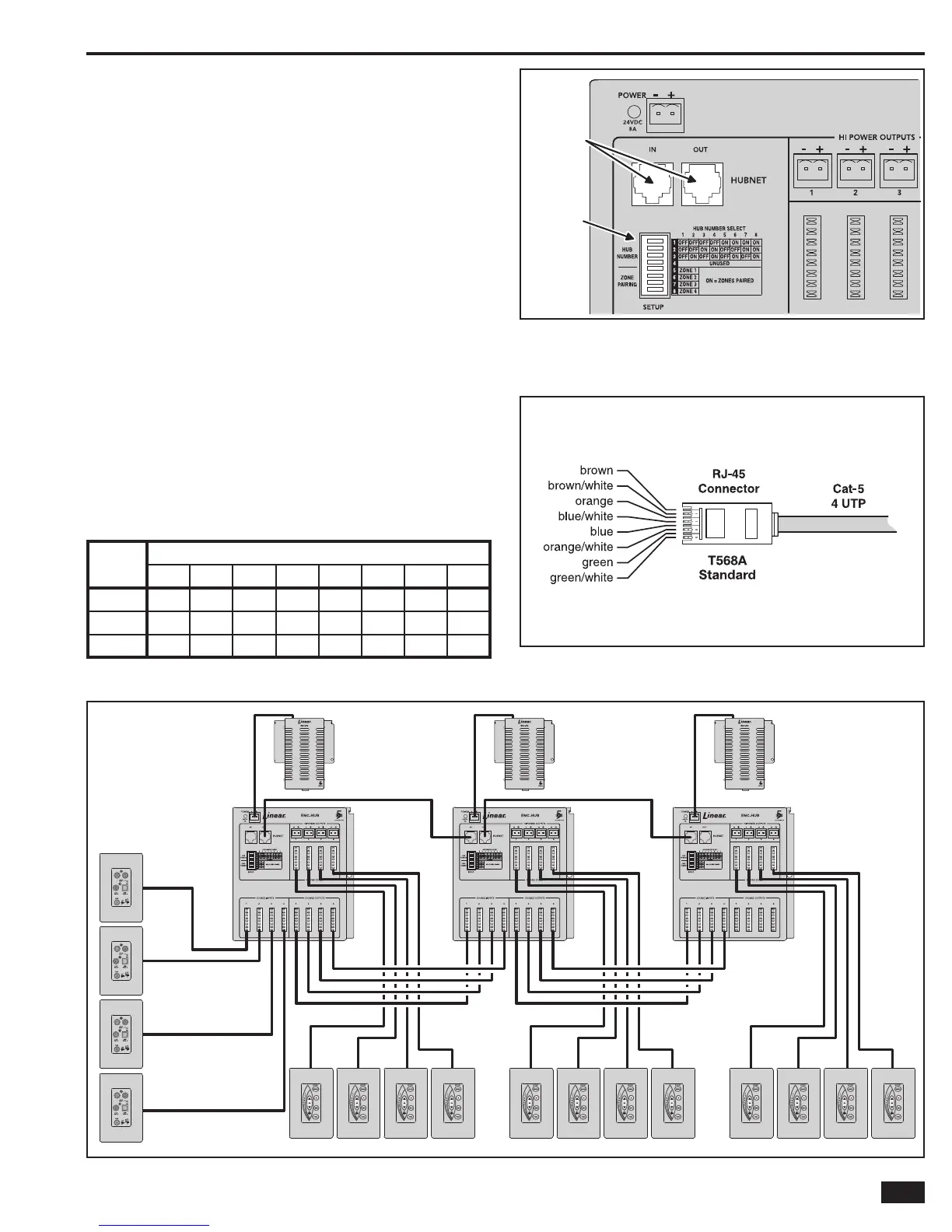
Use Cat-5 cables with RJ-45 connectors to interconnect each hub. Connect 3.
to the HUBNET OUT connector on the fi rst hub, then to the HUBNET IN
connector on the next hub. Continue interconnecting the hubs using the
HUBNET IN and OUT connectors until all the hubs are connected.
Use Cat-5 cables to interconnect the hub sources. Each hub has four 4.
SOURCE INPUT and four SOURCE OUTPUT Type 110 punch-down
connectors. Start at the fi rst hub and connect cables to each of the
SOURCE OUTPUT connectors. Route those cables to the next hub and
connect them to the same source number SOURCE INPUT connectors.
Continue interconnecting the hub source outputs and inputs until all the
hubs are connected.
Set the Hub Numbers using positions 1-3 of the 5. SETUP switch on each
hub. Each hub must be set to a unique number.
SWITCH
#
HUB NUMBER
12345678
1
OFF OFF OFF OFF ON ON ON ON
2
OFF OFF ON ON OFF OFF ON ON
3
OFF ON OFF ON OFF ON OFF ON
HUBNET Connector and Setup SwitchFigure 6.
T-568A Wiring Standard for Cat-5 in RJ-45Figure 7.
HUBNET
CONNECTORS
HUB
NUMBER
SWITCHES
Example 3 Hub, 12 Zone SystemFigure 8.
ENC-PS
POWER
SUPPLY
ENC-HUB
SYSTEM
HUB #1
ENC-PS
POWER
SUPPLY
ENC-HUB
SYSTEM
HUB #2
ENC-PS
POWER
SUPPLY
ENC-HUB
SYSTEM
HUB #3
ENC-SIWP
SOURCE
INPUT
WALL PLATES
ENC-DRS KEYPADS ENC-DRS KEYPADS ENC-DRS KEYPADS



 To Next Page