EasyManua.ls Logo

Linksys BEFVP41 - Page 48

Linksys BEFVP41
63 pages
Print Icon
To Next Page IconTo Next Page
To Previous Page IconTo Previous Page
Loading...
EtherFast
®
Cable/DSL VPN Router with 4-Port 10/100 Switch
89
Instant Broadband
®
Series
88
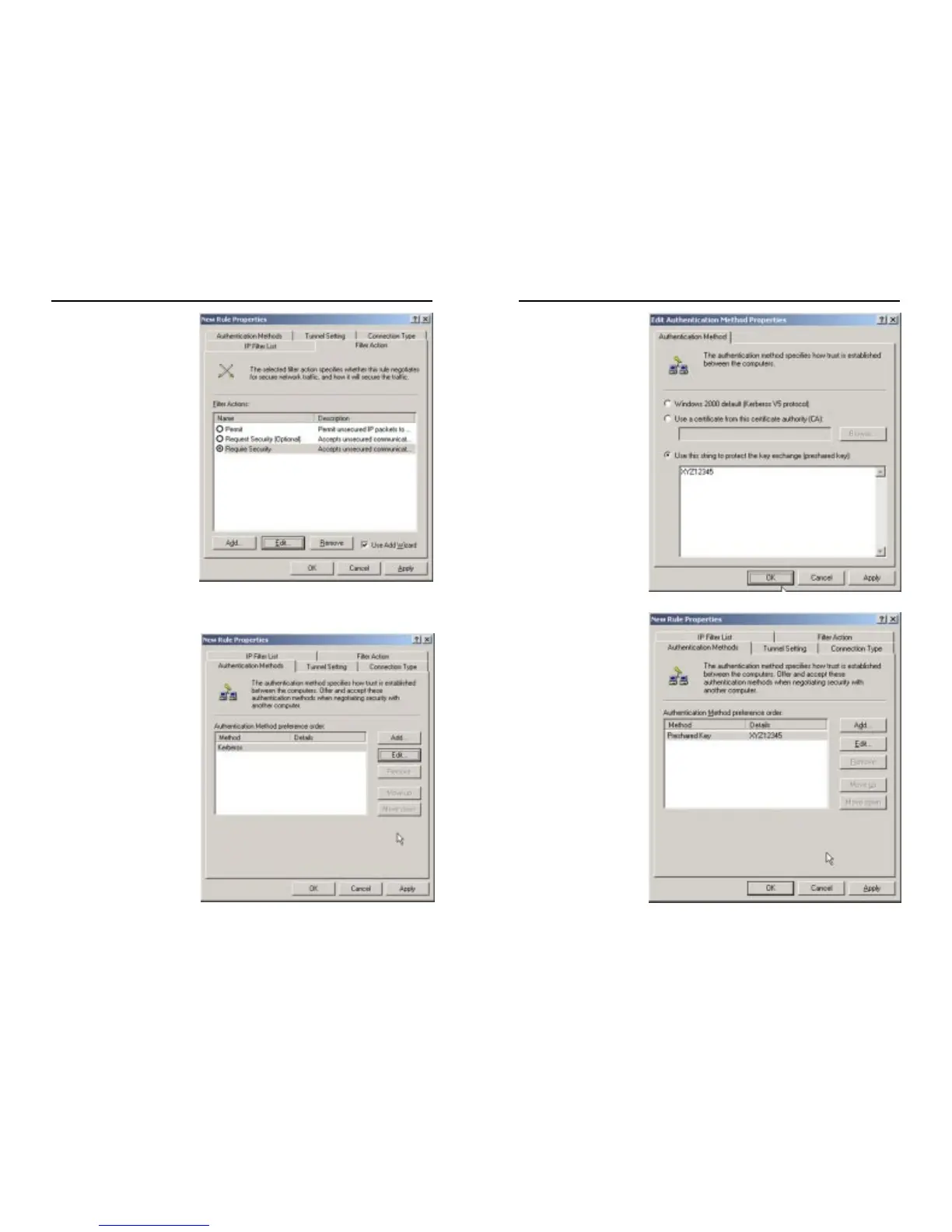
11. Click the Filter Action
tab, and select the filter
action Require Security,
as shown in Figure C-20.
Then, click the Edit but-
ton.
12. Click the Authentication
Methods tab, and verify
that the authentication
method Kerberos is
selected, as shown in
Figure C-21. Then, click
the Edit button.
Figure C-20
Figure C-21
13. Change the authenti-
cation method to Use
this string to protect
the key exchange
(preshared key), and
enter the preshared
key string, such as
XYZ12345, as
shown in Figure C-
22. (This is a sample
key string. Yours
should be a key that
is unique but easy to
remember.) Then
click the OK button.
14. This new Preshared
key will be displayed
in Figure C-23. Click
the OK button to
continue.
Figure C-22
Figure C-23

Table of Contents

Other manuals for Linksys BEFVP41

Related product manuals