6
Linksys recommends that you set up
your printer and install your printer’s
driver before you install the Print-
Server’s driver.
A If you haven’t already done so,
insert the Setup CD-ROM into
the computer’s CD-ROM drive.
When the Setup Wizard’s Wel-
come screen appears, click
User Install to continue.
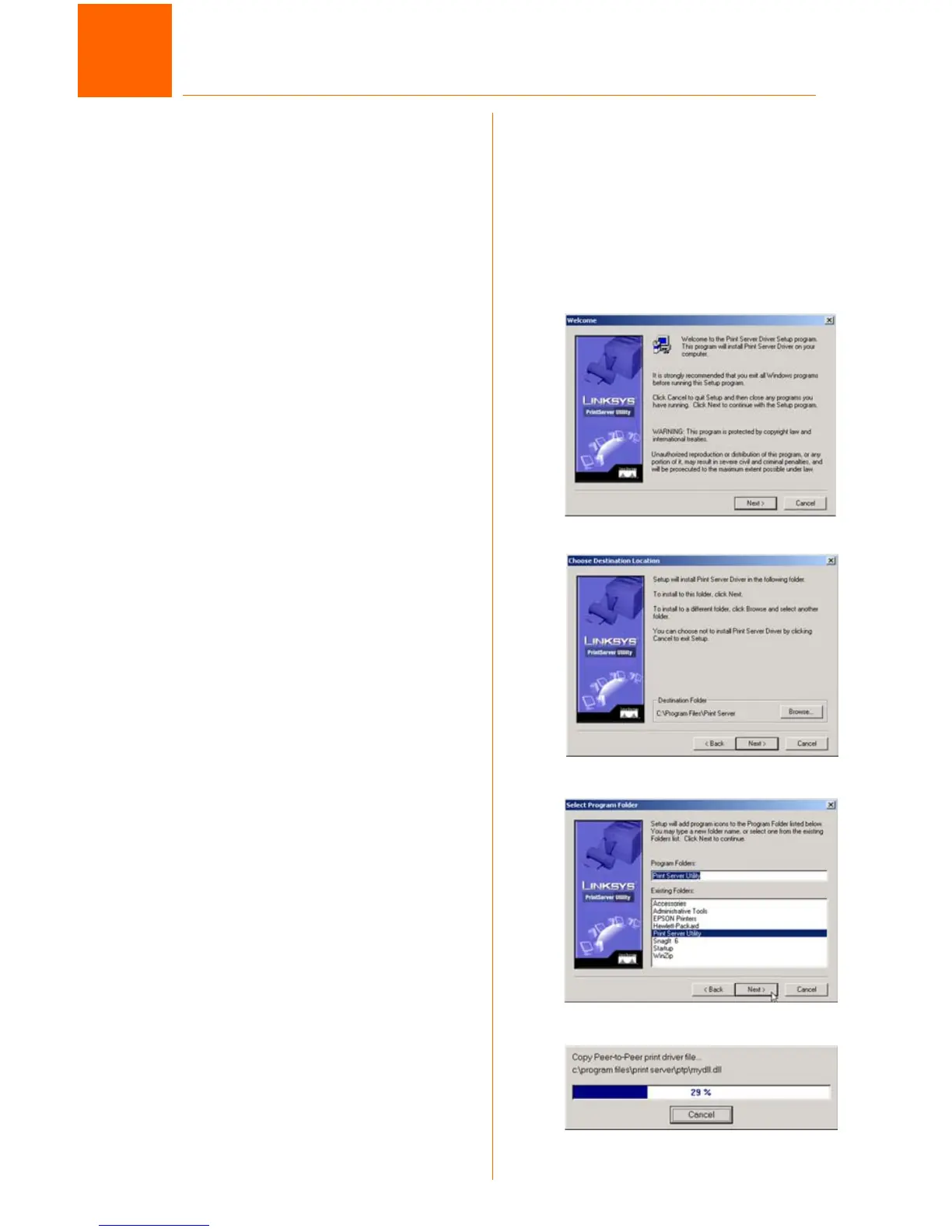
B When the Print Server Driver
Welcome screen appears,
click Next. See Figure B.
C When the next screen
appears, Figure C, choose the
location of where the driver’s
folder will be installed. If you
want the folder to be installed
in a different location, click the
Browse button and select the
location. To install the driver in
the default location, click Next
to continue.
D The next screen to appear is
Select Program Folder, shown
in Figure D. An icon will be
added to the program folder
listed. You may change the
name for the program folder.
Click Next.
E The next screen that may
appear while the driver is being
installed, is shown in Figure E.
B
Windows Driver Installation
3
C
D
E



 To Next Page