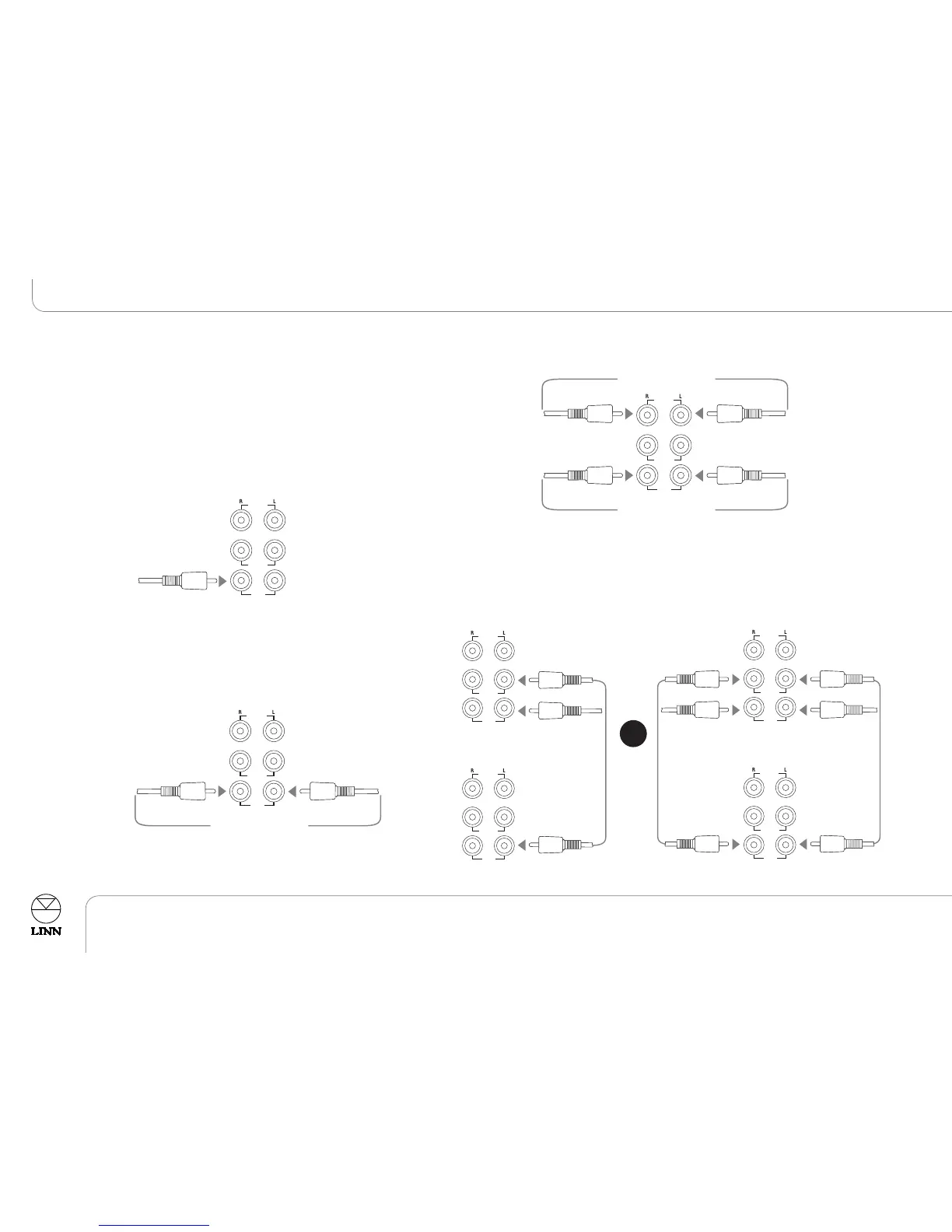
FROM STEREO PRE-AMP
TO POWER AMPLIFIER
HP OUT
AL OUT
A IN
FROM LINN SYSTEM
CONTROLLER
OR OTHER
AV PROCESSOR
AKURATE 226 - ONE
AKURATE 226 - TWO
HP OUT
AL OUT
A IN
HP OUT
AL OUT
A IN
FROM
STEREO
PRE-AMP
FROM
STEREO
PRE-AMP
AKURATE 226 - ONE
AKURATE 226 - TWO
HP OUT
AL OUT
A IN
HP OUT
AL OUT
A IN
Connecting
Connect the AKURATE 226 speaker to a mains supply using the mains lead
provided.
IMPORTANT:
Do not turn on the mains supply until you have connected all other
components.
C
onnecting to a Linn System Controller or other
AV processor
Connecting to a stereo pre-amplifier
if used with large (full-range
frequency response) speakers, for example AKURATE 242 or 212 speakers.
Connecting to a stereo pre-amplifier and power amplifier if used
with ‘small’ (limited bass response) speakers.
Note:
In the above configuration the AKURATE 226 speaker is being used to stop
low bass notes from being sent to the main speakers.
Connecting to another AKURATE 226 speaker
OR



 To Next Page