7
Power on/off
Press and hold the Stabilizer on/off button for 4 seconds to turn on
the gimbal stabilizer. The sele stick LED indicator lights up.
Press the power on/off button to change the phone holder orienta-
tion between portrait and landscape mode without using the remote
control.
Pairing the remote and gimbal stabilizer
If the connection between the remote control and gimbal is lost, they need
to be paired together again. Make sure both the stabilizer and remote
control are turned off.
Using the sele stick without the gimbal stabilizer
The phone holder orientation can be xed to avoid rotation
during use if the stabilizer is not turned on or if it runs out of
battery power.
To lock, twist the phone holder counterclockwise gently
until the lock beneath the phone holder engages. The sele
stick can now be used as a regular sele stick without sta-
bilization. To unlock the xed phone holder, twist the phone
holder clockwise gently until the lock releases.
Lock
Rotation Power
on/off
Charging
Connect a USB-C cable (sold separately) between the sele stick’s
USB-C charging port and a USB power adapter (sold separately).
The sele stick LED indicator lights up red during charging, and
turns off when the gimbal stabilizer is fully charged.
The LED indicator ashes red during use if the battery level is low.
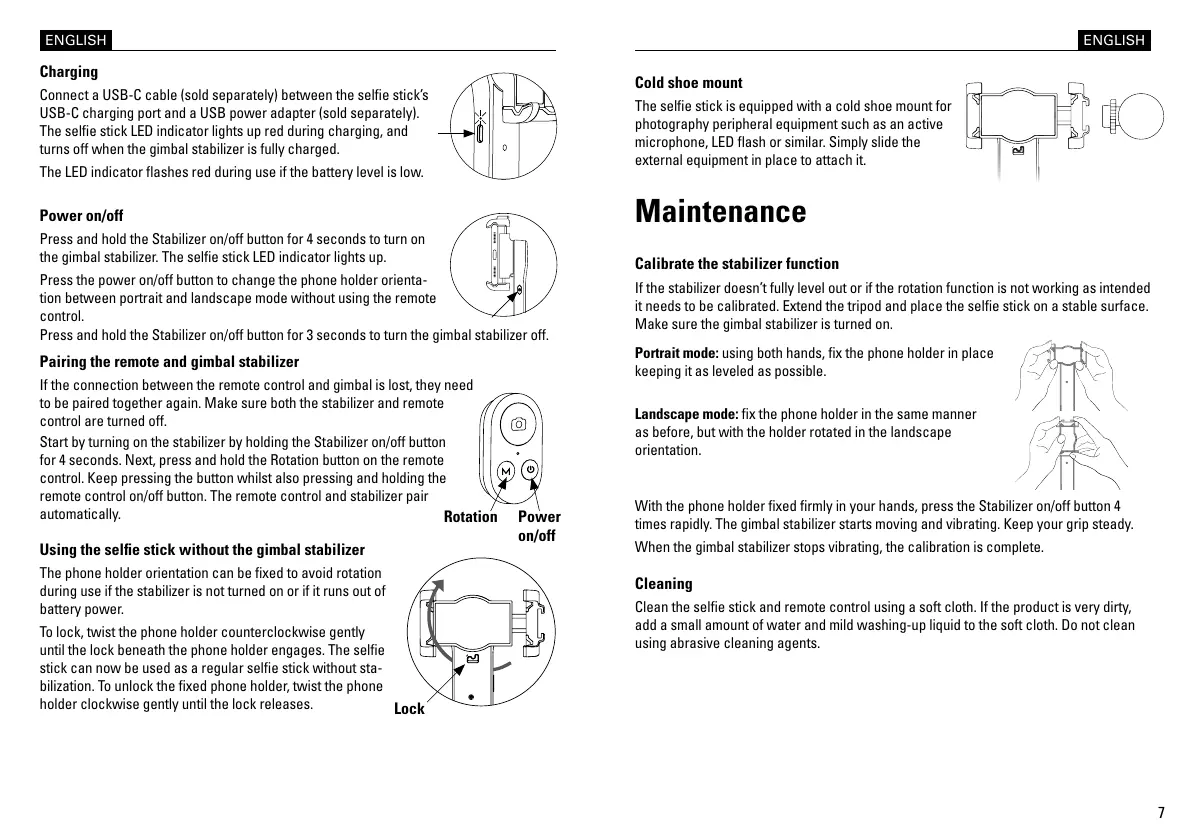
Start by turning on the stabilizer by holding the Stabilizer on/off button
for 4 seconds. Next, press and hold the Rotation button on the remote
control. Keep pressing the button whilst also pressing and holding the
remote control on/off button. The remote control and stabilizer pair
automatically.
Press and hold the Stabilizer on/off button for 3 seconds to turn the gimbal stabilizer off.
ENGLISH
Cleaning
Clean the sele stick and remote control using a soft cloth. If the product is very dirty,
add a small amount of water and mild washing-up liquid to the soft cloth. Do not clean
using abrasive cleaning agents.
Cold shoe mount
The sele stick is equipped with a cold shoe mount for
photography peripheral equipment such as an active
microphone, LED ash or similar. Simply slide the
external equipment in place to attach it.
Maintenance
Calibrate the stabilizer function
If the stabilizer doesn’t fully level out or if the rotation function is not working as intended
it needs to be calibrated. Extend the tripod and place the sele stick on a stable surface.
Make sure the gimbal stabilizer is turned on.
Landscape mode: x the phone holder in the same manner
as before, but with the holder rotated in the landscape
orientation.
Portrait mode: using both hands, x the phone holder in place
keeping it as leveled as possible.
With the phone holder xed rmly in your hands, press the Stabilizer on/off button 4
times rapidly. The gimbal stabilizer starts moving and vibrating. Keep your grip steady.
When the gimbal stabilizer stops vibrating, the calibration is complete.
ENGLISH


 To Next Page
 Loading...