2
3
Overview
1
Specications
Bluetooth version: 5.0 (A2DP, AVRCP, HFP, HSP)
Car connection: FM radio (87.5-108 Mhz)
Power input: DC 12/24 V
Power cable length: 1 m
USB-C (PD) output: 5 V 3 A, 9 V 2 A, 12 V 1.5 A (max. 18 W)
USB-A (QC) output: 5 V 3 A, 9 V 2 A, 12 V 1.5 A (max. 18 W)
Supported music formats: MP3/WMA/WAV/FLAC
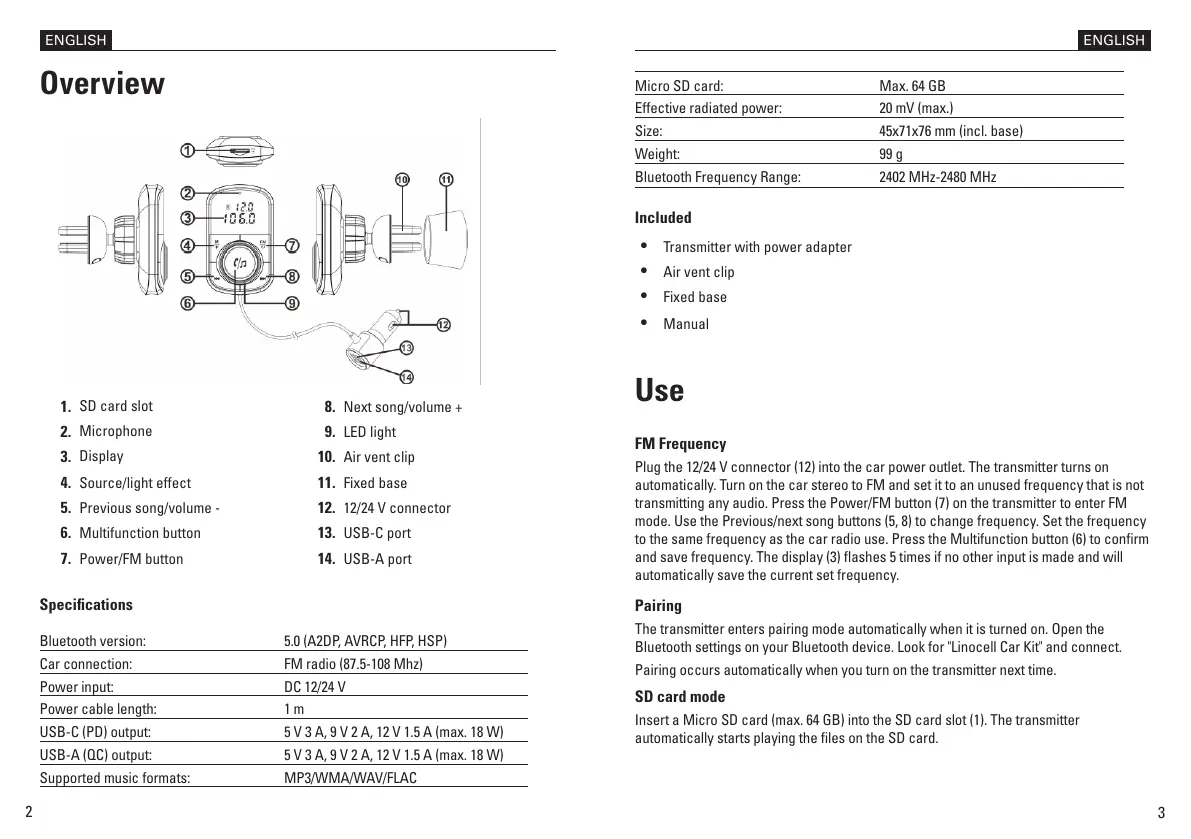
1.
SD card slot
2.
Microphone
3.
Display
4. Source/light effect
5. Previous song/volume -
6. Multifunction button
7. Power/FM button
Micro SD card: Max. 64 GB
Effective radiated power: 20 mV (max.)
Size: 45x71x76 mm (incl. base)
Weight: 99 g
Bluetooth Frequency Range: 2402 MHz-2480 MHz
Included
•
Transmitter with power adapter
•
Air vent clip
•
Fixed base
•
Manual
Use
FM Frequency
Plug the 12/24 V connector (12) into the car power outlet. The transmitter turns on
automatically. Turn on the car stereo to FM and set it to an unused frequency that is not
transmitting any audio. Press the Power/FM button (7) on the transmitter to enter FM
mode. Use the Previous/next song buttons (5, 8) to change frequency. Set the frequency
to the same frequency as the car radio use. Press the Multifunction button (6) to conrm
and save frequency. The display (3) ashes 5 times if no other input is made and will
automatically save the current set frequency.
Pairing
The transmitter enters pairing mode automatically when it is turned on. Open the
Bluetooth settings on your Bluetooth device. Look for "Linocell Car Kit" and connect.
Pairing occurs automatically when you turn on the transmitter next time.
SD card mode
Insert a Micro SD card (max. 64 GB) into the SD card slot (1). The transmitter
automatically starts playing the les on the SD card.
ENGLISH ENGLISH
8. Next song/volume +
9. LED light
10. Air vent clip
11. Fixed base
12. 12/24 V connector
13. USB-C port
14. USB-A port


 To Next Page
 Loading...