5
Control music and voice assistant
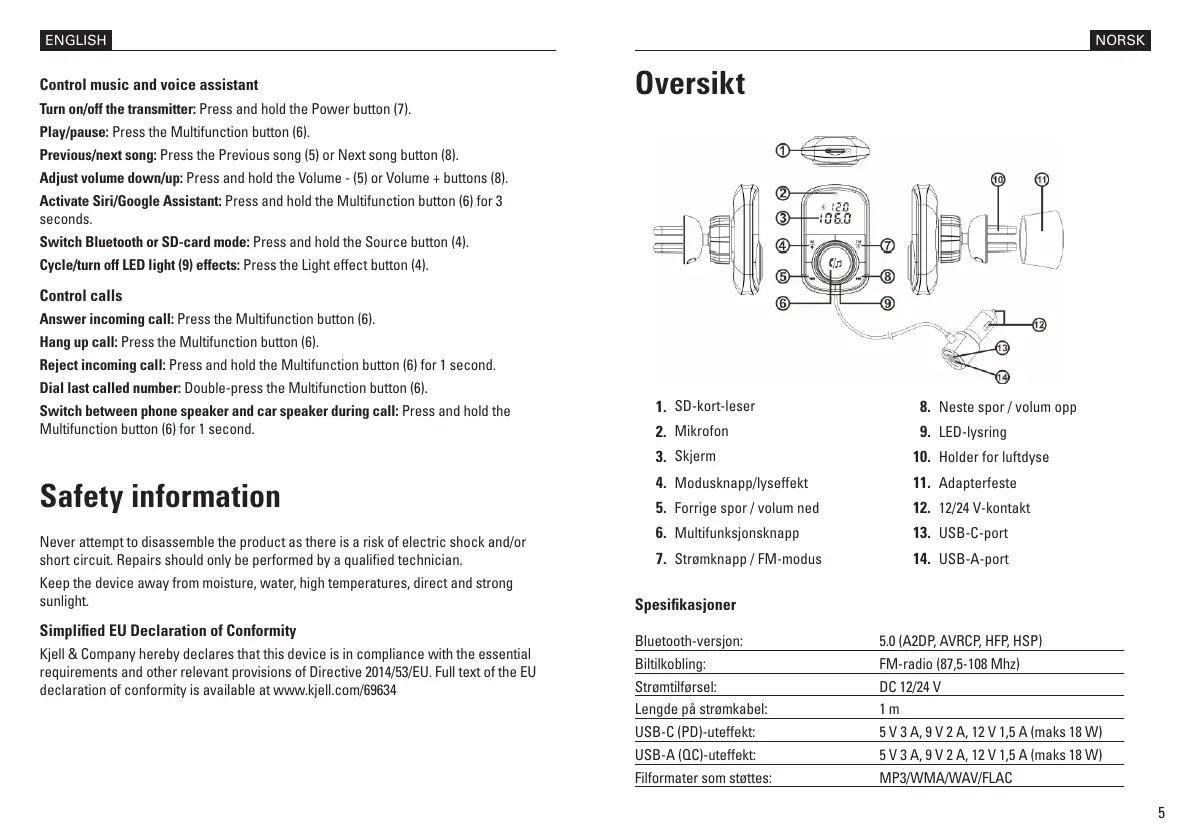
Turn on/off the transmitter: Press and hold the Power button (7).
Play/pause: Press the Multifunction button (6).
Previous/next song: Press the Previous song (5) or Next song button (8).
Adjust volume down/up: Press and hold the Volume - (5) or Volume + buttons (8).
Activate Siri/Google Assistant: Press and hold the Multifunction button (6) for 3
seconds.
Switch Bluetooth or SD-card mode: Press and hold the Source button (4).
Cycle/turn off LED light (9) effects: Press the Light effect button (4).
Control calls
Answer incoming call: Press the Multifunction button (6).
Hang up call: Press the Multifunction button (6).
Reject incoming call: Press and hold the Multifunction button (6) for 1 second.
Dial last called number: Double-press the Multifunction button (6).
Switch between phone speaker and car speaker during call: Press and hold the
Multifunction button (6) for 1 second.
Safety information
Never attempt to disassemble the product as there is a risk of electric shock and/or
short circuit. Repairs should only be performed by a qualied technician.
Keep the device away from moisture, water, high temperatures, direct and strong
sunlight.
Simplied EU Declaration of Conformity
Kjell & Company hereby declares that this device is in compliance with the essential
requirements and other relevant provisions of Directive 2014/53/EU. Full text of the EU
declaration of conformity is available at www.kjell.com/69634
ENGLISH
Oversikt
1
Spesikasjoner
Bluetooth-versjon: 5.0 (A2DP, AVRCP, HFP, HSP)
Biltilkobling: FM-radio (87,5-108 Mhz)
Strømtilførsel: DC 12/24 V
Lengde på strømkabel: 1 m
USB-C (PD)-uteffekt: 5 V 3 A, 9 V 2 A, 12 V 1,5 A (maks 18 W)
USB-A (QC)-uteffekt: 5 V 3 A, 9 V 2 A, 12 V 1,5 A (maks 18 W)
Filformater som støttes: MP3/WMA/WAV/FLAC
1.
SD-kort-leser
2.
Mikrofon
3.
Skjerm
4. Modusknapp/lyseffekt
5. Forrige spor / volum ned
6. Multifunksjonsknapp
7. Strømknapp / FM-modus
NORSK
8. Neste spor / volum opp
9. LED-lysring
10. Holder for luftdyse
11. Adapterfeste
12. 12/24 V-kontakt
13. USB-C-port
14. USB-A-port


 To Next Page
 Loading...