2
3
ENGLISHENGLISH
Bluetooth 5.0
Range 10 m
Battery time 4 + 12 hrs
Charging time, earbuds 1.5 h
Charge time, case 1.5 h
Charging
USB-C
Battery Li-Po 3.7 V, 30 mAh/3.7 V, 300 mAh
Frequency 20 Hz - 20 KHz
Wireless frequency 2.4-2.48G
Transmission power 20 mW (max)
Specications
Included
2x Earbuds
1x Charging case
1x USB-C cable
1x User manual
Use
Charge the case and earbuds fully before rst use.
Power on/off
Take the earbuds out of the case to start the headset. If the LED-indicators are off
when taking the earbuds out, charge the case and try again.
Place the earbuds back in the case to turn them off or press and hold the touch control
surface for 5 seconds. They can also be powered on by holding the touch control
surface for 2 seconds when they are not in the case.
To save battery time, the earbuds automatically turn off after 5 minutes of being out
of range from their Bluetooth device.
Pairing
Open the case and remove the earbuds. They start to ash and pair together. Open the
Bluetooth settings on your device and connect to "BTH-30".
Pairing occurs automatically after this each time the earbuds are removed from the
case.
Charging
Connect the USB-C cable to the charging port on the case and a computer or a USB
power adapter to charge the case. There are four LED indicators inside the case that
lights up to indicate the battery level. They will gradually ll up.
Put the earbuds in the case to charge them. Each earbud has an LED indicator that
turns red while charging. When the earbuds are fully charged the indicator turns off.
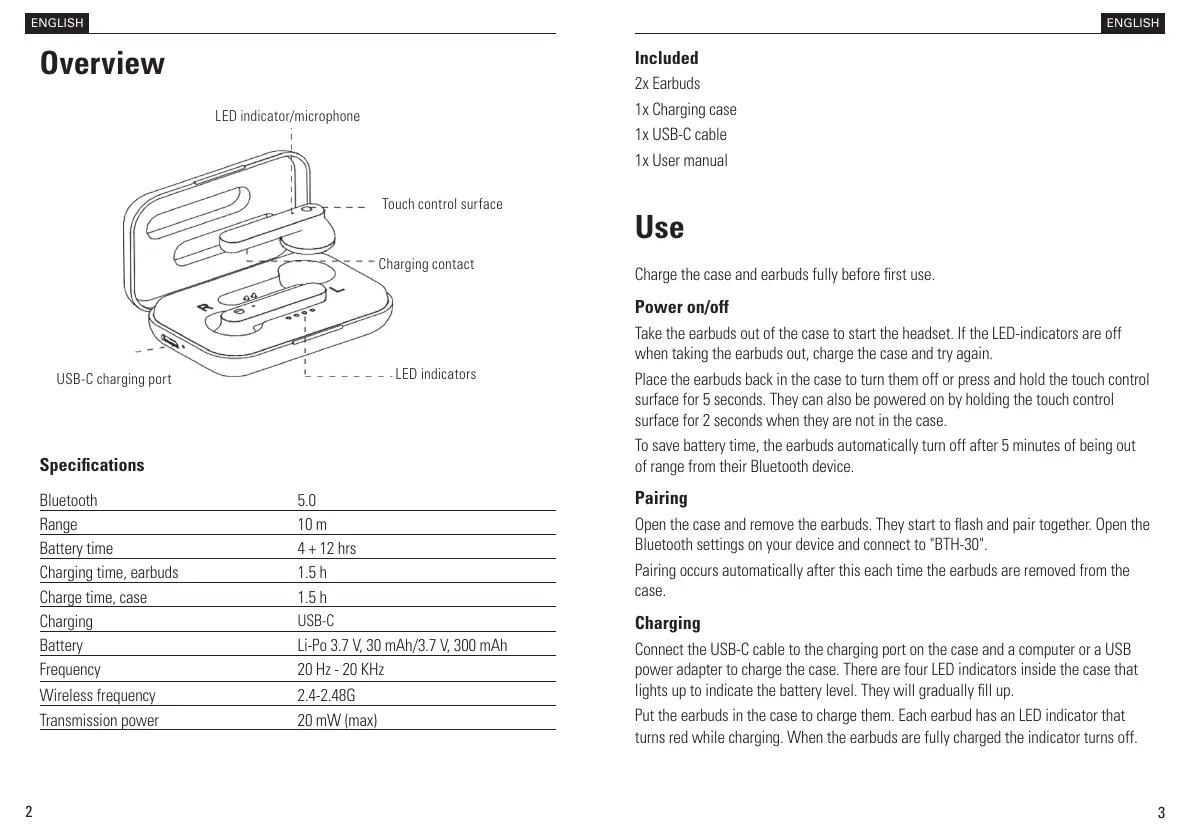
Overview
Touch control surface
Charging contact
LED indicators
LED indicator/microphone
USB-C charging port


 To Next Page